

What Does DHCP Mean? A Plain-English ExplainerDHCP stands for Dynamic Host Configuration Protocol, and it's the reason your laptop connects to Wi-Fi without you typing a single IP address. Defined in RFC 2131 by the IETF, DHCP is a network protocol that automatically assigns IP addresses and all the other settings a device needs to communicate on a network. For everyday users, that means plug in and go. For IT admins, it means managing hundreds of devices from one server instead of configuring each one by hand.
- No manual setup: Devices get an IP address, subnet mask, default gateway, and DNS server automatically.
- Centralized control: Change a DNS or gateway setting once on the server, and every device picks it up at the next lease renewal.
- Works everywhere: Home routers, enterprise data centers, hospital networks, and retail chains all rely on DHCP.
Table of Contents
- How does DHCP work? The DORA sequence explained
- What are the main DHCP components?
- What does DHCP actually assign to your device?
- When should you use DHCP versus a static IP?
- Common DHCP problems and how to fix them
- DHCP security: what can go wrong and how to stop it
- When should you call a managed-network provider?
- Key Takeaways
- Why the DORA-first approach actually helps you learn this
- Californiatelecom handles DHCP at scale so you don't have to
- Useful sources and further reading
How does DHCP work? The DORA sequence explained
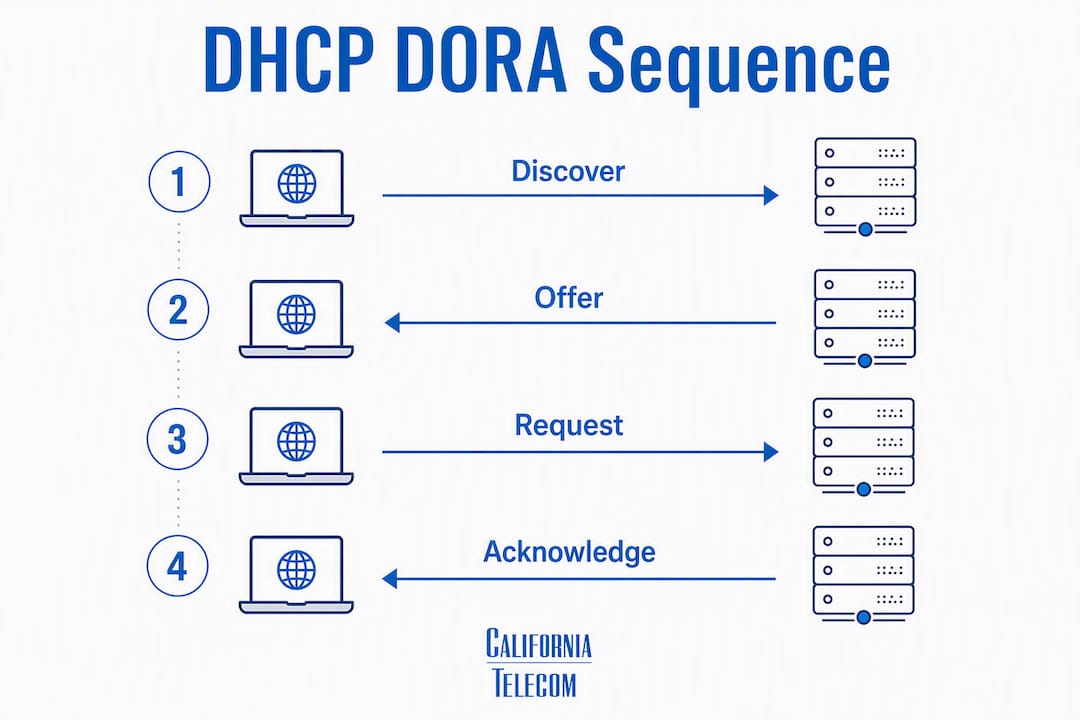
Every time a device joins a network, DHCP runs a four-step negotiation called DORA: Discover, Offer, Request, Acknowledge. The whole exchange usually wraps up in seconds.
- Discover — The client device has no IP address yet, so it broadcasts a message to 255.255.255.255, essentially shouting "Is there a DHCP server out there?" to every device on the local segment.
- Offer — Any DHCP server that hears the broadcast replies with an available IP address and configuration parameters it's willing to lease.
- Request — The client picks one offer (if multiple servers responded) and broadcasts back, formally asking for that specific address. Broadcasting here notifies other servers their offer was declined.
- Acknowledge — The server confirms the lease, and the client configures itself with the assigned settings. Done.
The DORA sequence is the backbone of automatic IP assignment. A client broadcasts Discover, a server replies with Offer, the client sends Request to accept, and the server sends Acknowledge to seal the lease — all within seconds of a device connecting to the network.
Think of it like a city's automated address-leasing office. You move into town (connect to the network), the office assigns you a temporary address from its available pool, and you use it until your lease expires or you move out. No paperwork, no waiting in line.
Pro Tip: If a device on your network shows an address starting with 169.254.x.x, it never completed the DORA handshake. That's an APIPA address — the device assigned itself one because no DHCP server responded. Start troubleshooting there.
What are the main DHCP components?
DHCP has three core players, plus two configuration concepts worth knowing.
- DHCP server: The device that holds the address pool and hands out leases. On a home network, your router fills this role. In an enterprise, it's typically a dedicated Windows Server or Linux server running ISC DHCP or Kea.
- DHCP client: Any device that requests an address — laptops, phones, printers, IP cameras, VoIP phones. Virtually every networked device ships with a DHCP client enabled by default.
- Relay agent: When a client and server sit on different subnets, a relay agent (usually a router or Layer 3 switch) forwards DHCP broadcasts across subnet boundaries. Without it, DHCP traffic would never leave the local segment.
Two configuration concepts matter a lot in practice:
- Scopes (address pools): The range of IP addresses a server is allowed to assign — for example, 192.168.1.100 through 192.168.1.200. Admins define scopes per subnet.
- Reservations: A MAC-to-IP binding that guarantees a specific device always gets the same address. The server still manages the lease; the device still uses DHCP. It's the best of both worlds.
Pro Tip: Prefer a DHCP reservation over a locally configured static IP whenever possible. Reservations keep address management centralized — if you ever need to renumber a subnet, you change it in one place instead of logging into every device.
Good enterprise network design accounts for relay agent placement and broadcast domain boundaries before a single cable gets run.

What does DHCP actually assign to your device?
An IP address is just the start. RFC 2131 specifies that DHCP can deliver all the parameters a host needs to operate on a TCP/IP network.
- IP address — e.g., 192.168.1.x
- Subnet mask — e.g., 255.255.255.0 (defines the local network boundary)
- Default gateway — e.g., 192.168.1.x (the router that handles traffic leaving the local network)
- DNS server addresses — e.g., 8.8.8.8 / 8.8.4.4 (translates domain names to IPs; see how DNS works in business networks)
- Lease time — how long the device may keep the address before it must renew
- Optional parameters — NTP server addresses, boot file names, vendor-specific options for VoIP phones or PXE boot clients
| Parameter | Example value | Purpose |
|---|---|---|
| IP address | e.g., 192.168.1.x | Unique identifier for the device on the network |
| Subnet mask | e.g., 255.255.255.0 | Defines which addresses are local vs. routed |
| Default gateway | e.g., 192.168.1.x | First hop for traffic leaving the local subnet |
| DNS server | 8.8.8.8 | Resolves domain names to IP addresses |
| Lease time | — | How long the address assignment is valid |
Lease renewal happens automatically. At 50% of the lease duration, the client tries to renew directly with the server that issued the lease. At 87.5%, it broadcasts to any available server. If neither succeeds before expiration, the client releases the address and starts the DORA process over.

When should you use DHCP versus a static IP?
The short answer: DHCP for everything that moves or changes, static addressing for infrastructure that other devices depend on.
| Scenario | Recommended approach | Why |
|---|---|---|
| Laptops, phones, tablets | DHCP | Addresses change frequently; no stability needed |
| Printers, NAS devices | DHCP reservation | Stable address without manual config on the device |
| Servers, firewalls, routers | Static IP or reservation | Other devices point to these by address |
| IP cameras, access points | DHCP reservation | Predictable address simplifies monitoring |
| VoIP phones | DHCP reservation | Voice quality depends on consistent network config |
Pros of DHCP:
- Zero per-device configuration
- Automatic reclamation of unused addresses
- Centralized updates push to all devices at renewal
Cons of DHCP (dynamic only, no reservations):
- Addresses can change between reboots, breaking device-to-device references
- Scope exhaustion can lock new devices out of the network
- Harder to audit which device holds which address without IPAM tooling
Pro Tip: For VoIP phones and POS terminals, always use a DHCP reservation. These devices need a consistent IP so call routing and payment processing don't break after a reboot or lease expiration.
Common DHCP problems and how to fix them
Most DHCP issues fall into a handful of categories. Work through these steps before escalating.
Symptoms to recognize:
- Device shows 169.254.x.x (APIPA) — no DHCP server responded
- "Limited connectivity" or "No internet" despite a physical connection
- IP address conflict warnings
- New devices can't get an address (scope exhaustion)
Quick fixes:
- Release and renew on Windows: Open Command Prompt as administrator and run
ipconfig /releasefollowed byipconfig /renew. This forces the client to drop its current lease and request a fresh one. - Release and renew on Linux/macOS: Run
sudo dhclient -r && sudo dhclient(Linux) or usesudo ipconfig set en0 DHCP(macOS). The release/renew commands resolve most transient assignment issues. - Power-cycle the DHCP device: Restart your router or DHCP server. Stale lease tables sometimes cause conflicts that a clean restart clears.
- Check physical connectivity: A device that never sends a Discover usually has a bad cable, wrong VLAN, or disabled Wi-Fi adapter.
- Check scope exhaustion: Log into your router or DHCP server and verify the address pool isn't full. Shorten lease times or expand the scope range.
- Verify only one DHCP server is active: Two DHCP servers on the same segment hand out conflicting addresses. Disable DHCP on any secondary device (a rogue access point, for example).
If basic fixes don't resolve the issue, check event logs on the DHCP server (Windows Event Viewer → DHCP Server log) for lease failures, scope warnings, or unauthorized server alerts.
DHCP security: what can go wrong and how to stop it
DHCP has no built-in authentication, which creates real attack surfaces on unmanaged networks.
Key risks:
- Rogue DHCP server: An unauthorized device starts answering DHCP requests and hands clients a malicious gateway or DNS address, redirecting traffic through an attacker's machine. Networks without DHCP snooping are vulnerable to exactly this.
- DHCP starvation: An attacker floods the server with fake Discover messages using spoofed MAC addresses, exhausting the address pool so legitimate devices can't get leases.
- Unauthorized clients: Without port security, any device plugged into a switch port can request and receive a valid address.
Best practices to lock it down:
- DHCP snooping: Enable this on managed switches. It designates trusted ports (where your real DHCP server lives) and drops DHCP server responses arriving on untrusted ports, blocking rogue servers cold.
- Dynamic ARP Inspection (DAI): Works alongside DHCP snooping to validate ARP packets against the DHCP binding table, preventing ARP spoofing.
- Port security / 802.1X: Limit which devices can authenticate on a switch port, reducing the attack surface for starvation attacks.
- VLAN segmentation: Separate guest, IoT, and corporate devices into different VLANs with separate DHCP scopes. A compromised IoT device can't exhaust the corporate address pool.
- Monitor lease utilization: Watch scope usage. A sudden spike in lease requests is often the first sign of a starvation attempt.
For a deeper look at how these network security vulnerabilities connect to broader infrastructure risks, the principles overlap significantly with web and application security.
When should you call a managed-network provider?
DIY fixes handle most single-site DHCP issues. A few situations genuinely call for professional support.
Signs you've hit the limit of self-service:
- DHCP problems span multiple locations and you can't isolate which site's server is at fault
- Critical services like VoIP, POS terminals, or medical devices are losing connectivity because of address issues
- You're seeing persistent scope exhaustion despite expanding pools
- A rogue DHCP server appeared on your network and you can't identify the source
- You need DHCP failover, split-scope redundancy, or IPAM integration across dozens of sites
What to ask a managed provider:
- Do you offer 24/7 NOC monitoring with DHCP lease alerts?
- Can you design multi-site DHCP with relay agents and redundant servers?
- Do you implement DHCP snooping and VLAN segmentation as standard?
- What's your SLA for restoring DHCP service if a server fails?
Californiatelecom handles exactly these scenarios through its managed LAN/WAN services, with a 24/7 U.S.-based NOC, per-site engineering, and SLA-backed uptime. For multi-location businesses where a DHCP failure means a POS system or VoIP phone goes dark, that level of oversight matters. Multi-site network onboarding includes centralized DHCP design from day one.
Pro Tip: Ask any managed provider whether they use IPAM (IP Address Management) software alongside DHCP. IPAM gives you a real-time view of every lease across every site — without it, troubleshooting a multi-location address conflict is mostly guesswork.
Key Takeaways
DHCP automates IP address assignment through a four-step DORA sequence, delivering not just an IP address but the full set of network parameters every device needs to communicate.
| Point | Details |
|---|---|
| DHCP definition | Dynamic Host Configuration Protocol assigns IP addresses and network settings automatically via a client-server model. |
| DORA sequence | Every connection runs Discover, Offer, Request, Acknowledge — typically completing in seconds at device boot. |
| What DHCP assigns | IP address, subnet mask, default gateway, DNS servers, lease time, and optional parameters like NTP. |
| DHCP vs. static | Use DHCP for end-user devices; use reservations for printers, cameras, and VoIP phones that need stable addresses. |
| Californiatelecom | Provides managed LAN/WAN with 24/7 NOC, multi-site DHCP design, and SLA-backed uptime for business networks. |
Why the DORA-first approach actually helps you learn this
Most DHCP explainers bury the DORA sequence halfway through a long definition section, which means readers absorb the acronym before they understand why the sequence exists. Starting with DORA flips that. Once you see that a device literally has no address when it first connects and must negotiate one in real time, every other DHCP concept clicks into place: why lease times matter, why rogue servers are dangerous, why relay agents are necessary across subnets.
There's also a tendency in networking education to treat static IPs and DHCP as competing philosophies. They're not. DHCP reservations are the practical middle ground that most production networks actually use, and skipping that concept leaves readers with a false binary. The same logic applies to security: DHCP snooping isn't an advanced topic for enterprise architects — it's a switch feature that any IT learner should know exists, because the attack it prevents (a rogue server redirecting your traffic) is straightforward and real.
The goal here is a reader who finishes this article and can immediately run ipconfig /renew, explain why their printer needs a reservation, and ask the right questions when evaluating a managed network provider.
Californiatelecom handles DHCP at scale so you don't have toWhen DHCP works, nobody notices. When it breaks across five locations at 8 AM on a Monday, everyone notices — and the fix isn't ipconfig /renew. Californiatelecom designs and manages multi-site networks with centralized DHCP, relay agent configuration, VLAN segmentation, and DHCP snooping built in from the start. Every site gets its own engineer, every network gets 24/7 NOC monitoring, and every service contract includes a 99.99% uptime SLA on data. One provider, one bill, one number to call. If your business runs VoIP, POS, or healthcare systems that can't afford an address conflict at the wrong moment, that's exactly the coverage you need. Request a free managed-network assessment or explore nationwide managed network services to see how Californiatelecom can take DHCP off your plate entirely.
Useful sources and further reading
The sources below back the technical claims in this article and are worth bookmarking if you want to go deeper.
| Source | What it covers |
|---|---|
| RFC 2131 — Dynamic Host Configuration Protocol | The original IETF specification; defines DORA, lease mechanics, and all DHCP options |
| Microsoft: DHCP Server in Windows Server | Practical deployment guide for Windows DHCP Server, scopes, reservations, and failover |
| Microsoft: DHCP Protocol Basics | Troubleshooting-focused breakdown of DORA, release/renew commands, and common errors |
| Juniper: DHCP Security Features | Covers DHCP snooping, DAI, and port security on enterprise switches |
| Wikipedia: Dynamic Host Configuration Protocol | Broad overview including allocation types, history, and protocol variants |
| Brainiac Media: IT Infrastructure Management | Context on managed infrastructure and how DHCP fits into broader IT operations |
A note on commands: ipconfig /release and ipconfig /renew are Windows-only. Linux users should use dhclient -r && dhclient; macOS users can use Network Preferences or sudo ipconfig set en0 DHCP. Always verify the correct interface name (en0, eth0, wlan0) on your specific system before running release/renew commands.