

How Enterprise Network Design Works for IT ProsEnterprise network design is the structured process of architecting connectivity, policies, and services across an organization's sites to deliver performance, security, and growth capacity. For IT professionals managing multi-location enterprises, understanding how enterprise network design works is the difference between a network that scales with the business and one that requires constant firefighting. The discipline draws on hierarchical architecture models, routing protocols like OSPF, Zero Trust security principles, and automation to build infrastructure that holds up under real operational pressure. Getting the fundamentals right from the start prevents the costly redesigns that plague organizations that skip rigorous planning.
What are the core architectural models in enterprise network design?

The 3-tier hierarchical model is the gold standard for large enterprises, separating the network into access, distribution, and core layers. Each layer has a defined job. The access layer connects end devices. The distribution layer enforces policy and aggregates traffic. The core layer moves packets fast between distribution blocks without applying complex policy. This separation creates clear failure domains, which means a problem at the access layer does not cascade into a full-site outage.
Smaller branch offices use a 2-tier collapsed core model, where the distribution and core functions merge into a single device pair. This reduces hardware cost and management overhead without sacrificing redundancy. The tradeoff is less granular failure isolation, which is acceptable when the branch hosts fewer than a few hundred devices.
Modern data centers use a leaf-spine architecture instead. Every leaf switch connects directly to every spine switch, creating a flat, predictable fabric optimized for east-west traffic between servers. This matters because application workloads increasingly communicate server-to-server rather than client-to-server.

| Model | Best fit | Strength | Limitation |
|---|---|---|---|
| 3-tier hierarchical | Large campus or HQ | Clear failure domains, high scale | More hardware, higher cost |
| 2-tier collapsed core | Small branch offices | Simpler management, lower cost | Less failure isolation |
| Leaf-spine | Data center | Low latency, east-west optimization | Not suited for campus WAN |
How to plan and engineer an enterprise network from scratch
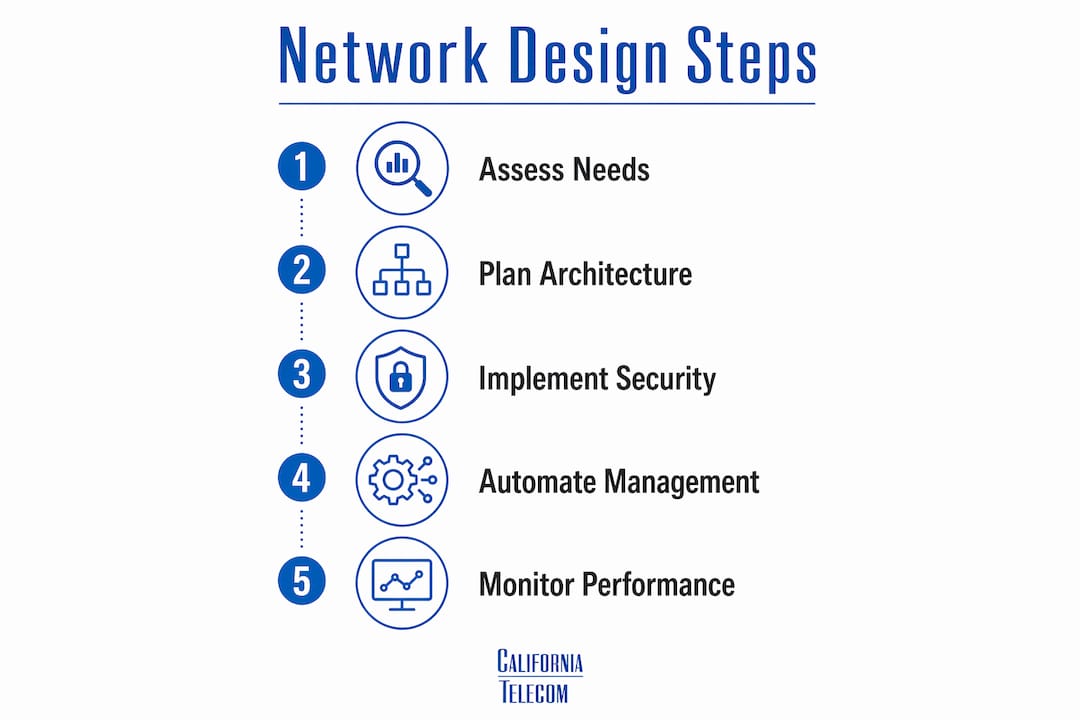
Effective enterprise network planning follows a 17-phase engineering checklist that begins with discovery and growth projection over a 3–5 year horizon. Skipping this phase is the single most common cause of expensive redesigns. Before touching a single device, you need accurate counts of current users, devices, and applications, plus a credible forecast of how those numbers will change.
The planning phases that follow discovery include:
- IP addressing and subnetting with growth buffers built in. Assign address blocks larger than you need today. Reclaiming address space later is painful and error-prone.
- VLAN segmentation design mapped to business functions, security zones, and compliance requirements. Plan this before deployment because retrofitting VLANs into a live network is difficult.
- Routing protocol selection. OSPF is the recommended interior gateway protocol for most enterprise environments due to its fast convergence and wide vendor support.
- Redundancy planning at every layer. This includes switch stacking, Multi-Chassis Link Aggregation (MLAG), and chassis-based designs for the core.
- High availability testing. Pull cables. Simulate failures. A design that looks correct on paper but has never been tested under failure conditions is not a reliable design.
- Documentation. Every IP address, VLAN, routing policy, and physical connection must be recorded before the network goes live, not after.
Pro Tip: Build your IP addressing scheme with at least 50% headroom in each subnet. The cost of planning generously is zero. The cost of re-addressing a live network is measured in days of engineer time and hours of downtime risk.
Network scalability depends on building repeatable, modular access blocks that allow capacity growth without redesign. When you add a new location, you should be deploying a known template, not inventing a new architecture.
What are the modern security foundations in enterprise network architecture?
Zero Trust Architecture has replaced the perimeter model as the security foundation for enterprise networks. Cisco's Secure Network Architecture integrates security at the physical, logical, and policy layers simultaneously rather than bolting it on at the edge. The core principle is simple: no device or user is trusted by default, regardless of where they connect from.
The practical elements of a Zero Trust enterprise network include:
- Identity-driven access control. Every connection request is evaluated against the identity of the user and device, not just the source IP address.
- Contextual policy enforcement. Access rights change based on device health, location, and time of day. A managed laptop on the corporate LAN gets different access than the same user on a personal device from a hotel.
- Least-privilege access. Users and systems receive only the permissions they need for their specific role. Nothing more.
- Telemetry and dynamic threat detection. The network continuously collects data on traffic patterns and flags anomalies before they become breaches.
Segmentation via VLANs and VRFs limits the blast radius of both security breaches and network failures. A flat architecture with no segmentation risks a total outage or full lateral movement by an attacker if a single issue occurs. Segmentation must be planned early. Retrofitting it into a production network is difficult and error-prone.
Pro Tip: Pair your VLAN design with a Zero Trust security model from day one. Trying to layer identity-based access control onto an unsegmented flat network after the fact creates gaps that attackers find before you do.
How do standardization and automation improve network management?
Standardization on hardware models, software versions, and IP schemes is the foundation of manageable enterprise networks. Without it, configuration drift accumulates silently across sites. Beyond 10–20 devices, troubleshooting a non-standardized environment becomes exponentially more complex. Every unique configuration is a liability.
Automation addresses drift directly by treating network configuration as code. Instead of configuring each device manually, engineers write templates that define the correct state for each device class. Deploying a new site means applying a tested template, not recreating decisions from memory. This approach also enables rollback. If a change causes problems, reverting to the previous known-good state takes minutes rather than hours.
The practical benefits of automation in designing enterprise networks include:
- Consistent security posture across all sites. Templates enforce the same ACLs, routing policies, and segmentation rules everywhere.
- Faster deployment. A new branch that previously took two days to configure manually can be provisioned in hours.
- Audit-ready documentation. Configuration-as-code tools maintain a version history of every change, which satisfies compliance requirements.
- Reduced human error. Manual CLI configuration at scale is where mistakes happen. Automation removes the repetition that causes errors.
Network automation also supports SD-WAN deployments, where centralized policy controllers push configuration changes to hundreds of edge devices simultaneously. This is how multi-location enterprises manage WAN connectivity without sending engineers to every site.
What practices ensure high availability and proactive network performance?
High availability in enterprise networks is achieved by removing every single point of failure through redundant links, paired core and distribution switches, and First Hop Redundancy Protocols (FHRP) like HSRP or VRRP. The goal is fast convergence. When a link or device fails, traffic must reroute in seconds, not minutes.
Monitoring has evolved beyond simple uptime checks. Observability delivers proactive capacity management by tracking metrics that reveal degradation before users notice it. The shift changes support from reactive break-fix to prevention.
| Metric | What it reveals | Action threshold |
|---|---|---|
| Latency | Application responsiveness | Investigate above baseline |
| Packet loss | Link quality or congestion | Any sustained loss above 0.1% |
| CPU utilization | Device capacity headroom | Sustained above 70% |
| Interface error rates | Physical layer problems | Any non-zero error trend |
Establishing baselines before problems occur is the critical step most teams skip. You cannot identify abnormal behavior without knowing what normal looks like. Californiatelecom's network monitoring services track these metrics continuously, with a 24/7 U.S.-based NOC responding to anomalies before they become outages.
Pro Tip: Test your failover quarterly, not just at deployment. Networks change. A redundant path that worked at launch may have been quietly broken by a configuration change six months later.
Key Takeaways
Effective enterprise network design requires layered architecture, early security integration, and automation to support multi-location growth without repeated redesigns.
| Point | Details |
|---|---|
| Start with growth projections | Plan IP addressing and architecture for 3–5 years of growth before touching hardware. |
| Match the model to the site | Use 3-tier for large campuses, collapsed core for branches, and leaf-spine for data centers. |
| Integrate Zero Trust early | Identity-based access and segmentation must be designed in, not added after deployment. |
| Standardize and automate | Consistent hardware platforms and configuration templates prevent drift and reduce errors at scale. |
| Monitor with observability | Track latency, packet loss, and CPU baselines to catch degradation before users are affected. |
What I've learned designing networks for distributed enterprises
The most expensive mistake I see in enterprise network design is treating growth projections as optional. Teams spend weeks on routing protocol selection and hardware comparisons, then sketch out IP addressing in an afternoon. Eighty percent of successful network design lives in detailed preparation. The architecture model matters far less than whether you planned accurately for where the business will be in four years.
Failover testing is the other area where I see teams cut corners. A diagram showing redundant links is not the same as a network that actually fails over cleanly. I have seen beautifully documented designs with a spanning tree misconfiguration that would have caused a 20-minute outage on any core switch failure. You find these problems by pulling cables in a maintenance window, not by reading the design doc.
The integration of legacy infrastructure with Zero Trust is genuinely hard. Older switches and access points often cannot participate in identity-based policy enforcement. The practical answer is phased replacement tied to the refresh cycle, with segmentation used to isolate legacy segments in the interim. Trying to retrofit Zero Trust onto hardware that cannot support it creates false confidence, which is worse than acknowledging the gap.
Automation adoption is where I see the biggest operational gains. Teams that resist it because "we only have 30 sites" are the same teams spending weekends troubleshooting configuration drift. Scaling network infrastructure to new locations becomes a repeatable, low-risk operation once you have templates and tested playbooks. Without them, every new site is a custom project.
— Jim
How Californiatelecom supports enterprise network design and operations
Multi-location enterprise networks require more than good design documents. They require engineers who deploy, monitor, and maintain the infrastructure day after day.Californiatelecom designs and deploys managed LAN/WAN solutions for multi-location businesses nationwide, sourcing from 50+ carriers and backing every deployment with a 99.99% uptime SLA on data. Every site is designed and deployed by Californiatelecom's own engineers, not subcontractors. Clients get one provider, one bill, and one engineer's direct number. For organizations ready to move from reactive network management to a proactive, fully managed model, nationwide managed network services from Californiatelecom are worth a direct conversation. Contact Californiatelecom for a free consultation.
FAQ
What is enterprise network architecture?
Enterprise network architecture is the structured framework that defines how devices, sites, and services connect across an organization. It includes the physical topology, logical design, routing policies, and security controls that govern all network traffic.
How does the 3-tier hierarchical model work?
The 3-tier model separates network functions into access, distribution, and core layers. Each layer has a specific role, which creates clear failure domains and makes the network easier to scale and troubleshoot.
Why is Zero Trust important in enterprise network design?
Zero Trust replaces the assumption that internal traffic is safe. Every user and device must authenticate and meet policy requirements before gaining access, which limits lateral movement if a breach occurs.
How does automation help with designing enterprise networks?
Automation applies consistent configuration templates across all devices, eliminating the manual errors and configuration drift that accumulate in large environments. It also enables faster deployment of new sites and reliable rollback when changes cause problems.
What metrics should enterprise network teams monitor?
Teams should track latency, packet loss, CPU utilization, and interface error rates against established baselines. Observability-based monitoring shifts support from reactive troubleshooting to proactive capacity management.
Recommended
- California Telecom | Internet, Voice & Managed Services
- Picking a Managed Network Services Provider When Your IT Team Is Small | California Telecom
- How to Improve Network Performance with Managed LAN/WAN Solutions | California Telecom
- What Is Network Provisioning? A Guide for IT Managers | California Telecom