

How to Scale Network Infrastructure to New LocationsScaling network infrastructure across new locations is defined as the disciplined process of extending connectivity, routing, and management systems to additional sites without rebuilding your existing architecture from scratch. Most performance failures in new site rollouts trace back to application gaps, not migration tooling. The IT managers who get this right follow three steps: thorough readiness assessments, incremental topology extension, and rigorous change management. Skip any one of these, and you absorb the cost in post-deployment outages and emergency re-engineering.
How to scale network infrastructure at new locations
The most common mistake IT teams make when they expand network infrastructure is treating the new site as a blank slate. Every new location inherits dependencies from your existing architecture: DNS zones, DHCP scopes, routing tables, and security policies. Treating those dependencies as afterthoughts creates the connectivity and security issues that surface at go-live, not during planning.
Deploying networks in new areas requires a structured readiness assessment before any circuit is provisioned or switch is racked. Scalable network solutions start with a clear picture of what the network must carry, not just what it currently carries. The goal is to close the gap between application requirements and actual connectivity before cutover, not after.

What critical network readiness assessments must precede scaling?
A network assessment checklist for migration readiness covers bandwidth, latency, packet loss, and application dependencies as the minimum baseline. Each metric tells you something specific. Bandwidth tells you whether the circuit can carry peak load. Latency tells you whether latency-sensitive applications like VoIP or real-time ERP queries will perform. Packet loss tells you whether the physical transport is reliable enough to support overlay solutions like SD-WAN.
Before you commit to a deployment timeline, complete these assessments at every new site:
- Baseline bandwidth and latency: Measure peak and average utilization, not just provisioned capacity. A 100 Mbps circuit running at 80% utilization during business hours is already a problem.
- Application traffic inventory: Map every application flow and its dependency chain. A forgotten dependency on an on-premises Active Directory server can break authentication at the new site entirely.
- Segmentation and DNS validation: Confirm that VLAN assignments, DNS zones, and remote access controls are consistent with your existing architecture. Inconsistencies here create security gaps.
- Backup and rollback assumptions: Test your recovery plan before deployment, not during an outage. Validate that backup circuits activate correctly and that rollback procedures restore service within your acceptable recovery window.
- Remote access control points: Confirm that VPN concentrators, jump hosts, and out-of-band management paths are reachable from the new site before go-live.
Pro Tip: Run a full application dependency scan using tools like SolarWinds Network Performance Monitor or Auvik before finalizing your site design. Hidden dependencies discovered post-deployment cost significantly more to fix than those found during assessment.
Unassessed gaps are the primary driver of post-deployment surprises. The time you invest in assessment directly reduces the time you spend troubleshooting after cutover.
How can you extend existing topologies without rebuilding?
Extending reach within your current topology is the core strategy for efficient network expansion. The alternative, a full topology rebuild at each new site, multiplies cost, complexity, and risk with every location you add. Incremental extension keeps your management model consistent and your team's operational knowledge relevant across all sites.
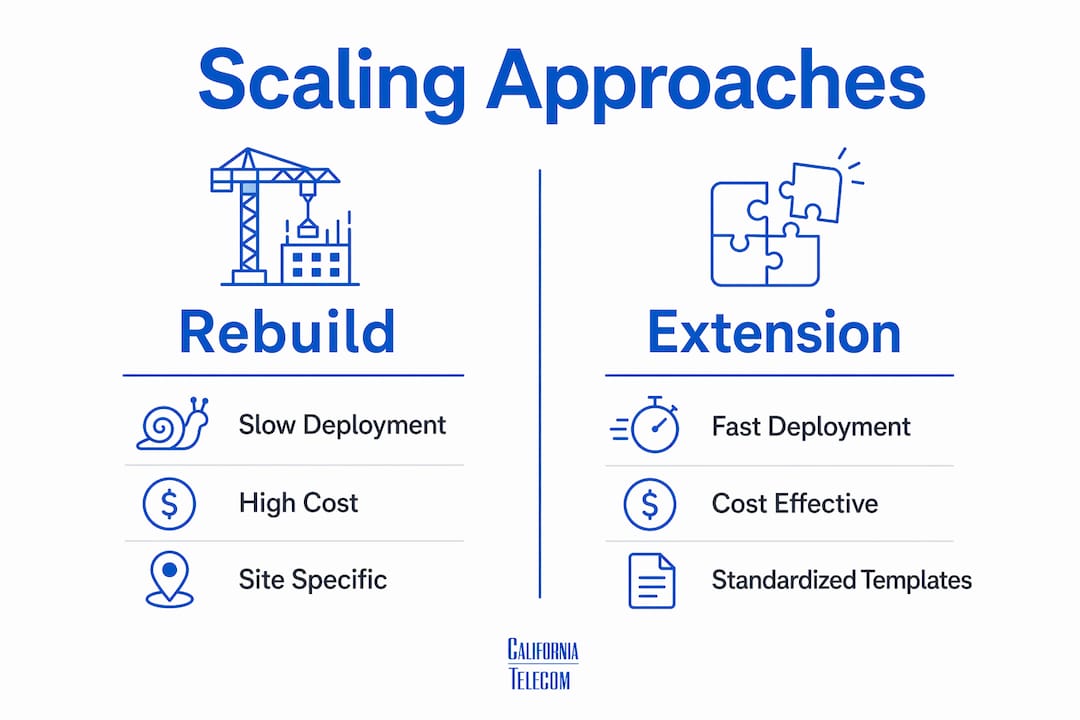
Standardized design patterns are the foundation of this approach. When you assign IP addressing, VLAN IDs, VXLAN segments, and routing boundaries using a repeatable template, you accomplish two things. You reduce the chance of one-off site designs that require global refactoring later. You also create the conditions for automation, because automation requires consistency to function reliably.
| Approach | Rebuild From Scratch | Incremental Extension |
|---|---|---|
| Deployment speed | Slow. Each site requires full design cycle. | Fast. Templates applied to new sites directly. |
| Operational complexity | High. Each site may have unique management model. | Low. Consistent architecture across all sites. |
| Automation readiness | Low. Inconsistent configs block automation. | High. Standardized patterns enable scripted deployment. |
| Risk per site | High. New designs introduce new failure modes. | Lower. Known patterns have known failure modes. |
| Cost over time | Increases with each new location. | Decreases as templates mature. |
Wireless architecture is a specific area where topology extension pays off. Cisco Meraki's Campus Gateway design supports up to 5,000 APs, 50,000 clients, and 100 Gbps throughput in a single deployment. It tunnels wireless traffic from access points to a central gateway, which limits VLAN scope, reduces broadcast domains, and lowers ARP and MAC table pressure on access switches. That architecture scales to large campuses without requiring changes to the underlay network at each new building or floor. For managed WiFi deployment across multiple sites, this centralized model is the right starting point.
Pro Tip: Build a site design template document that includes IP addressing schema, VLAN assignments, routing protocol parameters, and QoS policies. Apply it to every new location. Deviations from the template require written justification and peer review before implementation.
What role do underlay and overlay networks play in sd-wan scaling?
The physical transport layer is the gating factor for every overlay solution, including SD-WAN. Poor underlay quality cannot be corrected by overlay traffic steering. If a circuit has persistent packet loss during peak hours, SD-WAN path selection will route around it, but only if an alternative path exists. When all available paths are degraded, SLA compliance fails regardless of how well the overlay is configured.
Before deploying SD-WAN at any new site, assess and remediate the underlay first:
- Latency: Acceptable thresholds vary by application. VoIP requires under 150 ms one-way. Real-time video conferencing requires under 100 ms. Measure against your specific application requirements, not generic benchmarks.
- Jitter: Jitter above 30 ms on a VoIP path produces audible call quality degradation. Jitter is often a symptom of congestion or inconsistent routing, both of which require physical layer remediation.
- Packet loss: Loss above 1% on a business circuit is a problem. Loss above 3% will visibly degrade TCP-based applications and make real-time traffic unusable.
- Circuit diversity: A regional hub model, where multiple sites connect to a regional aggregation point, balances latency and manageability. It also provides path diversity when a single circuit fails.
Managed SD-WAN with zero-touch provisioning accelerates multi-site deployment by pushing configurations automatically when a device comes online. That capability only delivers its full value when the underlay circuits are already assessed and provisioned correctly. Zero-touch provisioning does not fix a bad circuit. It deploys your configuration to whatever transport exists at the site.
What are best practices for change management when scaling networks?
Network change management executed with thorough pre- and post-deployment validation is the single most reliable way to reduce outages during scaling. The five principles below apply to every change, regardless of site count or change complexity.
- Scope and risk analysis: Define exactly what the change affects, which systems depend on it, and what the failure impact is. A change that touches a core routing table has a different risk profile than one that adds a new VLAN to an access switch.
- Peer review: Every change plan gets reviewed by a second engineer before implementation. Peer review catches assumptions the original engineer made that are not documented in the change plan.
- Pre-deployment testing: Use virtual test labs or staging environments to validate configurations before they touch production. Tools like Cisco Modeling Labs or GNS3 let you replicate topology segments and test changes safely.
- Implementation and post-change testing: Execute the change during a defined maintenance window. Run post-change tests immediately after implementation to confirm the expected outcome before closing the change record.
- Documentation updates: Update network diagrams, IP address management records, and runbooks before the change window closes. Documentation updated after the fact is documentation that never gets updated.
Recovery sequencing during multi-site changes should restore physical and management layers first, then control-plane functions, then application dependencies. The traditional "core before access" rule does not always apply when management access to the core is itself unavailable.
Automation reduces human error in repetitive change tasks. Configuration management platforms like Ansible, Terraform, or Cisco NSO apply standardized templates consistently across sites. They also create an audit trail that manual change processes cannot match.
What physical transport strategies support long-term network scaling?
Physical transport investment is the foundation that every overlay, wireless, and application architecture depends on. Large-scale fiber builds by carriers like Zayo, which is constructing 8,000 route miles of new and overbuild fiber across high-demand AI corridors, illustrate the scale of transport investment required to meet growing bandwidth demand. That investment signals what enterprise IT teams should expect from their own transport planning: capacity must be built ahead of demand, not in response to it.
| Strategy | Application | Benefit |
|---|---|---|
| Dark fiber leasing | High-bandwidth inter-site links | Full capacity control, no contention |
| Dedicated fiber internet | Primary site connectivity | Consistent throughput, low latency |
| In-line optical amplifiers | Extended fiber reach beyond standard limits | Reduces need for regeneration sites |
| Connected campus fiber | Multi-site data center interconnect | Resilient, high-capacity site-to-site links |
Digital Realty's Malaysia deployment at Cyberjaya connects three sites with dedicated fiber, targeting scalable power and operational capacity planned through 2028. That architecture, three sites on a shared dedicated fiber ring, is the model for any multi-site data center footprint that needs operational continuity during expansion. For enterprises planning data center connectivity across multiple locations, dedicated fiber between sites eliminates the shared-medium contention that degrades performance during peak load.
Dedicated fiber internet at each site provides the consistent throughput and low latency that SD-WAN and cloud-hosted applications require. Shared broadband circuits introduce variability that no overlay can fully compensate for.
Key takeaways
Effective network scaling across new locations requires baseline assessments, standardized topology extension, and disciplined change management executed in sequence before any site goes live.
| Point | Details |
|---|---|
| Assess before you deploy | Measure bandwidth, latency, packet loss, and application dependencies at every new site before provisioning. |
| Extend, do not rebuild | Apply standardized IP, VLAN, and routing templates to new sites to maintain operational consistency. |
| Fix the underlay first | SD-WAN and overlay solutions cannot compensate for poor physical circuit quality at the transport layer. |
| Sequence your recovery | Restore physical and management access before control-plane and application layers during any outage. |
| Build transport ahead of demand | Fiber and circuit capacity must be provisioned before bandwidth demand peaks, not after. |
What i've learned designing networks across dozens of sites
The most expensive network projects I've seen were not the largest ones. They were the ones where the team skipped the readiness assessment because the timeline was tight. Every one of those projects ended with an emergency change window, a frustrated operations team, and a post-mortem that identified the exact gap the assessment would have caught.
The other pattern I see consistently: teams that treat each new site as a unique design problem. They customize IP addressing, VLAN schemes, and routing configurations for local conditions. Six months later, they cannot automate anything because no two sites look alike. The discipline of standardization feels slow at the start. It pays back every time you add a new location after the third one.
Speed and reliability are not opposites in network scaling. They are the same thing, achieved through preparation. The teams that deploy fastest are the ones with the best templates, the most thorough assessments, and the strongest change management culture. They are not cutting corners. They are removing the variables that cause delays.
— Jim
How Californiatelecom helps you scale network infrastructure nationwide
Californiatelecom designs and deploys network infrastructure for multi-location businesses across the country, handling everything from site assessment through ongoing management under a single contract. You get one engineer's contact, one bill, and a 24/7 U.S.-based NOC backing every site with a 99.99% uptime SLA on data.Whether you are adding three locations or thirty, Californiatelecom's nationwide managed network services cover Managed LAN/WAN, SD-WAN, and dedicated fiber connectivity sourced from 50+ carriers. Our engineers assess each site, extend your existing topology using standardized templates, and manage change through a documented process that protects your production environment. If you are ready to expand without the operational drag of managing multiple vendors, explore managed LAN/WAN options or contact us for a consultation.
FAQ
What is the first step to scale network infrastructure at a new site?
The first step is a baseline assessment of bandwidth, latency, packet loss, and application dependencies at the new location. Unassessed gaps between application requirements and actual connectivity are the primary cause of post-deployment failures.
Why can't sd-wan fix a bad physical circuit?
SD-WAN path selection depends on link quality metrics to route traffic. When underlay quality is poor across all available paths, the overlay has no good path to select and SLA compliance fails.
How do you avoid rebuilding your network topology at every new site?
Use standardized design templates for IP addressing, VLAN assignments, and routing boundaries across all sites. Consistent topology extension enables automation and reduces the risk of one-off configurations that require global refactoring later.
What is the correct recovery sequence during a multi-site network outage?
Restore physical infrastructure and management access first, then control-plane functions, then application dependencies. Dependency-ordered recovery reduces mean time to recovery more reliably than fixed sequencing rules like "core before access."
How much fiber capacity should you plan for new locations?
Plan capacity ahead of projected demand, not at current utilization levels. Carriers like Zayo are building 8,000 route miles of new and overbuild fiber specifically to stay ahead of AI-driven bandwidth growth, which signals the direction enterprise transport planning should follow.