

How Managed WiFi Deployment Works for Multi-Location ITManaged WiFi deployment is a fully outsourced wireless network service where a provider takes end-to-end responsibility for planning, installing, configuring, and managing your business's WiFi infrastructure across every location. Unlike buying access points and figuring out placement yourself, this model hands the entire lifecycle to engineers who specialize in enterprise wireless. Cloud-managed platforms like Cisco Meraki, Aruba Central, and Juniper Mist sit at the center of modern deployments, giving providers centralized visibility and control across dozens or hundreds of sites from a single dashboard. For IT managers running distributed operations, understanding how managed WiFi deployment works is the difference between a network that just exists and one that actually performs.
How managed WiFi deployment works: the 7-phase lifecycle
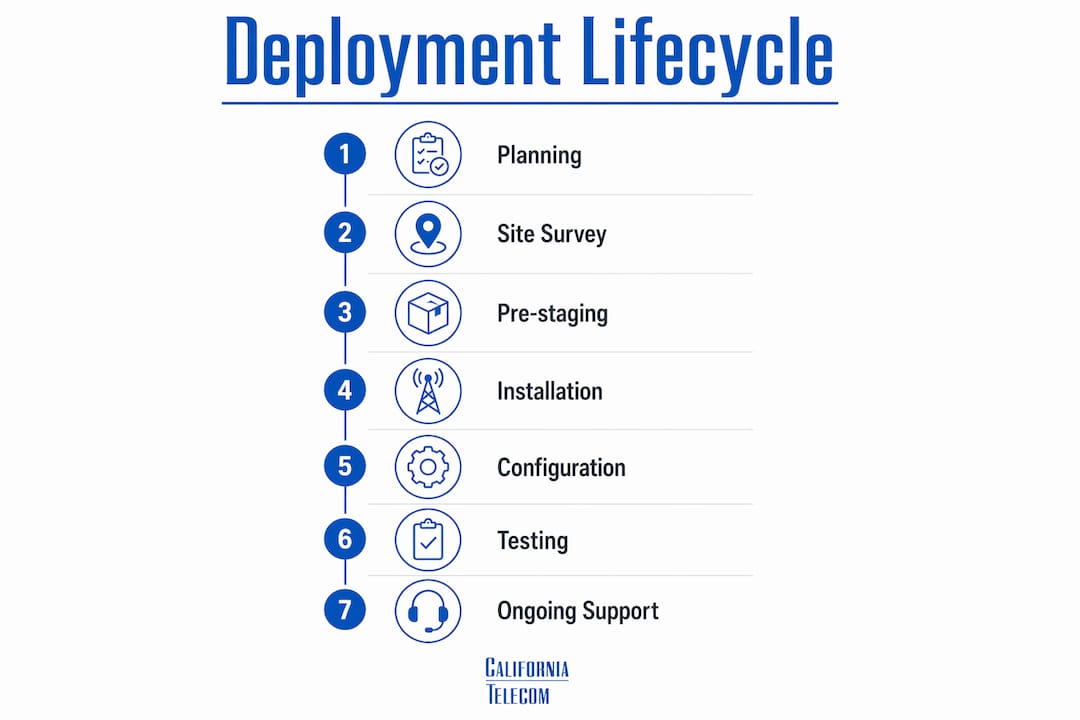
Managed WiFi deployment follows a 7-phase lifecycle covering scoping, RF design, documentation, procurement, installation, validation, and ongoing management. Each phase builds on the last, and skipping any one of them is where deployments go wrong. Here is what each phase actually involves.
-
Scoping: Engineers gather floor plans, user density estimates, application requirements, and any existing infrastructure details. This is where business outcomes get translated into technical requirements.
-
Predictive site survey: Using tools like Ekahau or iBwave, engineers model RF propagation across your floor plans before a single access point ships. The model identifies AP quantity, placement, and antenna orientation based on your building's construction materials and layout.
-
Documentation: A full design document captures AP placement, VLAN architecture, SSID structure, PoE requirements, and switch port assignments. This document becomes the installation blueprint and the baseline for future changes.
-
Procurement and pre-configuration: Hardware is ordered and pre-staged at a central facility. Access points are pre-configured with SSIDs, VLANs, security policies, and management profiles before they arrive on-site. This step alone cuts on-site deployment time significantly.
-
Installation: Technicians mount APs, terminate cabling, and connect to PoE switches. Professional site surveys assess construction materials and mounting constraints in advance, so installers arrive with a realistic plan rather than improvising.
-
Validation: Post-deployment physical surveys confirm real-world performance. Predictive models are a starting point, but furniture, human traffic, and interference sources require on-site measurement to verify coverage, roaming behavior, and throughput.
-
Ongoing management: The provider monitors the network continuously, pushes firmware updates, responds to alerts, and adjusts configurations as your environment changes.
Pro Tip: Pre-staging hardware off-site before installation day is one of the highest-leverage steps in the managed WiFi installation process. It removes configuration errors from the critical path and lets your on-site technicians focus entirely on physical installation.
How cloud-managed architectures change multi-site WiFi

Cloud-managed WiFi separates the control plane from the data plane, which means your traffic does not need to backhaul through a central controller to reach the internet. The management intelligence lives in the cloud while data flows locally at each site. This architecture is what makes managing 50 locations as operationally simple as managing five.
The practical advantages for multi-location IT teams are significant:
- Centralized dashboard: Cisco Meraki, Aruba Central, and Juniper Mist each provide a single pane of glass showing every AP, every client, and every alert across your entire estate. You can push a configuration change to 200 access points in minutes.
- Zero-touch provisioning: New hardware ships directly to a site, an on-site contact plugs it in, and the device calls home to the cloud to download its full configuration. No engineer needs to be present.
- Uniform security policy enforcement: Cloud-managed WiFi platforms enable centralized configuration and uniform security policies, which is critical when you need consistent firewall rules and guest isolation across every location.
- Cloud telemetry: Platforms collect continuous performance data, enabling providers to identify degrading APs, channel congestion, or client association problems before users open a ticket.
- No on-premises controllers: Eliminating physical wireless LAN controllers at each site reduces hardware costs, removes single points of failure, and simplifies your wiring closet.
Pro Tip: When evaluating cloud-managed platforms, ask your provider how they handle internet outages at a site. The best platforms cache configuration locally on the AP so the site continues operating normally even when the cloud connection drops.
What design decisions determine performance at scale
Managed WiFi deployment is fundamentally a planning challenge rather than a technology deployment. The hardware is largely commoditized. The design decisions made before installation are what separate a network that works from one that generates constant complaints.
Coverage vs. capacity: the core trade-off
Most IT managers instinctively think about coverage, meaning signal reaching every corner. Capacity is the harder problem. A high-density environment like a conference room, warehouse floor, or retail store needs more APs placed closer together at lower power, not fewer APs cranked up. Overpowered APs create co-channel interference because overlapping APs on the same channel halve available airtime and degrade performance for everyone. Assigning non-overlapping channels and controlling transmit power is the mechanism that solves this.
VLAN and SSID architecture
Segmentation into VLANs for corporate, guest, POS, and IoT traffic is non-negotiable for security and compliance. In retail environments, PCI DSS requires that payment systems operate on an isolated network segment. Each VLAN maps to a dedicated SSID with firewall policies enforcing isolation between segments. The table below shows a standard segmentation model.
| Traffic type | VLAN | SSID | Isolation requirement |
|---|---|---|---|
| Corporate | 10 | Corp-WiFi | Full access to internal resources |
| Guest | 20 | Guest-WiFi | Internet only, isolated from corporate |
| POS/Payment | 30 | POS-WiFi | PCI DSS isolated segment |
| IoT/OT devices | 40 | IoT-WiFi | Isolated, limited egress |
Wired infrastructure: the silent failure point
Neglecting wired infrastructure nearly guarantees failure even with top-tier access points. PoE power budgets, uplink capacity, and switching capacity must scale with WiFi demand. A Wi-Fi 6 AP drawing 25.5W on a switch port budgeted for 15.4W will either fail to power on or operate in a degraded state. Uplink capacity from the access layer to the distribution layer must account for the aggregate throughput of all APs on that switch. This is why enterprise WiFi planning always starts with a wired infrastructure audit.
Roaming protocols for client mobility
Using a single SSID across frequency bands supports fast roaming protocols 802.11r, 802.11k, and 802.11v, and reduces client connection fragmentation. Fragmenting SSIDs by band breaks these protocols and forces clients to roam slowly or stay associated to a distant AP. For environments with mobile workers, warehouse scanners, or voice-over-WiFi handsets, unified SSID with enabled roaming protocols is the correct architecture.
Common challenges in managed WiFi installation and how to handle them
Even well-planned deployments encounter real-world complications. Knowing where deployments typically break down lets you address problems before they become outages.
- Validation is two steps, not one. Post-deployment physical surveys are mandatory to validate real-world performance. Predictive heatmaps do not account for furniture rearrangements, new equipment, or seasonal changes in occupancy. Schedule a physical survey within 30 days of go-live.
- Firmware management requires a schedule. Firmware lifecycle management is systematic and continuous, scheduled during low-usage hours with rolling updates and automated health checks. Ad-hoc patching creates inconsistent software versions across your estate and introduces security gaps.
- Cable management affects long-term reliability. Poorly dressed cables create airflow problems in wiring closets, make troubleshooting slower, and increase the risk of accidental disconnection. Require your installation team to follow structured cabling standards on every site.
- SLA definitions matter more than uptime numbers. A 99.9% uptime SLA sounds strong until you realize it allows over eight hours of downtime per year. Understand what the SLA covers, how incidents are measured, and what remedies apply when the provider misses the target.
- Monitoring must be proactive, not reactive. Managed WiFi shifts responsibility to the provider, who proactively manages issues via remote monitoring, firmware updates, and security patches. If your provider only responds to tickets you open, you are not getting managed WiFi. You are getting break-fix support with a monthly fee.
Pro Tip: Ask your managed WiFi provider for a sample monthly report before you sign. The report tells you exactly what they monitor, how they measure performance, and whether their definition of "proactive management" matches yours.
For multi-location environments, a managed network guide that covers both wired and wireless design will save you from discovering mid-deployment that your switching infrastructure cannot support the AP density your RF design requires.
Key takeaways
Managed WiFi deployment succeeds when planning, wired infrastructure, cloud management, and ongoing monitoring are treated as a single integrated system rather than separate workstreams.
| Point | Details |
|---|---|
| Seven-phase deployment lifecycle | Scoping through ongoing management defines every professional deployment and prevents costly oversights. |
| Wired infrastructure is foundational | PoE budgets, uplinks, and switching capacity must be sized before access points are ordered. |
| Cloud management enables scale | Zero-touch provisioning and centralized dashboards make managing 50 sites as practical as managing five. |
| VLAN segmentation is mandatory | Corporate, guest, POS, and IoT traffic each require isolated segments for security and compliance. |
| Validation requires physical surveys | Predictive models must be confirmed with on-site measurements after installation to catch real-world gaps. |
Why the planning phase is the only phase that actually matters
After working with multi-location businesses on network deployments for years, the pattern I keep seeing is this: teams that struggle with WiFi performance almost always trace the problem back to a decision made before installation started, not a hardware failure or a software bug.
The most common oversight is treating the wireless design as independent from the wired infrastructure. I have seen deployments where the RF design called for Wi-Fi 6 APs at 25W PoE, and the existing switches were only capable of 15.4W per port. The APs powered on in a degraded state, and nobody connected the dots for weeks. That is not a WiFi problem. It is a planning problem.
Cloud-managed platforms like Cisco Meraki and Aruba Central genuinely change the operational equation for distributed IT teams. The ability to push a firmware update or a new security policy to every site simultaneously, without dispatching a technician, is not a minor convenience. It is the difference between a two-person IT team managing 30 locations effectively and that same team spending every week on reactive travel.
My honest recommendation: if you are managing more than five locations, the benefits of outsourcing WiFi management to a provider with a 24/7 NOC outweigh the cost in almost every scenario I have encountered. The value is not in the hardware. It is in the monitoring, the firmware discipline, and the institutional knowledge that comes from deploying hundreds of sites.
— Jim
How Californiatelecom deploys and manages WiFi for multi-location businessesCaliforniatelecom designs, deploys, and manages WiFi networks for multi-location businesses nationwide, using its own engineers from site survey through go-live and beyond. Every deployment starts with a professional WiFi site survey that covers RF design, wired infrastructure requirements, and VLAN architecture before a single piece of hardware ships. Ongoing management runs through a 24/7 U.S.-based NOC backed by a 99.99% uptime SLA, with proactive monitoring, firmware management, and a single engineer's number for every site. If you are managing connectivity across distributed locations and want one provider handling the full network lifecycle, explore nationwide managed network services from Californiatelecom.
FAQ
What is managed WiFi deployment?
Managed WiFi deployment is an end-to-end outsourced service where a provider handles planning, installation, configuration, and ongoing management of a business's wireless network. The provider takes responsibility for performance, security, and uptime across all locations.
How long does a managed WiFi deployment take?
Deployment timelines vary by site count and complexity, but a single-site deployment typically takes two to four weeks from scoping to go-live. Multi-location rollouts are phased, with pre-staging and zero-touch provisioning used to accelerate on-site installation time.
What is the role of a site survey in the managed WiFi installation process?
A site survey identifies AP placement, coverage gaps, interference sources, and wired infrastructure requirements before installation begins. Validation requires both a predictive survey before deployment and a physical survey after go-live to confirm real-world performance.
Why does VLAN segmentation matter in a managed WiFi deployment?
VLAN segmentation isolates corporate, guest, POS, and IoT traffic onto separate network segments, which is required for PCI DSS compliance in retail and reduces the blast radius of any security incident. Each VLAN maps to a dedicated SSID with enforced firewall policies.
What should IT managers look for in a managed WiFi services provider?
Look for a provider that offers outcome-based SLAs, proactive monitoring through a 24/7 NOC, and documented firmware management schedules. A provider that only responds to tickets you open is delivering break-fix support, not true managed WiFi services.