

Managed network guide for California multi-location ITRunning a network across five, ten, or twenty locations in California is nothing like managing a single office. The complexity compounds fast, and most IT teams hit a wall trying to juggle carriers, hardware vendors, and security tools while keeping the business running. A managed network takes that weight off your plate by putting monitoring, security, and support under one provider's responsibility. But "managed network" gets used loosely enough that many IT leaders sign contracts expecting one thing and get something far less. This guide cuts through that confusion so you know exactly what to look for, what it costs, and how to choose the right partner.
Table of Contents
- What is a managed network, and why it matters for multi-location businesses
- Key features of high-quality managed network services
- Managed network security: cloud-based protection for modern California businesses
- Costs and value: what to expect for managed network services in Southern California
- Infrastructure essentials: equipment, cabling, and monitoring for multi-site success
- How to choose the right managed network provider for your California multi-location business
- Why most companies underestimate the true value of proactive managed networks
- Discover tailored managed network solutions with California Telecom
- Frequently asked questions
Key Takeaways
| Point | Details |
|---|---|
| True managed network definition | Managed networks offer proactive 24/7 monitoring, security, and support, unlike reactive break/fix services. |
| High uptime standards | Top providers maintain 99.9% or higher uptime with rapid incident response and continuous device monitoring. |
| Security integration | Scalable cloud-based security like NSaaS and SASE is essential for multi-location business protection. |
| Realistic cost expectations | Expect to pay $150-$250/user monthly in Southern California for reliable managed network services. |
| Choosing providers wisely | Verify SLAs, equipment quality, and proactive monitoring capabilities to avoid costly downtime. |
What is a managed network, and why it matters for multi-location businesses
A managed network is a connectivity infrastructure where an outside provider takes ongoing responsibility for design, monitoring, security, and support rather than handing you equipment and walking away. You are not just buying a circuit or a firewall. You are buying continuous oversight.
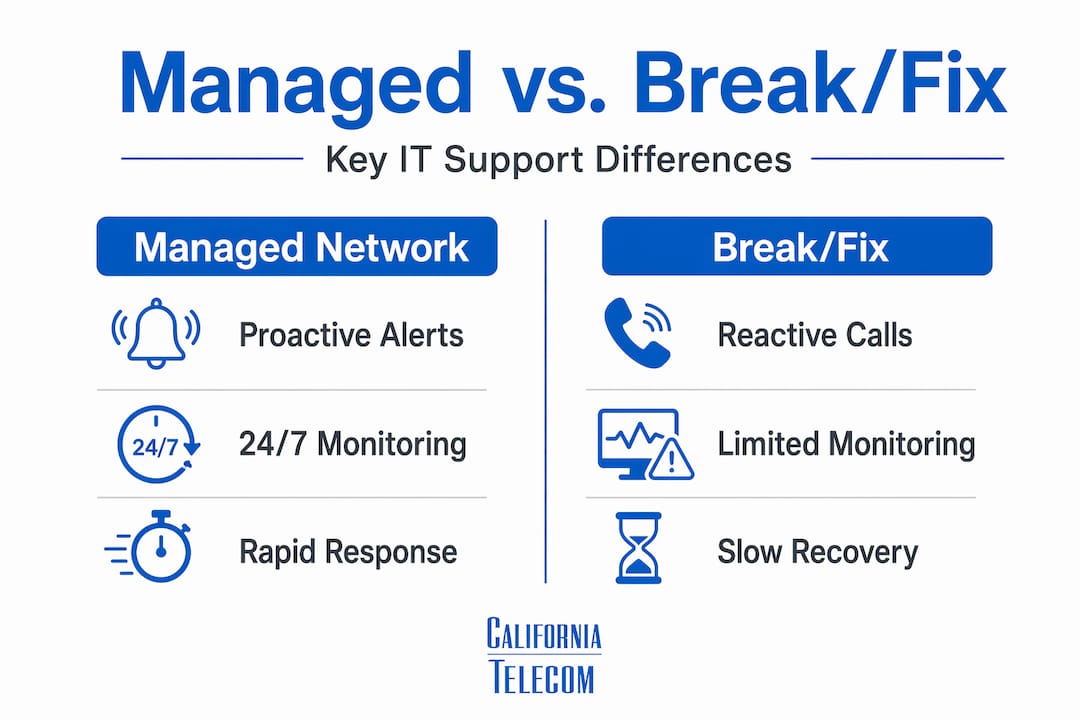
The clearest distinction is proactive versus reactive. Break/fix support means someone calls when things break, and you pay hourly for repairs. A managed network means your provider catches a failing switch, a saturated link, or a security anomaly before your team even knows something is wrong. Managed network services include 24/7 monitoring, security, and support with proactive oversight baked in from day one.
For multi-location businesses, this difference is significant. Each site introduces its own routing, cabling, equipment lifecycle, and security posture. Without centralized oversight, you end up with patchwork management where nobody has full visibility. Managed LAN/WAN services address exactly that by giving you unified control across every location.
Key components you should expect in a true managed network:
- Continuous monitoring of routers, switches, firewalls, and endpoints
- Incident detection and response, not just ticket logging
- Security integration at the network layer, not bolted on after the fact
- Change management for firmware, configs, and hardware refreshes
- Reporting and visibility into bandwidth, device health, and availability
If a provider offers only ticketing with no monitoring, you are buying reactive IT support with a managed label. That is the most common misunderstanding IT decision-makers face when evaluating vendors.
Key features of high-quality managed network services
Quality in managed network services is measurable. Vague promises about "fast response" and "expert support" are marketing. What you need are specific numbers and contractual commitments.
Providers should target 99.9% uptime with alert response SLAs under 15 minutes, polling network devices every 60 seconds. That polling interval matters because a switch that fails at 2 a.m. should trigger an alert and response within minutes, not hours. At California Telecom, we back our data networks with a 99.99% uptime SLA, and voice with 99.999%, which represents a meaningful step above industry baseline.

AI-driven detection is increasingly separating good providers from average ones. ISO 27001-certified NOC services can maintain up to 99.98% uptime using AI-driven detection and real-time response, because automated analysis catches anomalies faster than human-only monitoring ever could.
Pro Tip: Ask any prospective provider to show you a sample monthly report. If it only shows ticket counts and resolution times, that is a red flag. A quality report includes device uptime, bandwidth utilization by site, security event summaries, and trend analysis.
Here is a quick benchmark comparison across service tiers:
| Feature | Entry-level provider | Quality managed provider |
|---|---|---|
| Monitoring interval | 5 to 15 minutes | Every 60 seconds |
| NOC coverage | Business hours only | 24/7/365 |
| Uptime SLA | None or 99% | 99.9% to 99.99% |
| Security integration | Separate or none | Built in |
| Reporting | Monthly ticket summary | Device health, bandwidth, and security events |
| Incident response | Reactive after report | Proactive before impact |
Additional quality markers to verify with any provider:
- Managed LAN/WAN features covering both wired and wireless infrastructure
- Documented escalation paths with named engineer contacts, not just a helpdesk queue
- Change management protocols that prevent config errors during routine updates
- Proof of ISO certifications or SOC 2 compliance, not just claims
Managed network security: cloud-based protection for modern California businesses
Security used to be something you added to a network. In 2026, it has to be part of how the network is built. For multi-location businesses in California, especially those in professional services, healthcare-adjacent, or finance-adjacent industries, the stakes are high enough that inadequate security is a compliance risk, not just a technical one.

Network Security as a Service (NSaaS) is the model that fits most growing California businesses. Rather than buying and maintaining separate firewalls, intrusion detection systems, and web filters at every site, managed network security services let you scale protection as your organization grows without building expensive in-house infrastructure. You get enterprise-grade protection without the capital expense or the headcount.
The two frameworks that matter most right now are SD-WAN and SASE. SD-WAN (Software-Defined Wide Area Network) routes traffic intelligently across multiple links, improving both performance and resilience. SASE (Secure Access Service Edge) layers identity-based Zero Trust security directly into the network fabric. Together, they form a model where every user, device, and application is verified before access is granted. Managed cloud-based security combining SD-WAN, secure web gateways, and Zero Trust provides genuinely scalable protection for multi-location California businesses.
Pro Tip: If your current or prospective provider cannot explain how Zero Trust applies to your branch offices specifically, that is a skills gap. Zero Trust is not just a buzzword. It means no device or user is inherently trusted, even inside your own network perimeter.
Benefits of outsourcing to a provider offering managed network security:
- Continuous threat monitoring across all sites, not just headquarters
- Faster patch deployment when vulnerabilities are discovered
- Unified policy enforcement so every location follows the same rules
- Reduced exposure to regulatory penalties tied to data protection
- SASE managed security and managed SD-WAN security available as integrated, not siloed, services
One often-overlooked factor is network security scalability. As you add locations, your attack surface grows. A provider who designs security to scale from day one prevents you from having to renegotiate and rebuild security architecture every time you expand.
Costs and value: what to expect for managed network services in Southern California
Price transparency is rare in this industry, which is why many IT leaders get surprised at renewal time. Here is what the numbers actually look like.
Managed network services in Southern California for firms with 50 to 150 employees typically run $150 to $250 per user per month, with true managed services averaging around $200. That range includes 24/7 monitoring, proactive support, and basic security integration. Add compliance requirements or dedicated helpdesk coverage and you move toward the top of that range.
Cheap managed IT support at $75 to $100 per user often means reactive break/fix masquerading as managed services, with higher emergency costs coming later. That emergency rate is the hidden cost most IT leaders do not factor into the comparison.
Pro Tip: Build a true cost comparison by adding estimated downtime hours per year multiplied by your hourly revenue impact, then adding emergency response costs. Budget-tier providers almost always lose that comparison once downtime is priced in.
| Service type | Monthly cost per user | Monitoring | Security | SLA guarantee |
|---|---|---|---|---|
| Break/fix (hourly) | Unpredictable | None | None | None |
| Budget managed IT | $75 to $100 | Partial | Separate cost | Informal |
| True managed network | $150 to $250 | 24/7 NOC | Integrated | Contractual |
| Enterprise managed | $250 and above | 24/7 with AI | Full SASE/ZT | Credits for misses |
For multi-location professional services network costs, the calculation also needs to include per-site infrastructure management, which budget providers routinely exclude from base pricing and add back as line items.
Before signing anything, verify three things: the SLA has written remedies for misses, the provider can name the engineer assigned to your account, and the contract explicitly defines what "monitoring" includes.
Infrastructure essentials: equipment, cabling, and monitoring for multi-site success
The network you buy is only as good as the hardware it runs on. This is where many multi-location businesses quietly cut corners and pay for it in instability and security gaps.
Enterprise-grade equipment is critical because consumer-grade devices lack visibility tools and stop receiving security updates quickly, creating blind spots your provider cannot monitor through. A $200 router from a retail store does not expose the telemetry your NOC needs to do its job. If a provider is willing to manage consumer hardware, that tells you something about how seriously they take managed network services best practices.
Structured cabling is the other budget variable that catches IT leaders off guard. Structured cabling in Southern California costs $150 to $400 per Cat6 drop in 2026, and conduit requirements can double the labor cost in older commercial buildings. A 30-drop installation in a mid-sized office could run anywhere from $4,500 to over $24,000 depending on building conditions.
Key infrastructure considerations for California multi-site deployments:
- Use only manufacturer-supported switches and routers with active firmware updates
- Require your provider to document every device in a centralized asset register
- Verify that device polling includes both performance metrics and security event logs
- Budget for conduit in any California building constructed before 2000
- Request monthly infrastructure reports showing device health trends, not just incidents
- Enterprise network equipment should be specified in your contract, not left to the provider's discretion
Pro Tip: Before any new site deployment, ask your provider for a cabling assessment report. Discovering conduit requirements after work starts is the most common reason infrastructure projects run over budget.
How to choose the right managed network provider for your California multi-location business
Choosing a managed network service provider is a business decision, not just a technology procurement. The wrong choice costs you in downtime, compliance exposure, and the operational drag of managing a provider who cannot keep up.
Here is a practical evaluation framework:
- Verify actual SLA performance. Ask for uptime reports from existing customers, not just the number on the datasheet. Demand SLAs with response times of 15 minutes or less for P1 critical issues, 99.9% uptime guarantees, and automatic service credits for any misses.
- Confirm enterprise-grade equipment is standard. This should not be an upgrade. It should be the baseline.
- Test their multi-site experience. Ask specifically how they manage configuration consistency across locations and what their process is when one site goes down.
- Evaluate carrier breadth. A provider that sources from only one or two carriers cannot give you truly diverse routing options. California Telecom sources from 50 or more carriers specifically to give every site the best available path.
- Check escalation structure. You want a named engineer, not a ticket queue. The moment something serious happens, you need to reach someone who knows your network.
- Match services to your growth plans. A provider that handles ten sites well may struggle at thirty. Ask about their largest current customer and what that deployment looks like.
Choosing managed SD-WAN and selecting SASE solutions are two of the highest-impact decisions within a broader vendor evaluation. Get both right and you set your network up to scale without a rebuild.
Why most companies underestimate the true value of proactive managed networks
Most of the conversations we have with IT decision-makers early in the process circle around cost. That is understandable. But cost-per-user comparisons almost always miss the most important variable: the cost of the alternative.
Proactive monitoring can reduce downtime by up to 70% compared to reactive support models. For a business with ten locations, even a few hours of downtime per site per year adds up to significant lost revenue, productivity, and sometimes regulatory exposure. The break/fix model looks cheaper on a monthly invoice. It rarely is when you do the math.
The second underestimation is what good managed network services unlock for your internal IT team. When monitoring, vendor coordination, and incident response belong to your provider, your engineers stop being reactive firefighters. They start working on infrastructure improvements, system integrations, and projects that actually move the business forward. That shift in focus is hard to put a dollar value on, but it is real and it compounds. SD-WAN multi-location benefits are a good example: a technology that adds real performance and resilience but requires consistent management that internal teams rarely have bandwidth for.
The third thing companies miss is vendor consolidation value. When one provider handles your circuits, your hardware, your monitoring, and your security, you get accountability that is impossible with fragmented vendors. No more "that's the carrier's problem" or "that's the hardware vendor's problem." One bill. One engineer. One throat to grab if something goes wrong.
Discover tailored managed network solutions with California Telecom
Understanding what a managed network should deliver is one thing. Finding a provider who actually delivers it is another.California Telecom is built specifically for multi-location businesses in California and across the country that need reliable, fully managed connectivity without the vendor juggling act. Our managed network services include 24/7 U.S.-based NOC monitoring, enterprise-grade equipment standards, LAN/WAN management, SD-WAN, and integrated SASE security, all sourced from 50 or more carriers and backed by a 99.99% uptime SLA on data. Whether you are managing five offices or fifty, we design and deploy every site with our own engineers and back it with one bill and one point of contact. Explore our network solutions for professional services or managed SD-WAN solutions to see how we can simplify your infrastructure and put your IT team back on offense.
Frequently asked questions
What is the typical monthly cost for managed network services in Southern California?
For mid-sized professional services firms, managed network services cost between $150 and $250 per user per month, with $200 being the average for true managed services that include proactive monitoring and integrated security.
How do managed network providers ensure high network uptime?
Providers target 99.9% uptime through 24/7 NOC monitoring with devices polled every 60 seconds, triggering alerts and responses within 15 minutes so issues are resolved before they impact your business.
What security benefits come with managed network services?
Managed network security services provide scalable cloud-based protection through models like NSaaS and SASE, combining SD-WAN, secure web gateways, and Zero Trust access control to protect every location without building costly in-house security infrastructure.
Why is it important to verify SLA response times and vendor equipment quality?
Demanding SLAs with response times under 15 minutes and requiring enterprise-grade equipment protects you from two of the most common managed network failures: slow incident resolution and security blind spots caused by unmonitored consumer devices.