
Cut MTTR to Five Minutes with Out of Band Management for IT TeamsOut-of-band management is a dedicated channel for monitoring and controlling servers, switches, and other infrastructure that stays reachable even when the production network or host operating system fails. It matters because it turns a multi-hour outage requiring a technician on-site into a five-minute remote fix. The two most common access methods are serial console servers and BMC/IPMI interfaces built directly into server hardware.
TL;DR:
- Deploy at least two independent OOB connectivity paths per critical site, combining wired and cellular links to ensure true redundancy during outages.
- Regularly test failover mechanisms physically by unplugging circuits, and document all procedures and configurations to shorten recovery times during incidents.
- Enforce strict isolation of the management network from production traffic, with dedicated hardware and segmentation practices to prevent breaches and maintain security.
- Use role-based access control, multi-factor authentication, and encrypted sessions to secure privileged OOB access, and audit credentials regularly to prevent security risks.
- Outsource OOB management to a managed service provider for multi-site deployments, reducing operational burden and achieving higher uptime SLAs through centralized monitoring and failover automation.
Table of Contents
- What Is Out-of-Band Management and How Does It Work?
- Core Components and Architecture of an OOB Network
- Out-of-Band vs In-Band: Which One Do You Actually Need?
- Design and Best Practices for a Resilient OOB Network
- Deployment and Operations Checklist for OOB Readiness
- Security Considerations: Protecting Your Most Privileged Plane
- Where OOB Actually Pays Off: Use Cases and ROI
- How a Managed Provider Runs OOB Across Dozens of Sites
- Connecting OOB to the Rest of Your Network Stack
- Compliance and Audit Requirements for OOB Access
- Choosing OOB Vendors Without Creating an Interoperability Mess
- What OOB Actually Costs, and Where Budgets Go Wrong
- Common Mistakes and Three Moves to Make This Quarter
- Let a Managed Network Partner Run OOB So Your Team Doesn't Have To
- Sources
What Is Out-of-Band Management and How Does It Work?
Out-of-band management (OOB) runs on a management plane that is physically and logically separate from the production plane your applications and users depend on. That separation is the entire point: a dedicated management channel keeps working even when the main network goes dark or a device's OS locks up.
Admins reach that plane through a handful of proven methods:
- Serial console and console servers — direct terminal access to routers, switches, and appliances via RS232 or USB, aggregated through a console server so one device serves dozens of endpoints.
- BMC/IPMI — a baseboard management controller operates independently of the host OS, so you can power cycle a frozen server or reach BIOS/UEFI even when the operating system won't boot.
- KVM-over-IP — remote keyboard, video, and mouse access for full visual control, useful for troubleshooting boot loops or driver failures.
- Cellular console links — a 4G/5G modem attached to the console server, giving you a path in when the primary carrier circuit itself is the thing that failed.
With any of these in place, you can power cycle hardware, mount firmware images, or run a bare-metal reinstall from a coffee shop three states away.
Core Components and Architecture of an OOB Network
A functional OOB network isn't one box. It's a small stack of purpose-built components, each with a specific job:
- Console servers — the aggregation point for serial connections across your device fleet; look for models supporting multiple ports per unit to avoid excessive rack space use.
- Dedicated OOB router or LTE/5G gateway — provides the actual path to the outside world, ideally independent of your primary ISP circuit.
- Management-only switches — keep OOB traffic off production VLANs entirely; an unmanaged switch dedicated to management ports beats sharing bandwidth with user traffic.
- OOB firewall or VPN concentrator — gatekeeps who reaches the management plane and encrypts every session.
- Networked PDUs — remote power control for devices that don't have their own BMC, letting you force a reboot on dumb hardware.
Many vendors now bundle console server, router, and cellular failover into a single appliance, cutting the hardware count roughly in half. Whatever you deploy, document it: a static IP plan for every management interface, a port-to-device inventory, and a centralized console registry so the next engineer on call isn't guessing which port maps to which rack.
Out-of-Band vs In-Band: Which One Do You Actually Need?
In-band management rides your production network using SSH, RDP, or SNMP. But in-band access depends entirely on the production network and host OS being healthy, which is exactly the assumption that breaks during an outage.
Use in-band for:
- Routine configuration pushes and monitoring
- Log pulls and performance tuning
- Anything where speed matters more than resilience
Reserve OOB for:
- Recovery when the primary network or OS is unreachable
- Firmware and BIOS-level work
- Initial provisioning before a device has network connectivity
The right architecture runs both in parallel. In-band handles the day-to-day work cheaply; OOB sits quietly in reserve, ready the moment something breaks, at a higher cost per link that's worth paying for critical sites.
Design and Best Practices for a Resilient OOB Network
Cisco's guidance on OOB deployment converges on three pillars: isolate the management plane, build in redundancy, and test relentlessly. Skip any one of them and your "backup" network becomes just another single point of failure.
- Enforce a hard isolation boundary. No user traffic, no production VLANs, no exceptions on the management plane. If someone can browse the internet through your OOB router, you've already lost the isolation that makes it useful.
- Deploy at least two independent paths per critical site. Wired plus cellular is the standard pairing; if your primary circuit and your backup share a conduit or a carrier's last mile, you don't actually have redundancy.
- Segment with VRF, static addressing, and ACLs. Static IPs on every management interface mean you're never troubleshooting DHCP during an actual incident. Route management traffic through a dedicated firewall or VPN tunnel, never a shared perimeter device.
- Test failovers on a schedule, not a hunch. Quarterly, at minimum, for sites you'd consider revenue-critical.
- Write the runbook before you need it. Document exact recovery steps: which port, which credential vault, which escalation contact.
Pro Tip: Run your failover test by physically unplugging the primary circuit or an equivalent method that simulates physical-layer failure. Software-simulated failures miss the physical-layer issues (a bad SFP, a mislabeled patch cable) that cause most real outages.
Deployment and Operations Checklist for OOB Readiness
Getting OOB right on day one saves you from finding its gaps during an actual outage. Break the work into three phases:
- Pre-deployment. Inventory every device that needs management access, build a static IP allocation plan before racking anything, and confirm backup power (UPS or PDU battery) covers the console server itself, not just production gear.
- Go-live validation. Confirm console access from an external network, not just the local rack. Test VPN authentication end-to-end. Verify firmware compatibility between your console server and the BMCs it's talking to, since mismatches are a common silent failure.
- Ongoing operations. Scheduled failover tests catch problems like expired certificates, changed APN settings, or firmware drift before they show up during a real incident. Pair that with centralized monitoring of the OOB devices themselves and a quarterly drill where someone actually walks through the recovery runbook, not just reads it.
Skipping the go-live validation step is the most common failure point. Teams rack the hardware, confirm it powers on, and never actually test remote reachability until the night they need it.
Security Considerations: Protecting Your Most Privileged Plane
OOB access is, by definition, privileged access. It can power cycle production hardware, reach BIOS settings, and bypass whatever OS-level controls you've built. That makes the OOB plane a high-value target, and it needs controls that match the risk, not an afterthought VPN and a shared password.
Practitioner guidance on securing this layer converges on a consistent set of controls: role-based access control so junior technicians can't reach BIOS on your core switch, multi-factor authentication on every OOB login, and encrypted channels using IPsec or SSL/TLS for every session, no exceptions.
- Vault OOB credentials separately from production credentials, and rotate them on a schedule.
- Use TPM-backed authentication where your hardware supports it.
- Feed OOB access logs into your central SIEM rather than letting them sit in a local console server log that nobody checks.
- Run periodic access reviews to catch stale accounts before an ex-employee or a forgotten integration becomes a liability.
Console servers frequently ship with default credentials still active out of the box. A 2024 State of the Internet report from Akamai and similar industry research repeatedly flag exposed management interfaces as one of the easiest lateral-movement paths attackers find. Auditing every OOB endpoint for default logins should be step one, not a someday task.
Where OOB Actually Pays Off: Use Cases and ROI
OOB earns its budget line in a handful of recurring scenarios: recovering a frozen data center server without dispatching a technician, managing a branch or edge site with no local IT staff, pushing firmware updates fleet-wide, and containing an incident by isolating a compromised host at the hardware level.
The business case comes down to three numbers worth tracking internally:
- Mean time to repair (MTTR) for sites with OOB versus sites without it
- Truck-roll costs avoided per quarter
- SLA adherence on uptime commitments to your own customers
Decide where to invest based on criticality, not sentiment. A flagship data center and a five-person branch office don't need the same OOB budget, and pretending otherwise wastes money at the low-value site while under-protecting the high-value one.
How a Managed Provider Runs OOB Across Dozens of Sites
Running OOB well across one site is a project. Running it across forty sites is an operations discipline, which is where a centralized NOC model changes the math. A managed provider operates OOB monitoring and failover orchestration through a 24/7 U.S.-based NOC, pulling connectivity from multiple carriers so a single circuit outage at a branch location doesn't leave that site blind.
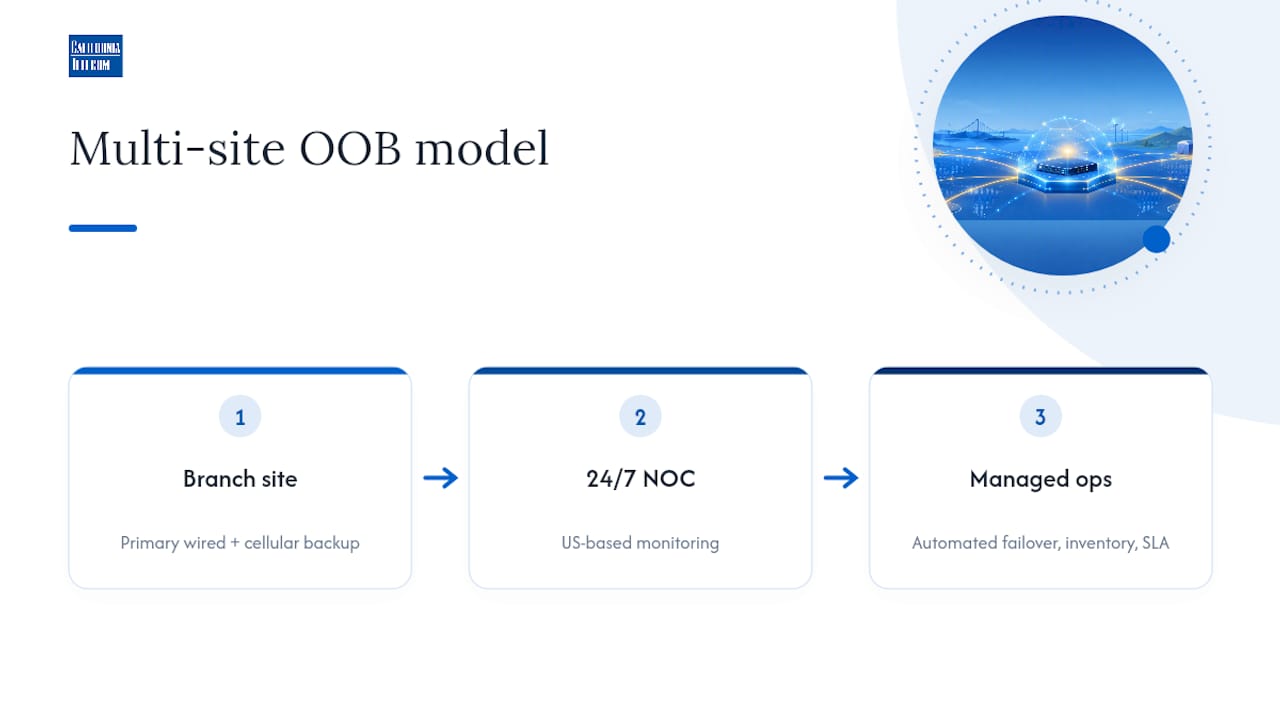
In practice, a managed provider typically owns the recurring work individual IT teams struggle to staff for: continuous monitoring of console reachability, automated failover orchestration when a primary path drops, and centralized inventory management across every management interface in the fleet. Consolidated vendor management under one SLA also means one team is accountable for uptime instead of three carriers pointing fingers at each other during an outage.
Connecting OOB to the Rest of Your Network Stack
OOB shouldn't operate as an isolated island. The real operational value shows up when console servers, BMCs, and cellular gateways feed data into the same monitoring and automation systems you already use for the production network.
Most modern console servers support SNMP traps or syslog forwarding, which means an OOB device going unreachable can trigger the same alert pipeline as a production switch failure. Feed that into whatever monitoring platform your team already lives in, and the on-call engineer sees "branch office 14 has lost both primary and backup connectivity" as a single correlated alert instead of two disconnected tickets. Without that integration, OOB becomes a separate system nobody checks until something's already broken.

Automation platforms add a second layer of value. Configuration management tools can push firmware updates, credential rotations, and configuration changes through the OOB path on a schedule, which matters most for devices that sit at remote sites with no local staff to babysit a manual update. Zero-touch provisioning extends this further: a new branch router can be pre-configured to phone home over its OOB interface the moment it powers on, pulling its full configuration without anyone on-site touching a keyboard.
The practical integration checklist looks like this: route OOB device health into your existing monitoring dashboard, forward OOB access logs to the same SIEM handling production security events, and script routine OOB tasks (firmware checks, credential rotation, reachability tests) through whatever automation platform already orchestrates your production changes. Treating OOB as a bolt-on system rather than an integrated one is the single biggest reason organizations discover their "backup" network doesn't actually work when they need it.
Compliance and Audit Requirements for OOB Access
Because OOB grants privileged, low-level control over infrastructure, it falls squarely inside the scope of most compliance frameworks your organization already answers to, whether that's PCI DSS, HIPAA, SOC 2, or an internal audit standard.
The core requirement across nearly all of them is the same: a complete, tamper-resistant audit trail of who accessed which device, when, and what they did once connected. That means every OOB session needs to log authentication events, session duration, and ideally command-level activity, not just a connection timestamp. If your console server's local logs are the only record and they roll over after a week, you have a compliance gap the moment an auditor asks for six months of access history.
Data privacy considerations matter too, particularly for organizations handling regulated data across multiple locations. Session content traversing an OOB link, including anything displayed via KVM-over-IP, can expose sensitive information if that traffic isn't encrypted end-to-end. Encryption in transit isn't optional for audit purposes; it's usually the first control an assessor checks.
Practically, build your OOB compliance posture around three habits: centralize logs somewhere with retention long enough to satisfy your specific framework, restrict OOB access to named individuals rather than shared accounts so every action traces to a person, and review access lists on a fixed schedule rather than waiting for an audit to surface a departed employee who still has console rights. Partners that specialize in provable security posture, like Nectos, emphasize this same principle: security and compliance claims need to be demonstrable with logs and evidence, not just asserted in a policy document nobody has tested against a real audit.
Choosing OOB Vendors Without Creating an Interoperability Mess
The OOB hardware market is fragmented enough that vendor selection deserves real scrutiny before you commit budget. The core decision criteria come down to four things: protocol support, scalability, integration depth, and long-term firmware support commitments.
Protocol support matters more than it looks at first glance. Not every console server speaks every BMC dialect cleanly, and IPMI implementations vary enough between hardware vendors that a console server certified for one server brand can behave inconsistently with another. Before standardizing on a platform, confirm it has documented compatibility with every hardware brand already in your fleet, not just the newest one.
Interoperability challenges show up most often at the intersection of old and new. A five-year-old switch with a serial-only management port and a brand-new server with a full BMC and web API don't manage the same way, and a console server platform needs to bridge both gracefully or you end up running two parallel management systems. That defeats the entire purpose of consolidating into one OOB architecture.
Scalability is the other differentiator worth testing before purchase, not after. Vendors marketing "unlimited scale" often mean their software scales; ask specifically how port density per appliance and centralized console management perform once you're managing hundreds of endpoints across dozens of sites, since that's where licensing costs and management overhead usually spike unexpectedly.
Finally, weigh how committed a vendor is to firmware support over the hardware's lifespan. OOB gear tends to sit in a rack for five to seven years, and a vendor that stops patching firmware after two years leaves you carrying known vulnerabilities on your most privileged network segment.
What OOB Actually Costs, and Where Budgets Go Wrong
Budgeting for OOB usually breaks into three buckets: hardware acquisition, connectivity, and ongoing operations, and teams consistently underestimate the third one.
Hardware costs scale with port density and redundancy requirements. A console server for a small branch site with a handful of devices costs far less than an enterprise-grade unit supporting dozens of serial ports plus integrated cellular failover for a core data center. Buying the cheapest option for a critical site is a false economy the first time it needs to handle a real recovery under load.
Connectivity is the recurring line item people forget to model. A dedicated cellular data plan for OOB failover, multiplied across dozens of sites, adds up to a real monthly number, and it's a cost worth paying rather than cutting since it's the one path that survives a wired circuit outage.
Operations is where the real budget mistake happens. Organizations buy the hardware, skip budgeting for the ongoing labor of testing, patching, and monitoring it, and end up with an OOB network that quietly degrades until it fails during the exact incident it was built for. Build a budget line for scheduled failover testing and firmware maintenance from day one, not as an afterthought once something breaks.
A general recommendation is to allocate a modest portion of your network infrastructure budget for OOB at critical sites, adjusting for site priority. That ratio isn't a hard standard, but it keeps OOB from being either badly underfunded or wastefully overbuilt relative to what it protects.
Common Mistakes and Three Moves to Make This Quarter
The most common OOB failure isn't a missing device. It's a device that was deployed once, never tested again, and quietly stopped working when a certificate expired or a carrier changed an APN setting. The second most common mistake is sharing the management plane with production traffic "just for now," a shortcut that becomes permanent and defeats the entire purpose of building OOB in the first place.
Three moves worth prioritizing this quarter: document every OOB endpoint with a static IP and port mapping if you haven't already, add a second connectivity path (cellular is the usual choice) to every site you'd consider critical, and run one actual failover test by pulling the primary circuit, not simulating it. If your team is stretched managing OOB across more than a handful of sites, that's the point where a managed network onboarding approach starts making more sense than adding headcount.
— Jim
Let a Managed Network Partner Run OOB So Your Team Doesn't Have To
Building and maintaining OOB across a handful of sites is manageable in-house. Doing it across dozens of locations, with consistent testing, firmware management, and 24/7 coverage, is a full operational discipline most internal IT teams weren't sized to carry. Such managed services include a 24/7 U.S.-based NOC, connectivity sourced from multiple carriers, and a single engineer contact to streamline vendor management during outages.That consolidation shows up directly in recovery speed and fewer truck rolls, backed by a 99.99% uptime SLA on data connectivity. If your team is managing OOB reactively across multiple locations, or you're planning a rollout and don't want to become the in-house expert on console servers and BMC firmware, start with a look at nationwide managed network services and request a consultation to map out what a managed OOB deployment would look like for your sites.
Sources
- What is out-of-band management? — CBT Nuggets
- What is out-of-band management? — Intel
- Out of band best practices — Cisco