

Secure Zero Touch Provisioning for IT Teams, RFC 8572 and Fleet SafetyZero touch provisioning (ZTP) automates the setup of network devices from their factory-default state to a fully configured, production-ready state with no manual keyboard entry. The primary payoff is consistency at scale: hundreds of switches, access points, or IoT gateways come online with identical baseline configs and none of the copy-paste errors that plague manual builds. Done right, that automation follows RFC 8572, the Secure ZTP standard, so the convenience doesn't come at the cost of a wide-open attack surface.
TL;DR:
- Secure ZTP must enforce TLS, cryptographic signing, and certificate rotation to prevent man-in-the-middle attacks and unauthorized device provisioning.
- ZTP is most effective at large scale, such as multi-site retail, IoT deployments, and data center setups, where manual config is impractical.
- Proper implementation requires thorough inventory, validation, network prerequisites, pilot testing, and continuous monitoring to avoid silent failures.
- Controller security is critical, as a compromised or poorly protected controller can threaten entire fleets through impersonation and credential theft.
- Outsourcing ZTP with managed services provides reliable, tested deployment, real-time visibility, and mitigates the risks of misconfiguration and security breaches.
Table of Contents
- How Zero Touch Provisioning Works: The Boot-to-Config Sequence
- Secure ZTP and RFC 8572: What the Standard Actually Requires
- When Zero Touch Provisioning Actually Pays Off
- Zero Touch Provisioning Implementation Checklist
- Common ZTP Pitfalls and the Attack Vectors Behind Them
- How a Managed Operator Runs Zero Touch Provisioning Safely
- The Real Value of Zero Touch Provisioning Isn't Speed
- Deploy Zero Touch Provisioning Without the In-House Guesswork
- Sources
How Zero Touch Provisioning Works: The Boot-to-Config Sequence
Every ZTP deployment follows roughly the same sequence, whether you're provisioning a single branch router or three thousand access points across a retail chain. The device ships in a factory-default state with no configuration and no trust relationships established.
On first power-up, it "phones home" over the network, typically using DHCP options or DNS records that point it toward a bootstrap server, or in simpler setups, a preconfigured redirect baked into firmware. That server responds with what RFC 8572 calls "conveyed information": a package that can include an ownership voucher, an owner certificate, and the actual onboarding data the device needs to trust the source and accept its instructions.
Once the device validates that it's talking to a legitimate source, the bootstrap process delivers the real payload:
- A boot image or firmware version pinned to the target build
- An initial configuration file, often generated from a device-class template
- Post-boot scripts that finish environment-specific setup, like registering with a network management system
Most field failures trace back to this handoff. A wrong DHCP option, a stale DNS entry, or a firmware mismatch between the template and the actual hardware revision will strand a device in a boot loop or leave it silently unconfigured. Building visibility into this exact junction, not just at the end of the process, is where operators save themselves the most troubleshooting time.
Secure ZTP and RFC 8572: What the Standard Actually Requires
Plain ZTP without security controls is a liability, not a convenience. That's the gap RFC 8572 closes. Secure ZTP (SZTP) requires mutual validation: the device confirms it's talking to an authorized bootstrap server, and the server confirms the device is one it's authorized to provision, using ownership vouchers and owner certificates as the trust anchors rather than blind faith in network position.
The standard also flags a real operational trade-off. DNS is a convenient way to point devices at a bootstrap source, but RFC 8572 explicitly treats DNS as untrusted, recommending signed onboarding artifacts or a dedicated bootstrap server with proper transport security instead of relying on DNS resolution alone.
By the numbers: RFC 8572 specifies a recursive bootstrapping algorithm plus device and server validation steps, ownership vouchers, and owner certificates as the mechanisms for signed, trusted onboarding, rather than leaving artifact integrity to chance.
In practice, that means enforcing TLS on every bootstrap connection, requiring cryptographically signed configuration and firmware artifacts, and rotating certificates on a defined schedule rather than treating them as set-and-forget.
When Zero Touch Provisioning Actually Pays Off
ZTP earns its keep at scale, not on a single device. Multi-branch retail rollouts, wide-scale Wi-Fi and access point deployments, IoT gateway fleets spread across hundreds of remote sites, and Day 0 data center builds are the scenarios where it shows its value fastest.
- Multi-site retail or branch banking: dozens to hundreds of near-identical locations need the same baseline config with zero on-site engineering time.
- Distributed Wi-Fi and AP rollouts: covered in more detail in how managed WiFi deployment works across multi-location environments.
- IoT gateway fleets: thousands of low-touch endpoints where manual configuration simply doesn't scale, an area where approaches like FIDO Device Onboard complement traditional network ZTP.
- Data center Day 0 builds: racks of switches provisioned in hours instead of the days a manual build usually takes.
Skip ZTP for one-off devices, lab gear, or legacy hardware that never got vendor support for automated onboarding. The template overhead isn't worth it below a certain fleet size, and forcing automation onto unsupported firmware tends to create more incident tickets than it prevents.
Zero Touch Provisioning Implementation Checklist
Rolling out ZTP successfully comes down to preparation, not clever scripting. Skip a step here and you'll find out in the field, usually at the worst possible time.
- Inventory and compatibility. Confirm the exact hardware models and firmware revisions you're deploying. A template validated on one switch revision can fail silently on another.
- Define your owner model. Decide who signs artifacts, who owns the templates, and how configuration versions get tracked and rolled back.
- Network prerequisites. Set the right DHCP options, DNS entries, firewall and NAT rules, and segment provisioning traffic away from production VLANs.
- Testing plan. Validate on the exact hardware and firmware you'll ship, then pilot with a small batch before a staged, phased rollout with a documented rollback path.
- Monitoring and alerting. Log every provisioning attempt, watch for adoption anomalies (devices that phone home but never complete onboarding), and build automated remediation for the common failure patterns.
Network readiness issues, particularly around enterprise network design, account for a disproportionate share of failed ZTP rollouts. It's rarely the provisioning logic that breaks. It's the DHCP scope someone forgot to update.
Pro Tip: Never trust a lab VM to represent your production hardware. Firmware quirks between device revisions hide until you're staring at three hundred stranded units in the field, and by then the fix costs a lot more than the extra day of hardware testing would have.
Common ZTP Pitfalls and the Attack Vectors Behind Them
ZTP's biggest security risk is the same thing that makes it convenient: devices trust the bootstrap process almost by default. Unencrypted HTTP or TFTP transport, or an unauthenticated redirect pointing a device toward a bootstrap source, gives an attacker on the network path a straightforward way to serve a malicious configuration or firmware image instead of the real one.

The deeper structural risk is the controller itself. Security research from Forescout documents real vulnerabilities in ZTP ecosystems that let attackers impersonate devices, harvest credentials, and compromise the provisioning controller directly. Because one controller often provisions an entire fleet, that single point of trust becomes a single point of catastrophic failure.
Concrete mitigations worth building into any deployment, including secure automated onboarding and protected configuration delivery, are detailed in this Secure Print Release: IT Implementation Guide for Australian Offices – Global Office Machines.
- Segment provisioning traffic away from general production networks.
- Require multi-factor authentication for any human access to the controller.
- Rotate credentials and signing keys on a fixed schedule, not just after an incident.
- Patch controller software and companion apps as aggressively as you patch edge devices.
- Monitor adoption events for anomalies, like a device onboarding twice or from an unexpected location.
ETSI's guidance on service-management security recommends formal threat-and-risk analysis for exactly this kind of centralized trust domain, and it's a useful framework for auditing your own controller architecture before an attacker does it for you.
How a Managed Operator Runs Zero Touch Provisioning Safely
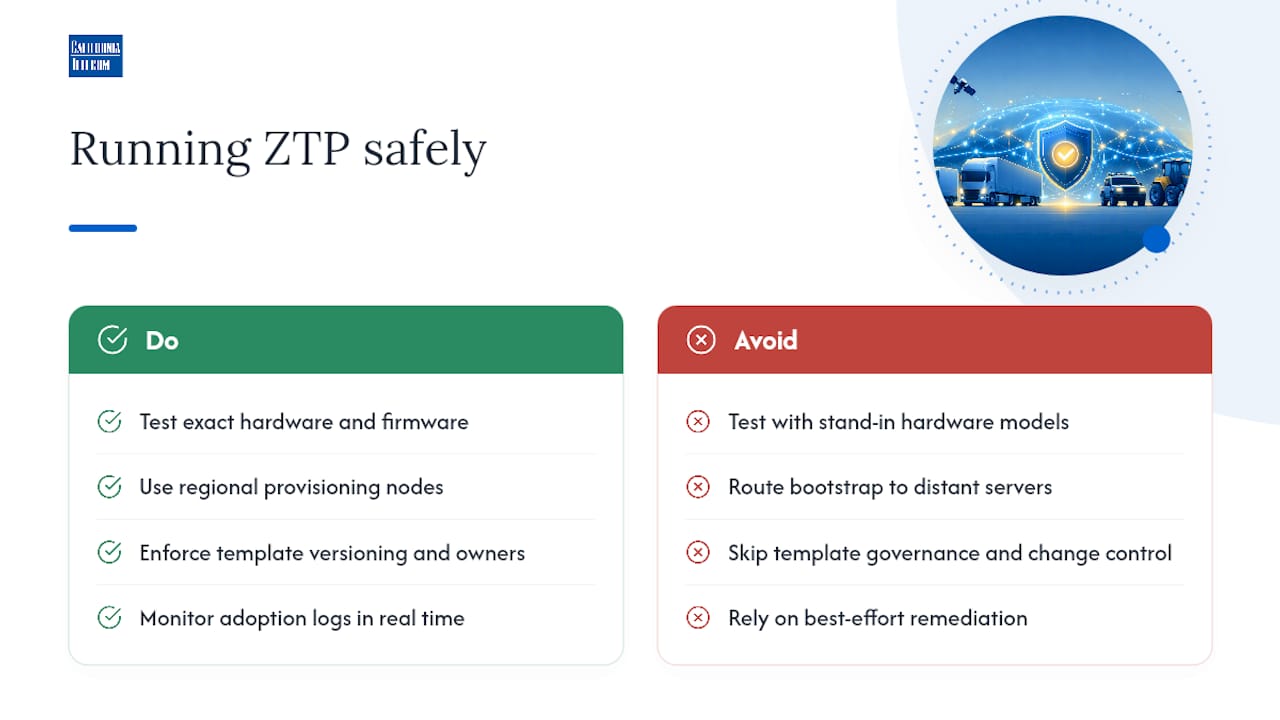
Running ZTP well at fleet scale means testing on the exact hardware and firmware going into production, never a stand-in model, and routing bootstrap traffic through regional provisioning nodes so devices at distant sites don't time out waiting on a server halfway across the country. Template governance and change control matter just as much as the provisioning mechanics: every config template needs a version history and an owner, and the NOC needs to be watching adoption logs in real time for anomalies, not reviewing them the next morning.
Distributed rollouts fail less from bad automation and more from skipped groundwork: firmware nobody tested, a DHCP scope nobody updated, a monitoring gap nobody noticed until sites started calling in.
A managed partner running this kind of program handles inventory mapping across every site, stages rollouts in controlled batches, and remediates under a defined SLA rather than a best-effort promise, an approach detailed in this turn-key network deployment guide.
Pro Tip: If your fleet spans multiple regions, ask whether your bootstrap architecture uses regional nodes. A provisioning server on the other side of the country will quietly rack up timeout failures that look like hardware problems but aren't.
The Real Value of Zero Touch Provisioning Isn't Speed
Most articles on this topic sell ZTP as a time-saver, and it is, but that's not the part that should change how you plan a deployment. The bigger shift is where it puts your senior engineers. Manual provisioning eats the hours of the people you least want tied up racking switches and typing configs one at a time; automating that work frees them for architecture, capacity planning, and the failures that actually need a human brain.
The conventional advice on ZTP treats security as a checkbox: "enable SZTP, done." That undersells the problem. Forescout's research makes clear that the controller, not the individual device, is where the real damage happens, and most teams spend far more time hardening endpoints than auditing the one system that can compromise all of them at once. If you take one thing from this guide, prioritize controller security and credential hygiene over perfecting your device templates. A beautifully templated fleet provisioned through a compromised controller is still a compromised fleet.
Test on real hardware before you trust any template in production. The gap between a lab VM and a field device is where most rollout failures start, and it's the cheapest problem to fix before deployment rather than after.
— Jim
Deploy Zero Touch Provisioning Without the In-House Guesswork
Getting ZTP right across a distributed fleet takes template governance, regional bootstrap infrastructure, and a NOC watching adoption logs around the clock, resources most internal IT teams can't dedicate full time. Californiatelecom builds and manages exactly this: inventory mapping, template authoring, staged rollouts, and remediation, all backed by a 24/7 U.S.-based NOC and a 99.99% uptime SLA on data.Instead of juggling carrier tickets and troubleshooting a bootstrap failure at 2 a.m., you get one engineer's number to call and one provider accountable for the outcome. If your organization is rolling out new sites or refreshing a device fleet, start with a look at managed LAN/WAN services built for exactly this kind of deployment, or check nationwide managed network services if you're coordinating rollouts across multiple states. Request a consultation and get a real deployment plan instead of a generic quote.
Sources
- ETSI GR ZSM 010 — Security aspects of ZSM framework based solutions
- Zero-Touch Provisioning Is a Fleet-Scale Attack Vector — Forescout Research