

What Is Always-On Connectivity for Multi-Location BusinessesAlways-on connectivity is defined as a persistent network state where devices, applications, and services remain continuously connected without interruption, regardless of hardware failures, ISP outages, or power disruptions. For IT managers running distributed networks across multiple locations, this is not a luxury. It is the baseline requirement for cloud access, VoIP, real-time analytics, and transaction processing. Understanding what is always-on connectivity means understanding how modern business continuity actually works.
What is always-on connectivity and how does it work?
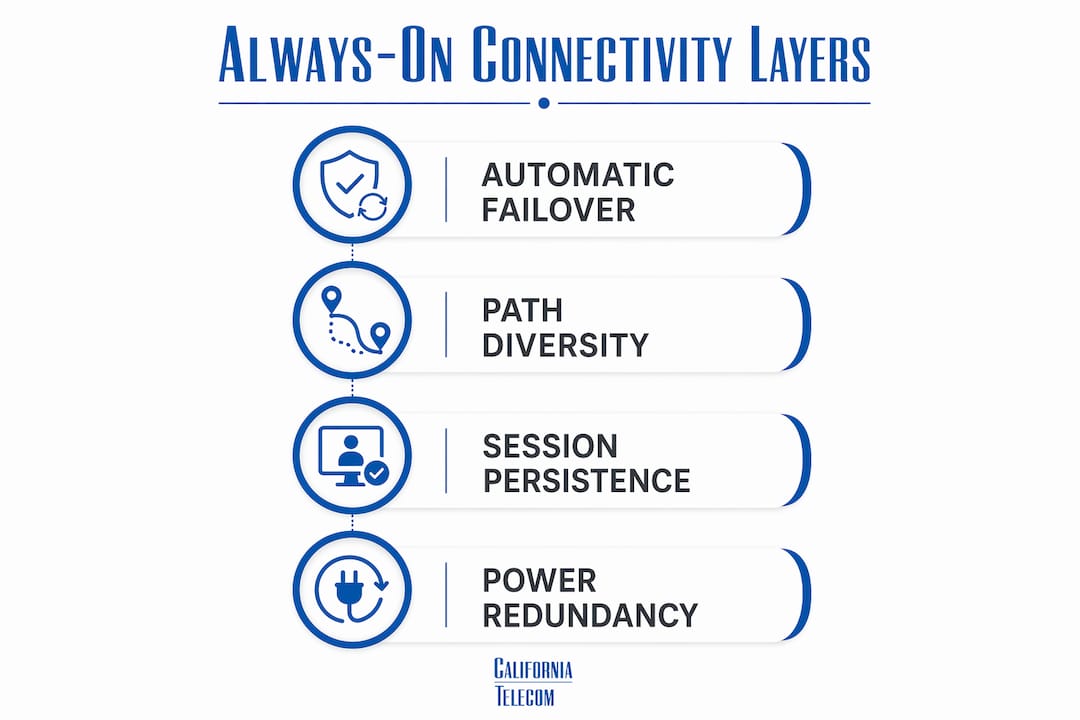
Always-on connectivity is not simply a faster internet connection. Connectivity experts confirm it is a persistent, session-aware network that keeps active workflows running even when the primary link fails. The industry term for the underlying architecture is "continuous connectivity," and it depends on several layered technologies working together.
The first layer is automatic failover. Dual-WAN routers switch traffic automatically within 10–30 seconds when a primary ISP fails. That window matters because a 30-second gap is enough to drop a VoIP call, interrupt a cloud sync, or time out an authentication session.

The second layer is path diversity. True redundancy requires connections on different physical infrastructure types, such as fiber paired with 5G cellular, to prevent simultaneous failures caused by shared physical routes. A cable line and a backup cable line from the same provider often share the same conduit. That is not redundancy. That is a single point of failure with extra billing.
The third layer is session persistence. Switching ISPs mid-session does not automatically preserve active VPN tunnels, VoIP calls, or TCP connections. SD-WAN and VPN-aware failover must be configured explicitly to maintain those sessions during switchover. Without this configuration, users experience dropped calls and broken application sessions even when the backup link is live.
The fourth layer is power redundancy. Battery-backed power units sustain network hardware for up to 8–9 hours during a power outage. A router with no power is offline regardless of how many ISP contracts you hold.
| Technology | Role in always-on connectivity |
|---|---|
| Dual-WAN router | Detects primary link failure and reroutes traffic within 10–30 seconds |
| SD-WAN | Manages traffic across multiple links and maintains session continuity |
| 5G cellular backup | Provides a physically separate path when wired infrastructure fails |
| UPS or battery backup | Keeps modems and routers powered during local outages for up to 8–9 hours |
| VPN-aware failover | Preserves active tunnels and TCP sessions during ISP switchover |
Pro Tip: Test your failover by physically unplugging your primary WAN connection during a scheduled maintenance window. Watching your team's VoIP calls and cloud apps in real time is the only reliable way to confirm your session persistence configuration actually works.
Why is always-on connectivity critical for multi-location businesses?
Even a 30-second outage can kill a client meeting, collapse a transaction, or corrupt a real-time analytics feed. For a business running 10, 50, or 200 locations, that risk multiplies at every site. One dropped connection at a regional office during a live customer demo is not an IT inconvenience. It is a revenue event.
The operational stakes are high for several reasons:
- Cloud dependency. Most multi-location businesses now run ERP, CRM, and collaboration tools entirely in the cloud. A connectivity gap at any site cuts off that location from core business systems.
- VoIP and UCaaS. Voice over IP calls require consistent, low-latency connections. A link failure without session-aware failover drops every active call at that site simultaneously.
- Real-time transaction processing. Retail, logistics, and financial services locations cannot process payments or update inventory during an outage. Every minute of downtime translates directly to lost revenue.
- Remote monitoring and IoT. Facilities with connected sensors, cameras, or industrial equipment lose visibility the moment connectivity drops, creating both operational and security gaps.
Downtime erodes customer trust and produces stale analytics data that distorts business decisions made hours or days later. The cost of an outage is not limited to the minutes the connection is down. It extends to the recovery time, the customer perception damage, and the data integrity problems that follow.
The types of business internet connections available in 2026 make always-on architecture more achievable than ever. Fiber, 5G, fixed wireless, and satellite options give IT teams genuine path diversity at price points that were not realistic five years ago.
Best practices for implementing always-on connectivity across multiple sites
Building continuous connectivity across multiple locations requires deliberate design, not just purchasing a backup connection. The following steps reflect what actually works in production environments.
-
Audit your current single points of failure. Map every site's connectivity path from the building entry point back to the ISP. Identify where primary and backup connections share physical infrastructure, power sources, or network hardware.
-
Select ISPs on separate physical infrastructure. Pair a wired connection such as dedicated fiber internet with a cellular or fixed wireless backup. This eliminates the path dependency risk that causes simultaneous outages when a single conduit or junction box fails.
-
Configure SD-WAN with session persistence. Deploy SD-WAN at every site and configure it to maintain VPN tunnels and active application sessions during failover. Confirm that your VoIP and UCaaS platforms support session handoff across WAN links.
-
Install UPS units on all network hardware. Every modem, router, and switch at every site needs battery backup. An 8–9 hour runtime window covers most power restoration scenarios and prevents the network from going dark during a local outage.
-
Define failover policies by application priority. Not all traffic is equal. Configure your SD-WAN to prioritize VoIP, authentication, and payment processing over general web browsing during a failover event. This preserves the most critical workflows when bandwidth on the backup link is limited.
-
Test redundancy on a scheduled basis. Failover systems degrade silently. A configuration that worked six months ago may have been changed by a firmware update or a routing policy edit. Quarterly failover tests catch these gaps before an actual outage does.
Pro Tip: When setting up redundant internet connections across sites, document the exact failover sequence for each location. Different sites often have different ISP combinations, and a generic runbook will miss site-specific edge cases that surface during real outages.
How does always-on connectivity fit into IT governance and risk management?
Always-on connectivity is structural risk management, not a technology upgrade. Framing it as a network feature undersells its role in business continuity planning, compliance, and operational governance.
From a governance perspective, persistent connectivity supports several critical requirements:
- Business continuity plans (BCPs). Most enterprise BCPs assume network access is available during a disruption. Without always-on architecture, those plans fail at the first outage.
- Compliance obligations. Industries including healthcare, finance, and retail face regulatory requirements for data availability and audit trail integrity. A connectivity gap can create compliance gaps in real time.
- SLA commitments. Businesses that promise uptime to their own customers cannot deliver on those commitments if their internal network infrastructure goes down.
Layered network design with backup connections and power redundancy is what separates a network that survives external disruptions from one that fails during them. Storms, utility outages, and ISP maintenance windows are not edge cases. They are scheduled and unscheduled events that every multi-location network will face.
Always-on architecture also supports high availability principles used in cloud infrastructure design. The same logic that keeps cloud workloads running across availability zones applies to physical network design. Eliminate single points of failure, distribute load, and build automatic recovery into every layer.
Key Takeaways
Always-on connectivity requires layered redundancy across ISP paths, session persistence configuration, and power backup to deliver genuine uptime across multiple locations.
| Point | Details |
|---|---|
| Define continuous connectivity correctly | Always-on means session-aware persistence, not just a backup ISP contract. |
| Use physically separate paths | Pair fiber with 5G or fixed wireless to eliminate shared infrastructure failure risk. |
| Configure session persistence explicitly | SD-WAN and VPN-aware failover must be set up to preserve active calls and sessions. |
| Power backup is non-negotiable | UPS units sustain network hardware for up to 8–9 hours and prevent outages from local power failures. |
| Test failover regularly | Quarterly tests catch silent configuration drift before a real outage exposes it. |
The real cost of treating connectivity as a utility
Most IT teams I work with treat internet connectivity the way they treat electricity: they assume it works until it does not. That assumption is expensive. The difference between a network that stays up and one that goes dark during a storm is not the ISP contract. It is the design decisions made before the outage happened.
The shift I have seen over the past several years is that businesses are no longer asking whether they need redundancy. They are asking why their existing redundancy failed. That is a meaningful change. It means the conversation has moved from justifying investment to diagnosing design gaps. Session persistence is almost always the gap. IT teams buy a second ISP, plug it into a dual-WAN router, and assume the job is done. Then a failover event drops every active VoIP call in the building and they realize the router switched links but the sessions did not follow.
The other underestimated factor is power. I have seen well-designed failover architectures go completely offline during a 20-minute power outage because no one installed UPS units on the network hardware. The backup ISP was live. The router was dark. Always-on connectivity is a system, not a feature. Every component in that system needs to be designed for the same resilience standard.
My recommendation for 2026: treat your network resilience audit the same way you treat your security audit. Schedule it, document it, and act on the findings before the next disruption makes the decision for you.
— Jim
How Californiatelecom supports always-on connectivity for multi-location businesses
Multi-location businesses need more than a second ISP. They need a network architecture designed from the ground up for continuous operation.Californiatelecom designs and deploys managed network services for multi-location businesses nationwide, sourcing from 50+ carriers to build genuine path diversity at every site. Every deployment includes failover configuration, session persistence setup, and 24/7 monitoring from a U.S.-based NOC. Californiatelecom backs data connections with a 99.99% uptime SLA and voice with 99.999%, so your business continuity plan has the network foundation it requires. One provider, one bill, and one engineer's number to call when something needs attention.
FAQ
What is always-on connectivity in simple terms?
Always-on connectivity is a network state where your connection never drops, even when a primary ISP fails or power goes out. It relies on automatic failover, backup links, and session persistence to keep applications running without interruption.
How does failover work in an always-on internet connection?
A dual-WAN router detects when the primary ISP fails and automatically reroutes traffic to a backup connection within 10–30 seconds. SD-WAN adds session persistence so active VoIP calls and VPN tunnels survive the switch.
What is the difference between redundancy and always-on connectivity?
Redundancy means having a backup connection. Always-on connectivity means that backup connection is configured to maintain active sessions, preserve application state, and keep network hardware powered, so users experience no interruption during a failover event.
Why do multi-location businesses need always-on connectivity more than single-site businesses?
Each additional location multiplies the number of potential failure points. A single outage at one site can cut off that location from cloud systems, VoIP, and transaction processing, creating revenue loss and operational gaps that compound across the network.
How long can battery backup keep a network running during a power outage?
Battery-backed power units can sustain network hardware including modems and routers for up to 8–9 hours during a local power outage, covering most utility restoration windows without requiring generator support.