
What Does "Local Network" Mean? A Plain-English GuideA local network, formally called a local area network (LAN), is a group of devices that share a private connection within a limited physical space. Your home Wi-Fi is one. The wired-and-wireless setup at your office is another. On an iPhone or iPad, "Local Network" also appears as an app permission, which means something slightly different and is worth understanding on its own terms.
Key Takeaways
A local network (LAN) is a privately managed group of devices sharing a connection within a limited space, and on Apple devices, "Local Network" is a permission that controls which apps can scan or interact with those devices.
| Point | Details |
|---|---|
| LAN definition | A local network connects devices within one building or campus under private management. |
| Private IP ranges | Home and office LANs use RFC 1918 addresses, most commonly the 192.168.x.x range. |
| iPhone permission | The iOS Local Network prompt blocks app-level LAN scanning until you approve it in Settings > Privacy & Security > Local Network. |
| Guest network | Run a separate guest Wi-Fi for visitors and IoT devices to protect your primary devices. |
| Least privilege | Deny Local Network access to any app with no clear reason to talk to local devices. |
Table of Contents
- What does a local network mean, and what parts make it up?
- How devices actually join and talk on a local network
- How a local network differs from a WAN and the Internet
- What the "Local Network" label means on your iPhone or iPad
- How to check and change Local Network access on iPhone
- What apps can learn by scanning your LAN, and how to protect yourself
- When apps legitimately ask for local network access
- How organizations manage local networks at scale
- An IT professional's perspective on local network permissions
- Sources
What does a local network mean, and what parts make it up?
A LAN interconnects devices within a defined area, whether that's a single apartment, a corporate floor, or a university campus. The network is locally managed, meaning the owner controls it rather than an ISP or third party. That's what separates it from the broader Internet.
Typical components on a LAN:
- Router — connects the LAN to the Internet and assigns private IP addresses
- Switch — links wired devices together within the LAN
- Wireless access point — extends the network over Wi-Fi
- Client devices — laptops, phones, tablets, smart TVs
- Shared resources — printers, NAS drives, smart speakers, IoT hubs
A simple home network flows like this: modem → router → switch (optional) → access points → devices.
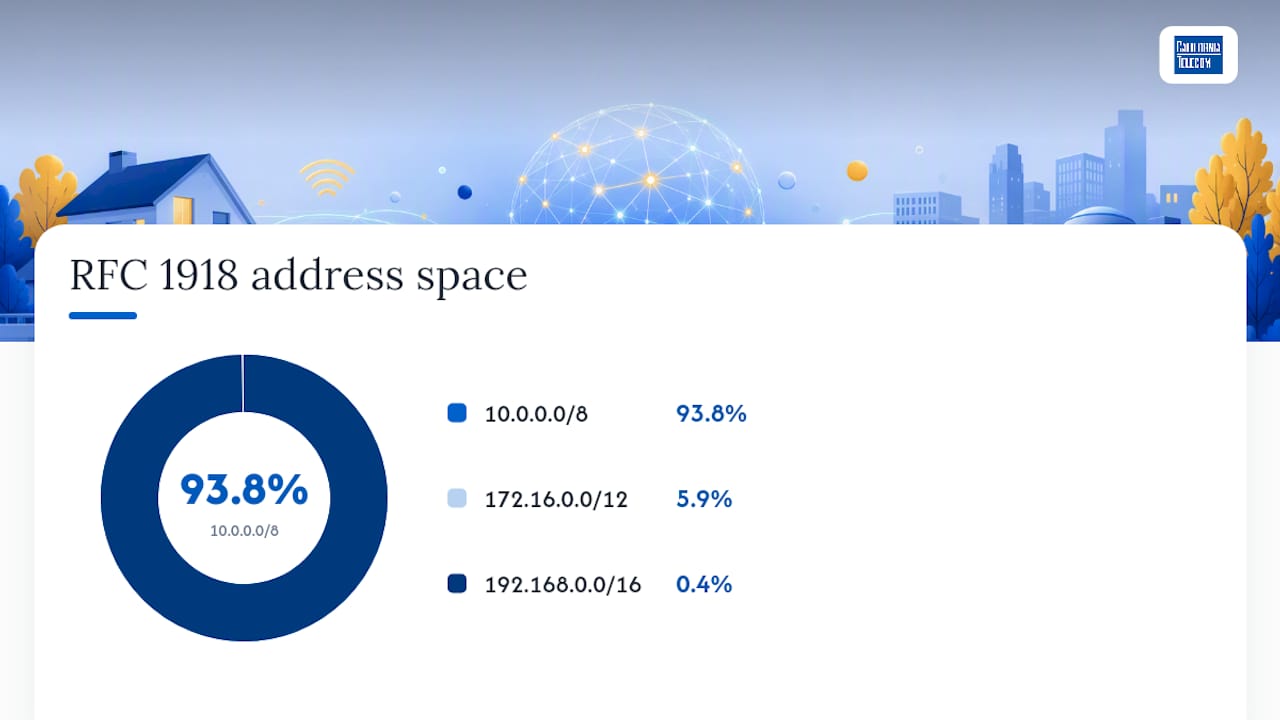
Every device on a LAN gets a private IP address drawn from ranges defined by RFC 1918:
| Range | Subnet | Common use |
|---|---|---|
| 10.0.0.0–10.255.255.255 | /8 | Large enterprise networks |
| 172.16.0.0–172.31.255.255 | /12 | Mid-size networks |
| 192.168.0.0–192.168.255.255 | /16 | Home and small office |
If your phone shows an address starting with 192.168, you're on a standard home LAN.
How devices actually join and talk on a local network
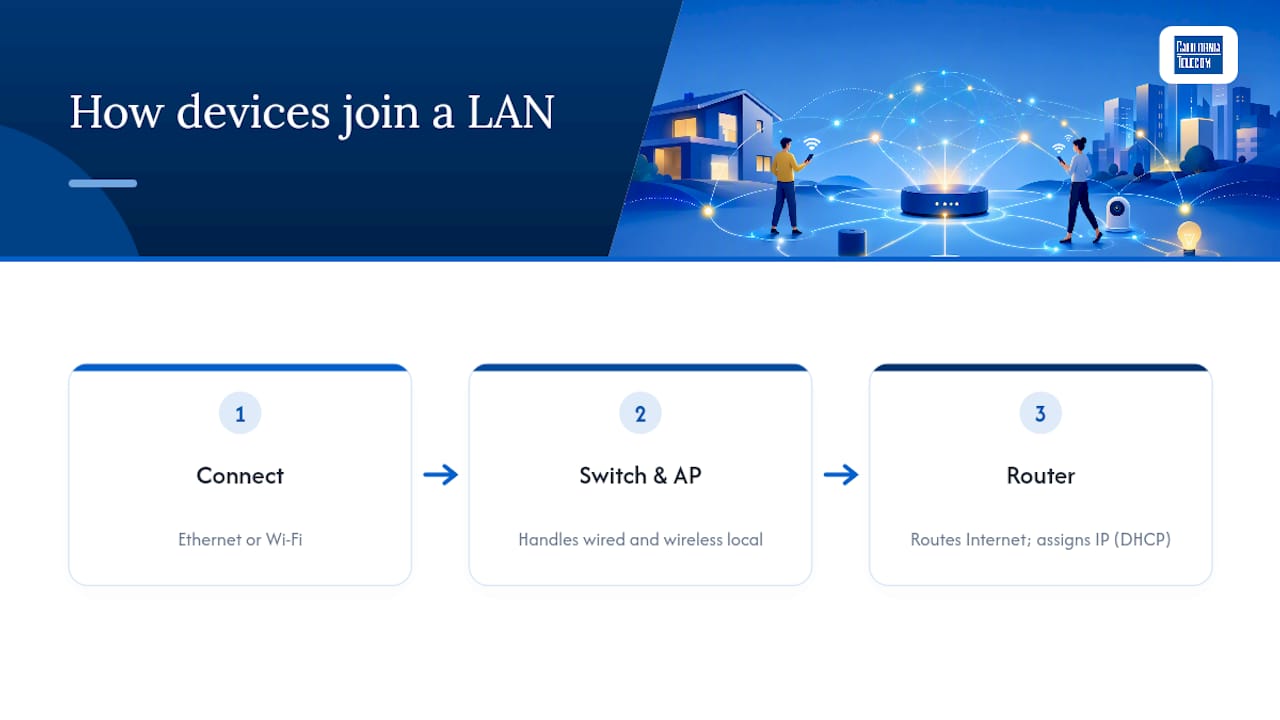
Devices connect to a LAN in one of two ways: a physical Ethernet cable or Wi-Fi. Wired connections are faster and more stable, which is why servers and desktop workstations usually stay plugged in. Phones, laptops, and tablets almost always connect wirelessly.
The router is the traffic director. It decides what stays local and what goes out to the Internet. The switch handles traffic between wired devices on the same LAN without involving the router at all. An access point does the same job wirelessly, broadcasting the signal your phone connects to.
When a new device joins, it requests an IP address automatically through a protocol called DHCP. The router hands one out from its private pool, and the device is on the network within seconds. You never see this happen, but it's why plugging in a laptop or connecting to Wi-Fi "just works."
How a local network differs from a WAN and the Internet
These three terms describe networks at different scales:
- LAN (local area network) — your home or office; privately owned, locally managed, typically one building or campus
- WAN (wide area network) — connections that span cities, states, or countries; often leased lines or ISP links between locations
- Internet — the global public network that connects billions of LANs and WANs worldwide
One practical detail: most home and office LANs share a single public IP address when talking to the Internet. The router handles this through a process called NAT (Network Address Translation), swapping private internal addresses for the one public address your ISP assigned.
What the "Local Network" label means on your iPhone or iPad
On Apple devices, "Local Network" is an explicit privacy permission. When an app wants to scan for or communicate with devices on your LAN, iOS stops it and asks you first. Per Apple Support guidance, denying the prompt blocks direct local discovery entirely, though the app can still reach the Internet or use system-level services like AirPlay.
Apple's local network privacy framework: the system displays an alert the first time an app attempts a local network operation. The user's choice is recorded, and the app cannot bypass it. Direct LAN discovery is blocked until the user explicitly approves.
Three common legitimate reasons an app triggers this prompt:
- Smart speaker setup — the app needs to find the speaker on your network to pair it
- Casting to a smart TV — the app scans for compatible displays nearby
- Local multiplayer gaming — the game looks for other players on the same Wi-Fi
Apple's developer documentation confirms that system services like AirPlay, AirPrint, and HomeKit run discovery at the OS level and don't require per-app permission. So AirPlay keeps working even if you deny an app's Local Network request.
How to check and change Local Network access on iPhone
The exact path is Settings > Privacy & Security > Local Network. Every app that has ever requested the permission appears here with a toggle.
- Open Settings on your iPhone or iPad.
- Tap Privacy & Security.
- Tap Local Network.
- Review the list. Each app shows either enabled (green) or disabled (gray).
- Tap the toggle next to any app to grant or revoke access immediately.
- If an app still can't find local devices after you enable the toggle, close the app fully and reopen it, or disconnect from Wi-Fi and reconnect.
No restart required in most cases. The change takes effect the next time the app attempts a local network operation.
What apps can learn by scanning your LAN, and how to protect yourself
When an app scans your local network, it can pick up more than you might expect: device types, manufacturer names, rough location hints based on network identity, and which services are running. That data can be used to build a profile of your home environment, which is why Apple added the permission in the first place.
Practical steps to keep your network safer:
- Enable WPA2 or WPA3 on your router — older encryption standards are easier to exploit
- Change the default admin password on your router immediately after setup
- Keep router firmware updated — manufacturers patch security vulnerabilities regularly
- Set up a guest network for visitors and IoT devices so they can't reach your primary devices; this is a habit worth building for small business Wi-Fi security as much as home use
- Limit Local Network permissions to apps that have a clear, logical reason to need them
Pro Tip: Apply least privilege: if an app has no obvious reason to talk to your smart TV or printer, deny the Local Network permission. Most apps work fine over the Internet without it, and you can always grant access later if a feature stops working.
When apps legitimately ask for local network access
Not every Local Network prompt is suspicious. Here are situations where the request makes sense:
- Casting to a smart TV — the app scans the LAN to find a compatible display (Chromecast, Roku, Fire TV)
- Pairing a smart speaker — setup apps need to locate the device before configuring it
- Discovering a network printer — print apps look for printers by IP or Bonjour service
- Local multiplayer games — the game finds other players on the same Wi-Fi without going through a server
- Configuring a Wi-Fi router or camera — admin apps must reach the device directly on the LAN
- Home automation — apps controlling smart lights, locks, or thermostats need direct device access
The test is simple: does the app's core feature require talking to a local device? If yes, the prompt is expected. If a weather app or a news reader asks, that's a red flag.
How organizations manage local networks at scale
Enterprise LANs follow the same basic structure as home networks, but with more layers. Servers and critical infrastructure stay wired for reliability. Employees connect wirelessly through access points spread across floors or buildings. VLANs (virtual LANs) segment traffic so the finance team's devices don't share a broadcast domain with the guest Wi-Fi.
For multi-location businesses, managing all of this in-house gets complicated fast. That's where managed LAN/WAN services come in. The comparison below shows where the two approaches differ:
| Feature | In-house IT | Managed network services |
|---|---|---|
| Uptime SLA | Varies; no formal guarantee | Defined SLA on data |
| Monitoring | Business hours or on-call | NOC with real-time alerting |
| Vendor management | Team handles multiple carriers | Single provider, single bill |
| Multi-site deployment | Requires per-site coordination | Centrally designed and deployed |
| Redundancy | Manual failover planning | Multi-carrier redundancy built in |
Organizations typically move to managed services when they operate more than a handful of locations, face uptime requirements their in-house team can't guarantee, or simply don't have the staff to monitor the network around the clock.
An IT professional's perspective on local network permissions
The Local Network permission is one of the most misunderstood toggles on an iPhone. Most people either approve everything without reading the prompt or deny everything out of caution and then wonder why an app stopped working.
The smarter habit: treat it like a door. You wouldn't hand a key to every delivery person who knocked. Grant access when the app's feature clearly requires it, and revisit the list in Settings every few months. On family devices especially, it's worth checking which apps accumulated permissions over time without anyone noticing.
For businesses managing dozens or hundreds of devices, the same principle scales up. A managed network guide for multi-location IT covers how organizations apply segmentation and access controls across sites, which is the enterprise version of the same least-privilege thinking.
FAQ
What does “local network” mean?
A local network (LAN) is a privately managed group of devices sharing a connection within a limited space — an apartment, an office floor, or a campus. The defining trait is local management: the owner controls it, not an ISP or third party.
What is the difference between a LAN, a WAN, and the internet?
A LAN is your home or office network — privately owned, typically one building or campus. A WAN spans cities, states, or countries, connecting LANs together. The internet is the global network of networks that all of them can reach.
What does the “Local Network” permission on iPhone mean?
On Apple devices, Local Network is an explicit privacy permission. When an app wants to scan for or communicate with devices on your LAN, iOS stops it and asks you first. You can review and change grants under Settings > Privacy & Security > Local Network.
What can an app learn by scanning your local network?
More than most people expect: device types, manufacturer names, rough location hints based on network identity, and which services are running — enough to build a profile of your home environment. Grant the permission only to apps with a legitimate need, like casting to a TV or pairing a smart speaker.
Sources
- If an app would like to connect to devices on your local network - Apple Support
- TN3179: Understanding local network privacy — Apple Developer Docs