
Enterprise Contact Center Network Requirements: A Build ChecklistAny enterprise contact center network needs four numbers to be right before anything else matters: one-way latency under 150 ms (300 ms round trip for cloud-hosted media), jitter under 30 ms, packet loss under 1%, and per-call bandwidth sized to your codec, from roughly 80 to 100 kbps for G.711 up to 1.5 Mbps for HD video on WebRTC calls. Miss any one of those and agents hear it before your monitoring dashboard does.
Before you architect anything, run three checks:
- Probe every site. Fire an end-to-end test from each agent location to your contact center platform's data center and record RTT, jitter, and loss.
- Confirm DSCP survives the path. Tag a test stream and verify the marking is still intact on arrival, not stripped by an ISP hop.
- Check your NAT headroom. Count public IPs and ephemeral ports against peak concurrent call volume to rule out exhaustion before it happens.
You'll also need UDP ports for STUN/TURN, RTP/SRTP ranges reserved for media, and TCP 443 available for signaling and telemetry. Get those five things confirmed and you have a network that can carry a real enterprise contact center load.
Key Takeaways
Meeting enterprise contact center network requirements comes down to four hard numbers, five connectivity items, and a validation plan run before go-live, not after.
| Point | Details |
|---|---|
| Hit the four thresholds | Keep latency under 150 ms one-way, jitter under 30 ms, and packet loss under 1% across every agent site. |
| Size bandwidth per codec | Budget 80 to 100 kbps per call, up to 1.5 Mbps for HD WebRTC video, plus AI assist overhead. |
| Open the right ports | Allow UDP 3478 to 3481 for STUN/TURN, dedicated RTP/SRTP ranges, and TCP 443 for signaling. |
| Size NAT pools for peak, not average | Plan public IPs and ephemeral ports against peak concurrent calls to avoid silent exhaustion. |
| Test before launch | Run extended multi-day probes and track MOS, jitter, and port usage, not just a one-hour spot check. |
| Consider a managed route | Californiatelecom pairs 50+ carrier sourcing with a 24/7 NOC and 99.99%/99.999% SLAs to carry this checklist operationally. |
Table of Contents
- What Are the Network Performance Requirements for Contact Centers?
- Which Ports and Domains Need to Be on the Firewall Allow-List?
- How Much Bandwidth Does Each Agent Actually Need?
- What WAN and Redundancy Design Meets Uptime SLAs?
- What Security and Compliance Controls Are Required?
- How Do You Validate the Design Before Go-Live?
- A Field Note on Where These Projects Usually Go Wrong
- How Californiatelecom Maps to This Checklist
- Where to Verify Exact Ports and Bandwidth Tables
- Frequently Asked Questions
- Sources
What Are the Network Performance Requirements for Contact Centers?
The industry term for this work is contact center infrastructure needs assessment, and it starts with three measurements: latency, jitter, and packet loss. One-way latency is the time a voice packet takes to travel from an agent's headset to the far end. Round-trip time (RTT) doubles that, roughly, and most enterprise voice platforms want RTT under 300 ms for cloud-hosted media, with a one-way target closer to 150 ms. Five9 recommends latency under 150 ms one-way to the data center and explicitly warns against satellite and some wireless last-mile connections for production voice traffic.
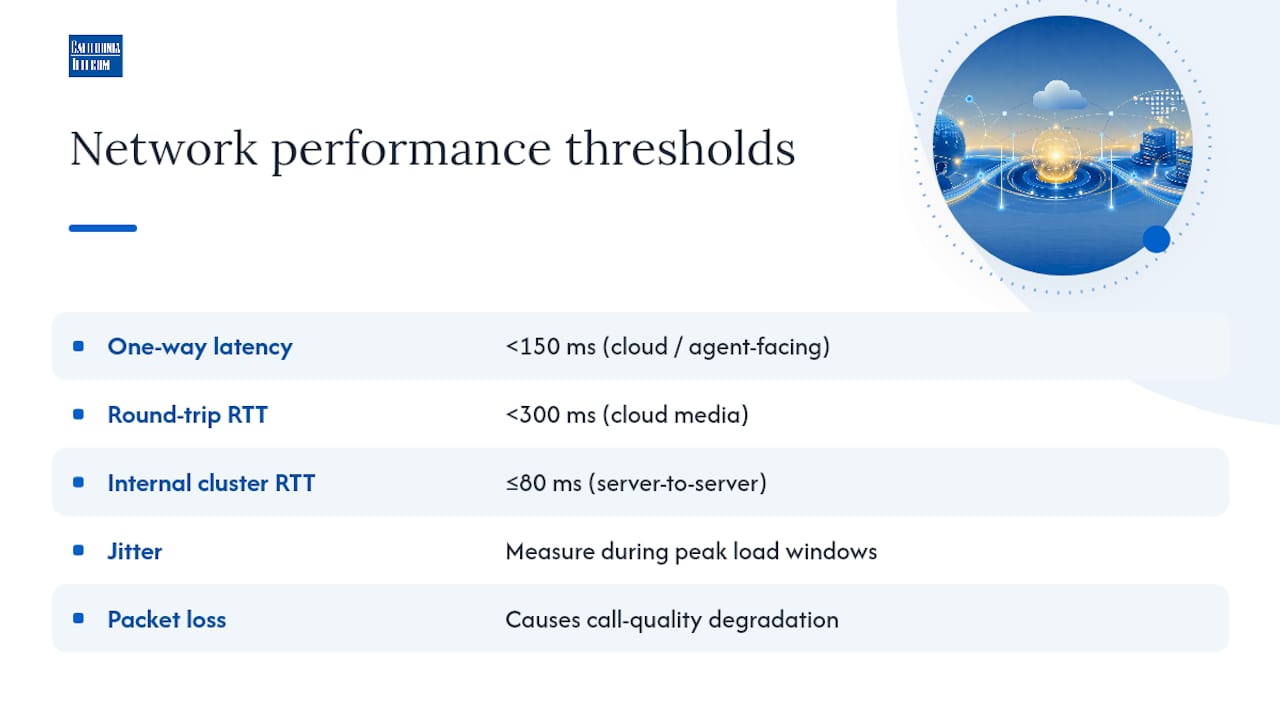
Cisco's contact center design guidance goes further for internal cluster links: private network RTT between Central Controller pairs should stay at 80 ms or below, a far tighter window than the agent-facing target, because server-to-server signaling is more latency-sensitive than a single voice stream.
Both failures compound each other.
Geography drives most of this. Every carrier hop and backbone transition adds latency, so a call center in Ohio routing media through a data center in Ireland will struggle no matter how clean the LAN looks. Regional points of presence and edge TURN servers shorten the media path and keep it inside your budget.
Pro Tip: Don't just test at 9 a.m. on a Tuesday. Run your latency and jitter probes during your actual peak call volume window, when the WAN link is under real load, not when it's idle.
Which Ports and Domains Need to Be on the Firewall Allow-List?
Get these five categories configured correctly and most connectivity failures disappear before they start:
- STUN/TURN media negotiation. Open UDP 3478 through 3481. These ports handle NAT traversal for real-time media and are consistent across most cloud contact center platforms, including Azure Communication Services.
- RTP/SRTP media streams. Reserve a dedicated UDP range for the actual voice and video payload, separate from signaling traffic.
- TCP 443 for signaling and telemetry. Nearly every modern platform falls back to HTTPS for call setup, presence, and monitoring data when UDP is blocked.
- SIP signaling ports. If you run on-premises SIP trunks alongside cloud services, keep those ports distinct from the STUN/TURN range to simplify troubleshooting.
- Media storage and CRM endpoints. Cloud contact center vendors often route recordings and screen-share data through region-specific IP subnets or content delivery domains that need their own allow-list entries.
Fully qualified domain names are easier to maintain than static IP ranges, since cloud providers rotate infrastructure. But FQDN allow-listing can require wildcard rules that some security teams resist, so multi-region deployments usually need a hybrid: FQDNs for application traffic, fixed ranges for known media gateways.
NAT and PAT deserve particular attention. When hundreds of softphones share a handful of public IPs, each call consumes an ephemeral port for its session. Run out of ports and new calls simply fail to connect, often intermittently, which makes the root cause hard to spot without deliberately checking. NAT pool exhaustion is a common, under-anticipated failure in large distributed deployments using softphones, so size your public IP allocation and NAT gateway capacity against peak concurrency, not average load.
How Much Bandwidth Does Each Agent Actually Need?
Per-agent math is where most capacity plans quietly fall apart. RingCentral's guidance puts G.711 media around 88 kbps per active call, plus roughly 35 kbps per workstation for the data transport layer running underneath it. Five9 lands in a similar range, 88 to 128 kbps depending on the agent desktop client. Add screen sharing, CRM traffic, and any AI agent-assist stream, and the number climbs further. Five9 specifically calls out 12 kbps per agent for its Agent Assist feature on top of the base voice bandwidth, a detail plenty of capacity plans miss entirely. Vendors covering AI's role in call quality note the same pattern: assist features add small but real overhead to every concurrent session, and it needs its own line item rather than getting absorbed into a rounding error, as AI Management Agency explains.
| Traffic Type | Typical Bandwidth per Session |
|---|---|
| G.711 voice call | 80–100 kbps |
| WebRTC audio only | 30 kbps |
| WebRTC HD video | up to 1.5 Mbps |
| Agent desktop data transport | ~35 kbps |
| AI agent-assist stream | ~12 kbps |
For QoS, mark voice with DSCP EF (46), video with AF41, and signaling with CS3, then remark at the WAN edge if endpoints can't tag traffic reliably themselves. A structured QoS rollout matters more than the specific values chosen, because consistency across every hop is what actually protects the call.
- Never treat an ISP's advertised burst speed as committed bandwidth. Size your QoS policy to the guaranteed circuit rate.
- Apply traffic shaping at the WAN edge router, not just the access switch, so DSCP tags survive the handoff to the carrier.
- Recalculate concurrency limits whenever you add agent-assist or AI features, since the per-agent baseline shifts.
What WAN and Redundancy Design Meets Uptime SLAs?
Meeting these latency and loss targets consistently, not just on a good day, comes down to WAN architecture. Multi-carrier SD-WAN with active/active failover keeps traffic flowing when one circuit degrades instead of waiting for it to fail outright. Wireless backup covers last-mile outages at branch sites without needing a second wired circuit at every location.
- Deploy regional PoPs or edge TURN servers when agent sites sit far from your primary data center, shortening the media path.
- Use active/active carrier diversity for sites carrying heavy call volume; reserve active/standby for smaller or lower-priority locations.
- Contract for measurable SLA terms, specifically availability percentage and mean time to repair, not just "best effort" language.
- Plan capacity assuming one carrier path is down; failover shouldn't mean the surviving link chokes under full load.
What Security and Compliance Controls Are Required?
Contact centers touch PCI card data, protected health information, and recorded conversations, so the security layer isn't optional configuration; it's baseline architecture.
- Require TLS for all signaling traffic and SRTP for media streams, and confirm corporate proxies aren't breaking certificate validation on either.
- Encrypt call recordings at rest, restrict access by role, and align retention windows with whatever compliance standard applies, PCI DSS for payment data, HIPAA-adjacent controls for healthcare.
- Build firewall rules on least-privilege allow-lists rather than broad port ranges, and monitor those ports for anomalous traffic patterns.
- Document every exception made to accommodate contact center flows so security reviews don't have to reverse-engineer why a rule exists.
How Do You Validate the Design Before Go-Live?
Two types of readiness assessments cover most scenarios. A short probe, run over a few hours, catches gross misconfigurations like blocked ports or missing DSCP marking. An extended probe running multiple days catches the intermittent carrier issues that only show up under variable load, the kind that make a network look fine in a demo and fall apart during a Monday morning surge.
- Deploy a probe at each representative site and capture RTT, jitter, packet loss, and MOS score continuously for at least a week.
- Set alert thresholds tied to the targets above (150 ms latency, 30 ms jitter, 1% loss) so your NOC gets paged before agents start complaining.
- Track ephemeral port usage against your NAT pool ceiling as a leading indicator of exhaustion.
- Build a troubleshooting runbook covering the four most common failure modes: firewall blocks, NAT exhaustion, DSCP stripping mid-path, and Wi-Fi coverage gaps at agent desks.
Pro Tip: If MOS scores drop only during specific hours, check DSCP preservation first. ISPs sometimes strip marking during peak congestion windows even when off-peak tests look clean.
A Field Note on Where These Projects Usually Go Wrong
The same three mistakes show up in almost every troubled deployment: NAT pools sized for average load instead of peak concurrency, ISP burst speeds mistaken for committed bandwidth, and DSCP marking that never gets remarked at the network edge, so it quietly disappears somewhere in the carrier path. None of these are exotic problems. They're just the ones nobody checks until agents start complaining.
Bring in outside expertise once you're juggling multi-carrier failover logic, a NAT redesign across dozens of sites, or recording retention rules tied to regulatory audits. Success after launch looks boring: stable MOS scores, a flat incident rate, and capacity headroom you can actually predict three quarters out.
How Californiatelecom Maps to This Checklist
Every requirement above, latency budgets, port allow-lists, DSCP policy, NAT sizing, is exactly what a distributed enterprise has to solve on its own if it manages carriers, QoS, and NOC monitoring in-house across a dozen sites. Californiatelecom removes that operational load by sourcing connectivity from over 50 carriers, designing and deploying each site with in-house engineers rather than a subcontracted install crew, and backing the whole build with a 24/7 U.S.-based NOC.That combination is what lets carrier diversity, multi-carrier SD-WAN, and QoS policy rollout function as one coordinated system instead of five separate vendor relationships you're stitching together yourself. If your team is validating whether your current network can meet these thresholds, or is starting a design from scratch, request a free consultation and get a Californiatelecom engineer looking at your specific site list before your next capacity review.
Where to Verify Exact Ports and Bandwidth Tables
Vendor documentation carries the authoritative numbers for your specific platform:
- Azure Communication Services network requirements: bandwidth tables by codec and resolution, plus port lists.
- Cisco Packaged Contact Center Enterprise design guide: cluster latency and QoS mapping specifics.
- Five9 LAN/WAN requirements: per-agent bandwidth and supported connection types.
Frequently Asked Questions
What latency is acceptable for a cloud contact center?
Target one-way latency under 150 ms and round-trip time under 300 ms for cloud-hosted media. Internal server-to-server links within a contact center cluster need tighter windows, sometimes 80 ms RTT or less, depending on the platform's design guide.
How much bandwidth does one contact center agent need?
Plan for roughly 80 to 128 kbps for the voice stream itself, depending on codec, plus 35 kbps for desktop data transport and 12 kbps or more if AI agent-assist features are active. Video pushes that total up to 1.5 Mbps per session.
Why does packet loss affect call quality more than most IT teams expect?
Do remote and hybrid agents change the network requirements?
Yes. Home and hybrid agents introduce variable last-mile quality, split-tunnel VPN behavior, and residential router NAT that enterprise LANs don't have, so validation testing needs to cover home network conditions specifically, not just the corporate WAN.
Is a managed network provider worth it for a multi-site contact center?
For enterprises running failover across multiple carriers, complex NAT redesigns, or regulated recording requirements, a managed provider with a dedicated NOC often resolves issues faster than an internal team juggling several vendor support lines at once.
Sources
- Network requirements - Azure Communication Services
- Solution Design Guide for Cisco Packaged Contact Center Enterprise — Bandwidth, Latency, and QoS Considerations
- Five9 Network Requirements (LAN and WAN)
- Network requirements | RingCentral Contact Center
Recommended
- Customer Proprietary Network Information: FCC Compliance Guide | California Telecom
- SBC Network Explained: What Engineers Need to Know | California Telecom
- How Enterprise Network Design Works for IT Pros | California Telecom
- How to Evaluate Outsourced Network Engineering Providers | California Telecom