

The Role of QoS in Business Voice: IT Manager's GuideQuality of Service (QoS) is a network mechanism that prioritizes voice traffic over other data to maintain call clarity during congestion. The role of QoS in business voice is to guarantee that real-time audio packets reach their destination on time, in order, and intact. Without it, voice over IP (VoIP) calls compete for bandwidth against file transfers, video streams, and web traffic. For IT managers running multi-location businesses, that competition produces dropped calls, robotic audio, and one-sided conversations. QoS is the technical policy that prevents all of that by telling the network which packets matter most.
What are the critical network performance metrics QoS manages?
Three metrics determine whether a VoIP call sounds good or falls apart: latency, jitter, and packet loss. QoS exists to keep all three within acceptable thresholds, even when the network is under load.
Latency is the time a packet takes to travel from sender to receiver. Reliable business voice requires latency below 150ms, with 100ms or less as the preferred target. Beyond 150ms, conversations develop an unnatural delay that disrupts the rhythm of speech.

Jitter is the variation in packet arrival times. A jitter buffer on the receiving device smooths out those variations, but jitter buffers typically have a 20–60ms depth. Packets arriving outside that window get discarded. High jitter is effectively hidden packet loss because the audio engine treats late packets the same as missing ones.
Packet loss is the most audible problem. Even at 1%, callers notice clipping and gaps. Above 3%, conversations become unusable. The target for business voice is below 1%.
| Metric | Target threshold | Effect when exceeded |
|---|---|---|
| Latency | Below 150ms (ideally below 100ms) | Unnatural conversation delay |
| Jitter | Below 30ms | Clipping, robotic audio |
| Packet loss | Below 1% | Gaps, dropped syllables |
QoS addresses all three by placing voice packets in a high-priority queue. When the network is congested, the router sends voice packets first and holds back lower-priority traffic like bulk file transfers. That sequencing keeps latency and jitter low without requiring more bandwidth.
Pro Tip: Run a baseline measurement of latency, jitter, and packet loss during your busiest hour before touching any QoS settings. You cannot fix what you have not measured.
How does QoS prioritize business voice traffic technically?
QoS works through a combination of traffic marking, queue management, and network segmentation. Each layer reinforces the others.
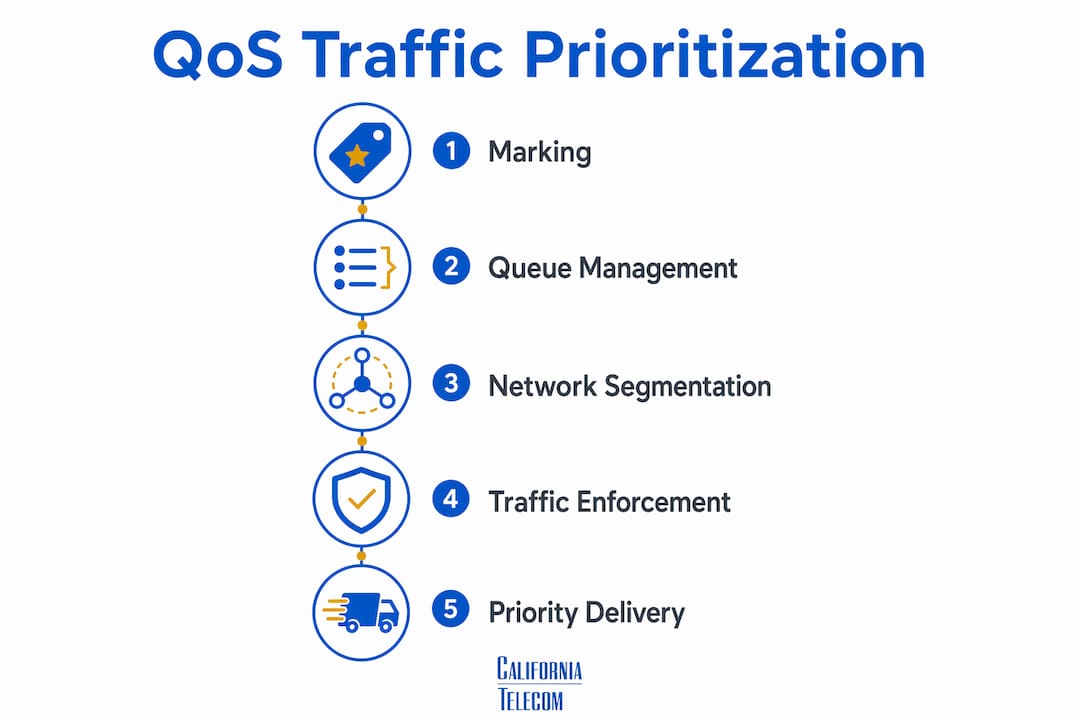
DSCP marking is the foundation. Voice RTP packets get tagged with DSCP EF (Expedited Forwarding), which carries a decimal value of 46. Signaling traffic, such as SIP, gets tagged with DSCP CS3 or AF31. These markings tell every router and switch along the path how to handle each packet.
Low Latency Queuing (LLQ) is the enforcement mechanism. LLQ creates a strict priority queue on routers and edge devices. Packets marked DSCP EF jump to the front of that queue every time. The result is consistent, low-delay delivery for voice even when other traffic is competing.
Voice VLANs add another layer of separation. By isolating voice traffic on its own VLAN, network engineers prevent voice packets from mixing with data traffic at the switch level. This reduces the chance of congestion before packets even reach the router.
Key QoS mechanisms for business voice:
- DSCP EF (46): Tags voice RTP packets for strict priority treatment
- DSCP CS3/AF31: Tags SIP signaling for elevated but not strict priority
- LLQ: Enforces the priority queue on routers and WAN edge devices
- Voice VLANs: Isolates voice at the access layer to prevent early congestion
- Traffic policing: Caps voice queue bandwidth to prevent it from starving data traffic
One critical boundary: QoS markings only affect traffic within managed networks. ISPs routinely strip DSCP tags at their edge. Once a packet crosses into the public internet, your markings are gone. End-to-end QoS requires private circuits, MPLS connections, or SD-WAN with traffic shaping agreements.
Pro Tip: Verify that your IP phones are configured to apply DSCP EF markings themselves, not just rely on the switch. Phones that mark their own traffic give you consistent tagging even when switch configurations drift.
What are the QoS bandwidth strategies for multi-location businesses?
Bandwidth planning and QoS configuration work together. QoS without enough bandwidth is like a priority lane on a road that is too narrow for any traffic to move.
Each concurrent VoIP call requires approximately 85–100 Kbps of dedicated, prioritized bandwidth. Ten simultaneous calls need at least 1 Mbps reserved for voice alone. That number climbs fast in a contact center or a multi-department office.
Follow these steps for bandwidth planning across multiple sites:
- Count peak concurrent calls per site. Use call records or UCaaS reporting to find the maximum simultaneous calls during your busiest period.
- Calculate voice bandwidth per site. Multiply peak concurrent calls by 100 Kbps to get a conservative estimate.
- Apply the 20–30% WAN allocation rule. Best practice allocates 20–30% of total WAN bandwidth to voice using DSCP EF and LLQ. Voice queues should never exceed 75% of total WAN capacity.
- Focus on the uplink. The uplink is the choke point in most business connections. Outbound voice packets from your phones compete with every other upload. Prioritize the uplink queue first.
- Build in headroom. Size your WAN circuit so voice uses no more than 20% of capacity at peak. That buffer absorbs unexpected spikes without degrading call quality.
For network bandwidth planning across multiple locations, the math compounds quickly. A 10-site business with 20 concurrent calls per site needs 20 Mbps of voice-dedicated bandwidth before accounting for headroom. Undersizing the circuit makes QoS irrelevant because there is simply no bandwidth to prioritize.
What are the limitations and common pitfalls of QoS?
QoS is insurance, not a cure. IT managers who treat it as a fix for every voice problem will waste hours chasing the wrong root cause.
QoS prioritizes voice traffic during congestion but does not increase bandwidth. If your WAN circuit is saturated, QoS keeps voice moving while data suffers. But the underlying problem is still insufficient capacity. Calls may sound fine while your team complains that file uploads have stopped working entirely.
Common QoS pitfalls to avoid:
- Insufficient bandwidth: QoS cannot create bandwidth. A 10 Mbps circuit with 15 Mbps of demand will degrade voice eventually, regardless of marking.
- Public internet limitations: DSCP markings disappear at the ISP edge. Hosted VoIP over broadband gets no QoS benefit beyond your own router.
- Masked congestion: QoS can hide deeper network congestion problems, delaying detection of capacity issues. Calls sound fine while data traffic suffers silently.
- SIP ALG interference: Disabling SIP ALG on firewalls often resolves call drops more effectively than any QoS adjustment. Firewalls with SIP ALG enabled misinterpret SIP packets, introducing jitter and one-way audio that QoS cannot fix.
- Poor Wi-Fi: Wireless interference and weak signal strength cause packet loss that QoS cannot address. Voice on Wi-Fi requires proper access point placement and 802.11r fast roaming support.
QoS is the right tool for managing competing traffic on a well-provisioned network. It is the wrong tool for compensating for a circuit that was never sized correctly, hardware that is failing, or an ISP that does not honor your markings.
How do you implement and verify QoS for business voice?
Effective QoS deployment follows a structured process. Configuration without verification is guesswork.
- Tag voice packets at the source. Configure IP phones to apply DSCP EF (46) to RTP streams and DSCP CS3 to SIP signaling. Do not rely solely on switch-level marking.
- Configure LLQ on routers and edge devices. Set up a strict priority queue for DSCP EF traffic on every WAN-facing interface. Cap the voice queue at no more than 30% of total interface bandwidth to prevent voice from starving data during low-call periods.
- Apply QoS trust on access switches. Set access switch ports connected to IP phones to "trust DSCP." This tells the switch to honor the phone's markings rather than overwrite them.
- Segment voice on a dedicated VLAN. Assign all IP phones to a voice VLAN and configure inter-VLAN routing to maintain QoS markings across the boundary.
- Disable SIP ALG on all firewalls. This single step eliminates a common source of one-way audio and call drops that QoS cannot resolve.
- Test during peak hours. Testing with VoIP quality tools during peak hours confirms QoS effectiveness. Use tools that report latency, jitter, and packet loss in real time. A clean test at 2:00 AM proves nothing about performance at 10:00 AM.
- Monitor continuously. QoS settings drift when firmware updates reset switch configurations or new devices join the network without proper tagging. Build monitoring into your network management routine.
For troubleshooting choppy calls and packet loss on business Wi-Fi, the same metrics apply. Wireless voice quality requires both proper QoS marking and a well-designed RF environment.
Pro Tip: After configuring QoS, run a simulated call flood during a maintenance window. Push your concurrent call count 20% above your expected peak and watch what happens to data traffic. If data collapses completely, your voice queue cap is too aggressive.
A good call quality scoring system gives your team a structured way to track whether QoS changes are actually improving the experience callers hear on the other end.
Key Takeaways
Proper QoS implementation requires correct DSCP marking, Low Latency Queuing, voice VLAN segmentation, and adequate WAN bandwidth at every site in a multi-location network.
| Point | Details |
|---|---|
| Three metrics drive voice quality | Keep latency below 150ms, jitter below 30ms, and packet loss below 1% for clear calls. |
| DSCP EF (46) is the standard marking | Tag RTP voice packets with DSCP EF and configure LLQ on all WAN-facing interfaces. |
| Bandwidth planning comes first | Each concurrent call needs 85–100 Kbps; allocate 20–30% of WAN capacity to voice. |
| QoS cannot fix insufficient bandwidth | A saturated circuit degrades voice regardless of marking; size the circuit correctly first. |
| Disable SIP ALG before adjusting QoS | Firewall SIP ALG causes one-way audio and call drops that no QoS configuration can resolve. |
What I have learned about QoS after years of multi-site deployments
The most common mistake I see IT managers make is treating QoS as a substitute for a properly sized network. They configure DSCP EF, set up LLQ, and then wonder why calls still break up. The answer is almost always the same: the WAN circuit is undersized, and QoS is just deciding which traffic suffers least.
QoS is genuinely valuable, but only on a network that has enough capacity to begin with. Think of it as a traffic cop at a busy intersection. A good traffic cop keeps things moving efficiently. But if the road itself has too many cars for its lanes, the cop cannot fix that. You need more lanes.
The second thing I tell every IT manager is to watch for the masking effect. When QoS is working, voice sounds fine. That can hide the fact that your data traffic is being crushed during peak hours. Your network monitoring needs to track data performance separately from voice performance, or you will miss a congestion problem until it becomes a capacity crisis.
My practical advice: invest equally in three things. First, right-size your circuits at every site. Second, configure QoS correctly with proper DSCP marking and LLQ. Third, audit your hardware, especially firewalls with SIP ALG enabled. Get all three right, and voice quality becomes a non-issue. Get one wrong, and the other two cannot compensate.
— Jim
Californiatelecom's managed network services for business voice
Multi-location businesses face a compounding challenge: every site needs correctly sized bandwidth, properly configured QoS, and hardware that does not undermine the voice stack. Getting that right across 10, 50, or 200 locations requires more than a configuration guide.Californiatelecom designs and deploys managed LAN/WAN solutions with QoS configuration built in from day one. Every site gets engineered by Californiatelecom's own team, backed by a 24/7 U.S.-based NOC and a 99.999% uptime SLA on voice. You work with one provider, one bill, and one engineer's direct number. For businesses operating nationwide across multiple locations, that single point of accountability eliminates the vendor coordination that typically turns voice problems into week-long troubleshooting cycles. Contact Californiatelecom for a free consultation to assess your current voice network.
FAQ
What does QoS actually do for VoIP calls?
QoS tags voice packets with DSCP EF (46) and places them in a strict priority queue, so they pass through the network before lower-priority traffic during congestion. It keeps latency, jitter, and packet loss within the thresholds required for clear audio.
What are the minimum network requirements for business VoIP?
Business voice requires latency below 150ms, jitter below 30ms, and packet loss below 1%. Each concurrent call needs approximately 85–100 Kbps of dedicated bandwidth.
Does QoS work over the public internet?
No. ISPs strip DSCP markings at their network edge, so QoS only functions within your managed network. End-to-end voice quality over the public internet requires private circuits, MPLS, or SD-WAN with traffic shaping.
Why do my VoIP calls drop even with QoS configured?
Call drops after QoS configuration are most often caused by SIP ALG on the firewall, which misinterprets SIP signaling and introduces errors that QoS cannot fix. Disabling SIP ALG is the first troubleshooting step.
How much WAN bandwidth should I reserve for voice?
Allocate 20–30% of total WAN bandwidth to voice traffic, and size your circuit so voice uses no more than 20% of capacity at peak load to maintain headroom for traffic spikes.
Recommended
- Common California business telecom mistakes IT managers must avoid | California Telecom
- Role of DNS in Business Networks: IT Manager's Guide | California Telecom
- What is business-grade broadband for multi-location IT | California Telecom
- VoIP System Types for Large Businesses: 2026 Guide | California Telecom