

What Is Guest WiFi Management for Multi-Location BusinessesGuest WiFi management is defined as the systematic process of providing, monitoring, and securing internet access for visitors while isolating their traffic from internal business networks. The industry term for this practice is managed guest network access, and it combines technologies like VLANs, captive portals, WPA3 encryption, and bandwidth controls into a single operational framework. For multi-location enterprises, this is not a convenience feature. It is a security requirement, a customer experience tool, and a compliance obligation rolled into one.
Guest WiFi management involves providing, monitoring, and securing internet access for visitors, separating their traffic from internal networks through controls including captive portals, bandwidth limits, session monitoring, and network isolation. That separation is what makes the difference between a guest network that protects your business and one that quietly exposes it.

What is guest WiFi management and what does it actually include?
The core of guest WiFi management sits at the intersection of network security and customer experience. Done correctly, it gives visitors fast, reliable internet access while keeping your point-of-sale systems, employee workstations, and internal servers completely out of reach. Done poorly, it creates a direct path for compromised guest devices to reach your most sensitive infrastructure.
The technical building blocks break down into five categories:
- Network segmentation: VLANs (Virtual Local Area Networks) create a logical wall between guest traffic and corporate traffic. Guest devices live on one VLAN; internal systems live on another. Traffic between them is blocked by firewall rules.
- Captive portals: The branded login page guests see before accessing the internet. It handles authentication, collects consent for data use, and can capture marketing data like email addresses.
- Bandwidth and session controls: Limits that prevent one guest from consuming all available bandwidth. Session timers force re-authentication after a set period.
- Access control and client isolation: Firewall rules that block guest devices from reaching private IP ranges, and client isolation settings that prevent guest devices from communicating with each other.
- Encryption standards: WPA3 is the current standard for securing wireless connections. WPA2 is still common but carries known vulnerabilities that WPA3 addresses directly.
Pro Tip: When evaluating cloud management platforms like Cisco Meraki, Aruba Central, or Juniper Mist, check whether they support centralized VLAN and SSID policy templates. Pushing a single policy update to 50 locations simultaneously is the operational advantage that justifies the platform cost.
How do captive portals work and why do they matter?
A captive portal intercepts the first HTTP or HTTPS request a guest device makes and redirects it to an authentication page. The entire login completion process takes approximately 15 to 20 seconds when the portal is well-designed. That speed matters more than most operators realize.
Portal friction directly affects authentication success rates. When the process runs longer or requires too many steps, guest drop-off increases measurably. A hotel chain or retail group that sees 40% of guests abandon the login process is not just losing data. It is creating frustrated customers who blame the brand, not the technology.
Authentication methods range from simple to sophisticated:
- Click-through: Guest accepts terms of service with one tap. Lowest friction, minimal data capture.
- Email verification: Guest enters an email address and receives a confirmation link. Moderate friction, builds a marketing list.
- Social login: Guest authenticates via Google or Facebook. Fast for the user, delivers verified identity data.
- Voucher systems: Front desk or staff issue a unique code. Common in hotels and co-working spaces where access control is tied to a paid service.
- RADIUS-backed authentication: Enterprise-grade, integrates with Active Directory or a Property Management System (PMS) for identity-verified access.
The technical mechanism that makes all of this work is the walled garden. Before a guest authenticates, the network only allows traffic to a pre-approved list of IP addresses and domains. These are the portal server, any CDN resources the portal page loads, and any social login endpoints. Without this allowlist, the portal page itself cannot load on modern devices that use HTTPS by default.
Pro Tip: Test your captive portal on iOS and Android separately. Apple's Captive Network Assistant and Android's network probe system behave differently, and a portal that works perfectly on one platform may silently fail on the other.
Why network segmentation is non-negotiable for guest WiFi
Segmentation is the single most important factor in guest WiFi security. Without proper isolation, a compromised guest device can scan and attack internal systems on the same flat network. A retail location running a flat network where guest devices and payment terminals share the same subnet is a PCI DSS violation waiting to happen.
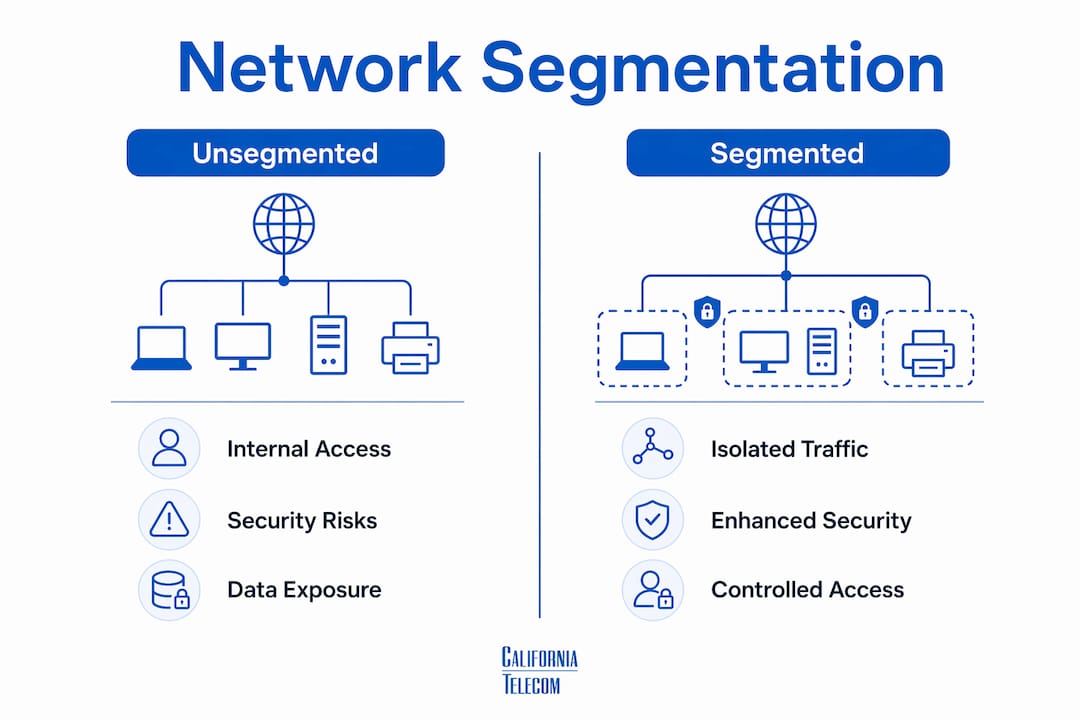
The table below shows the difference between a segmented and an unsegmented guest network:
| Factor | Unsegmented network | Properly segmented network |
|---|---|---|
| Guest access to internal servers | Unrestricted | Blocked by VLAN and firewall rules |
| Lateral movement between guest devices | Possible | Blocked by client isolation |
| Threat to POS or ERP systems | High | Negligible |
| Compliance posture (PCI DSS, HIPAA) | Non-compliant | Compliant |
| Incident containment | Entire network at risk | Guest VLAN isolated |
Effective segmentation requires guest VLANs configured with firewall rules that deny access to RFC1918 private address ranges (10.0.0.0/8, 172.16.0.0/12, 192.168.0.0/16), allowing only outbound internet traffic. The default posture should be deny-all for internal resources, with explicit allow rules only for services guests legitimately need, such as a DNS resolver or a time server.
Multi-layer enforcement is what separates a real deployment from a checkbox exercise. Hardware-level VLAN tagging at the access point, stateful firewall rules at the gateway, and software-level client isolation at the controller level each provide independent protection. If one layer is misconfigured, the others still hold. Understanding the difference between enterprise and consumer WiFi is where this conversation starts for most businesses that have been running consumer-grade equipment without realizing it.
What strategies and tools support guest WiFi management at scale?
Managing guest WiFi across 10, 50, or 200 locations requires a different operational model than managing a single site. The core challenge is consistency. A security policy that works at your flagship location means nothing if three regional sites are running outdated firmware or misconfigured VLANs.

Cloud-based management platforms solve this through centralized policy templates. Cisco Meraki, Aruba Central, and Juniper Mist all support multi-location policy enforcement through layered pipelines spanning SSID/VLAN mapping, firewall rules, and authentication servers. A change made at the policy level propagates to every site automatically, which eliminates the configuration drift that plagues manually managed networks.
Key practices for multi-location guest WiFi management include:
- Standardize SSID and VLAN naming conventions across all sites. When every location uses the same VLAN ID for guest traffic, troubleshooting becomes predictable and audits become faster.
- Monitor bandwidth consumption per site and per SSID. Unusual spikes in guest bandwidth often indicate abuse, unauthorized devices, or a misconfigured access point broadcasting to a wider area than intended.
- Address MAC address randomization directly. Modern iOS and Android devices randomize their MAC addresses by default, which breaks device-based identification. User-level authentication via captive portals delivers more reliable control than MAC-based filtering, because it ties access to a session or user account rather than a hardware identifier that changes with every connection.
- Build consent management into your captive portal. GDPR, CCPA, and similar privacy regulations require explicit consent before collecting personal data. The captive portal is the natural enforcement point. Log every consent event with a timestamp and IP address.
- Schedule firmware updates and security patches. Access points running firmware from 2022 are not running WPA3 correctly, regardless of what the configuration screen says.
The operational data your guest network generates is also a business asset. Foot traffic patterns, peak usage times, and session duration data from a well-instrumented guest network feed directly into staffing decisions, marketing campaigns, and lease negotiations for retail operators. Californiatelecom's managed WiFi deployment approach covers exactly how to build this instrumentation into a multi-site rollout from day one rather than retrofitting it later.
Key takeaways
Guest WiFi management requires network segmentation, captive portal authentication, and centralized cloud management to protect business infrastructure and deliver a consistent guest experience across every location.
| Point | Details |
|---|---|
| Segmentation is the foundation | VLANs and default-deny firewall rules block guest devices from reaching internal systems. |
| Captive portal speed drives adoption | Portals completing authentication under 20 seconds see significantly higher guest login rates. |
| MAC randomization changes identity management | User-level authentication via portals is now more reliable than device MAC-based controls. |
| Multi-location requires centralized tools | Cloud platforms like Cisco Meraki or Aruba Central push consistent policies across all sites simultaneously. |
| Compliance is built into the portal | GDPR and CCPA consent must be captured and logged at the authentication step, not added later. |
What I've learned managing guest networks across distributed enterprises
After working with multi-location businesses on network deployments, the pattern I see most often is this: operators treat guest WiFi as an afterthought until something goes wrong. A security incident, a failed PCI audit, or a wave of customer complaints about slow connections forces the conversation that should have happened at the design stage.
The segmentation problem is the most common and the most dangerous. I have walked into locations where the "guest network" was just a second SSID on the same flat subnet as the corporate network. The SSID name was different. The password was different. The security was identical to having no separation at all.
The captive portal UX problem is the second most common. Operators spend real money on portal branding and then bury the login button below a 400-word terms-of-service block that nobody reads. The result is a 30-second authentication process that feels like 3 minutes. Guests give up, connect to their mobile data, and the business loses both the data capture opportunity and the goodwill.
What actually works at scale is treating guest WiFi as a managed service rather than a one-time configuration. That means scheduled audits, firmware update cycles, portal A/B testing, and bandwidth monitoring that someone actually reviews. The businesses that do this well are the ones running managed WiFi services through a provider that owns the outcome, not just the hardware.
One trend worth watching: Wi-Fi 7 is beginning to appear in enterprise access point catalogs, and its multi-link operation capability will change how guest and corporate traffic coexist on the same physical infrastructure. The Wi-Fi 7 implications for business networks are significant enough that any major refresh cycle starting now should account for it in the hardware selection.
— Jim
How Californiatelecom manages guest WiFi for multi-location businesses
Multi-location guest WiFi management is one of the most operationally complex problems in enterprise networking, and it is exactly what Californiatelecom is built to solve.Californiatelecom designs, deploys, and manages guest network infrastructure across distributed business locations nationwide. Every deployment includes VLAN segmentation, captive portal configuration, bandwidth controls, and ongoing monitoring from a 24/7 U.S.-based NOC. You get one engineer's number, one bill, and a 99.99% uptime SLA on data. If you are managing multi-location network services and want a guest WiFi setup that is secure, scalable, and actually maintained, contact Californiatelecom for a free consultation.
FAQ
What is guest WiFi management?
Guest WiFi management is the process of providing, monitoring, and securing internet access for visitors while isolating their traffic from internal business networks through VLANs, captive portals, and access controls. It protects corporate infrastructure while delivering a reliable connection experience for guests.
How is a guest network different from a corporate network?
A guest network runs on a separate VLAN with firewall rules that block access to private internal IP ranges, while the corporate network carries internal business traffic. Client isolation on the guest VLAN also prevents guest devices from communicating with each other.
Why do captive portals sometimes fail to load?
Captive portals require a walled garden allowlist of pre-approved IP addresses and domains so unauthenticated devices can reach the portal page before completing login. Without this allowlist, the portal page cannot load on devices that block unauthenticated traffic by default.
How does MAC address randomization affect guest WiFi?
Modern iOS and Android devices randomize their MAC addresses with each new connection, which makes device-based identification unreliable. User-level authentication through captive portals ties access to a session or account instead, delivering consistent control regardless of MAC address changes.
What is the most important security measure for guest WiFi?
Network segmentation through dedicated VLANs and default-deny firewall rules is the most critical security control. Without it, a single compromised guest device can reach internal servers, payment systems, and employee workstations on the same network.