
Save $5–$50: Static vs Dynamic IP for Home and Small BusinessStatic IPs stay fixed and matter most when other systems need to reliably find your network, like a mail server, a VPN gateway, or a partner's allowlist. Dynamic IPs change periodically and work fine for everyday browsing, phones, and laptops. Most home users should stick with dynamic plus a router reservation or DDNS. Businesses running inbound services usually need a static IP, and it's worth asking your ISP what that costs before assuming you need one.
TL;DR:
- Most home users should stick with dynamic IPs and set DHCP reservations or use DDNS for remote access to avoid unnecessary costs and management.
- Static IPs are typically required only for hosting servers, VPNs, or VoIP systems that need reliable external reach and often come with extra monthly charges.
- Switching from static to dynamic involves requesting an IP change from your ISP or configuring router-based reservations, with DDNS providing an alternative for remote reachability.
- Static IPs are more vulnerable to being targeted over time but do not inherently increase security risks compared to dynamic addresses when proper protections are in place.
- To identify your IP type, verify with your ISP, check if the address remains the same after router restarts over several days, or ask directly.
Table of Contents
- What Is an IP Address, and Why Does It Change?
- What Is a Static IP, and When Do You Actually Need One?
- What Is a Dynamic IP, and How Does DHCP Assign It?
- Static vs Dynamic: The Side-by-Side Breakdown
- How Do You Choose the Right IP Type for Your Situation?
- How to Get a Static IP or Set Up Dynamic Alternatives
- Does a Static IP Make You Less Secure?
- How Can You Tell if Your IP Is Static or Dynamic?
- What Should You Actually Do Next?
- Sources
- FAQ
What Is an IP Address, and Why Does It Change?
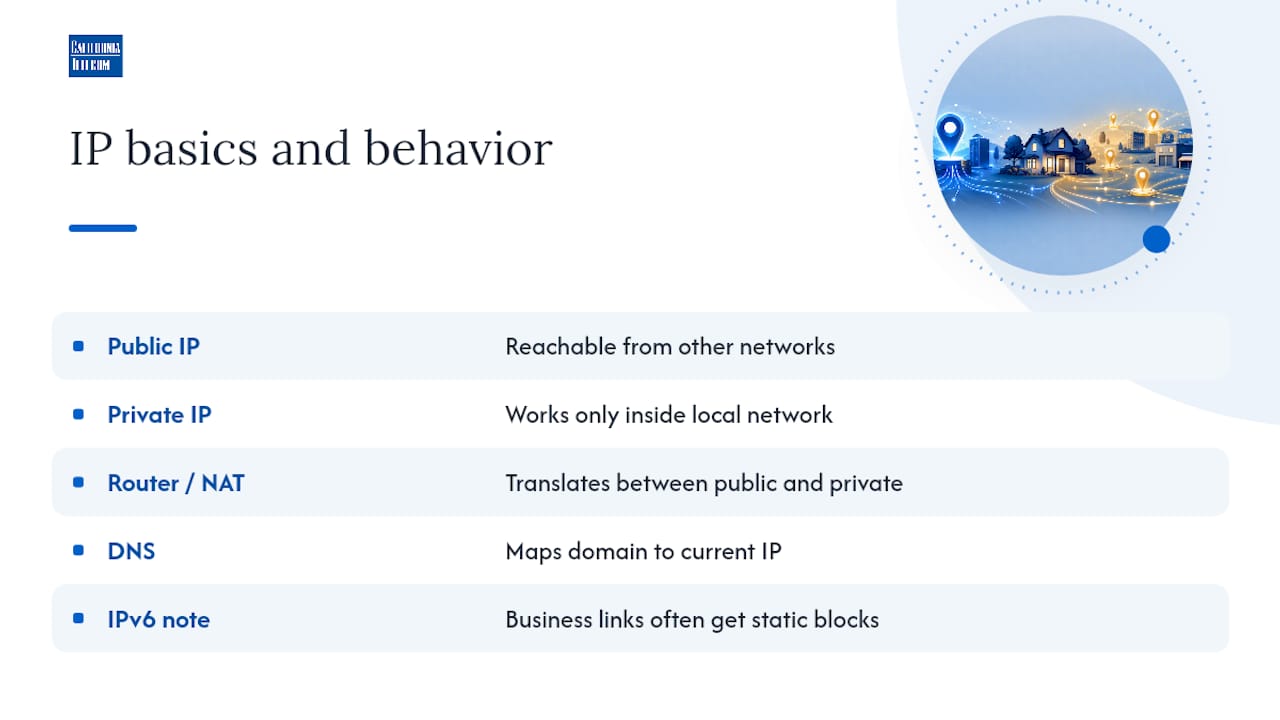
Every device online gets a public IP address, the number other networks use to reach it, and usually a private IP address that only works inside your home or office network. Your router handles the translation between the two. Domain names exist partly to hide this volatility: DNS maps a memorable name like example.com to whatever IP is currently active, so a business site keeps working even if the underlying server address shifts. One more wrinkle worth knowing: IPv6, the newer addressing standard, has enough space that many business connections get a static IPv6 block by default, even when the IPv4 side is dynamic.
What Is a Static IP, and When Do You Actually Need One?
A static IP is a fixed address that doesn't change. There are two flavors, and mixing them up causes real confusion. A public static IP comes from your ISP and identifies your entire network to the outside world. An internal static or reserved IP lives inside your own network and stays constant only for devices on your LAN, usually through a router setting rather than a manual entry.
Static IPs earn their keep when something outside your network needs to find you reliably. Businesses running a VPN gateway, a mail server, or a VoIP PBX often need one, and B2B partners sometimes require allowlisting a fixed address before granting access. A stable address also supports reverse DNS lookups, which mail servers check to filter spam, and it keeps VPN and VoIP endpoints from breaking every time your connection resets.
The downsides are real too:
- Most ISPs charge extra for a public static IP, commonly in the $5 to $50 monthly range depending on the provider and plan.
- A fixed address is permanently discoverable, which means it's a steadier target for scanning and probing over time.
- Managing static addresses across many devices adds administrative overhead nobody enjoys.
Pro Tip: Skip manual static IPs on individual devices inside your network. Set a DHCP reservation on your router instead. You get the same predictable address without the risk of two devices accidentally claiming the same one. This approach is widely recommended over manual IP mapping for exactly that reason.
What Is a Dynamic IP, and How Does DHCP Assign It?
Dynamic IPs come from a pool your ISP or router manages, and they can change periodically. The mechanism behind this is DHCP, which runs on a four-step cycle networking folks call DORA: Discover, Offer, Request, Acknowledge. A device requests an address, the server offers one, the device accepts, and the server confirms. That address comes with a lease, a time limit after which the device has to renew it or get assigned a new one. This lease cycle is why dynamic addresses shift over time rather than staying fixed forever.
Dynamic addressing is the default for a reason:
- It's included in nearly every consumer and most business internet plans at no extra cost.
- It requires zero setup or ongoing management from you.
- It lets ISPs reuse addresses efficiently across huge customer bases instead of permanently locking one to each household.
The tradeoff shows up the moment you want something to reach you consistently. Hosting a home server, running a security camera system remotely, or self-hosting anything without DDNS or a tunnel service means your access point can quietly stop working after an IP change. Those changes are usually infrequent and brief, but they can cause a short outage right when you least expect it.
Static vs Dynamic: The Side-by-Side Breakdown
| Static IP | Dynamic IP | |
|---|---|---|
| Permanence | Fixed, doesn't change | Changes periodically via DHCP lease |
| Typical cost | Often an added monthly fee | Usually included in your plan |
| Best for | Servers, VPNs, VoIP, mail, B2B allowlisting | Everyday browsing, phones, laptops, IoT |
| Setup effort | Requires ISP request or manual config | Automatic, no setup needed |
Static IP add-ons commonly run $5 to $50 a month, depending on your ISP and business tier, which is worth budgeting for before you commit.
Choose static if:
- You host a VPN, mail server, or VoIP system that others need to reach directly.
- A vendor or partner requires you to allowlist a fixed address.
Choose dynamic if:
- You're mostly browsing, streaming, and using apps.
- You want remote access to a home device but haven't ruled out DDNS yet.
How Do You Choose the Right IP Type for Your Situation?
The right choice depends less on theory and more on what you're actually running. Here's how it breaks down by scenario:
- Home users: Stick with dynamic. Set up a DHCP reservation for anything that needs a consistent local address (a printer, a NAS), and use DDNS if you want remote access to a home server. This avoids ISP fees entirely for most household needs.
- Small business: Evaluate a static public IP only if you're hosting a VPN, VoIP system, or mail server, or if a client requires allowlisting your address. If none of that applies, dynamic with reservations covers most day-to-day operations.
- Enterprise/multi-location: Static IPv4 and IPv6 addressing, reverse DNS configuration, and SLA guarantees become standard requirements, especially when multiple sites need predictable, monitored connectivity. Multi-homing across carriers also becomes a real consideration once uptime failures start affecting revenue.
Before committing to a static IP, ask your ISP or IT provider these questions:
- What's the monthly cost difference between static and dynamic on this plan?
- Do you support reverse DNS configuration for mail deliverability?
- What SLA backs this connection, and what's the guaranteed uptime?
- Is static IPv6 included, and does it change your pricing?
Pro Tip: If you're not sure whether you need a static IP yet, start with a DHCP reservation and DDNS. You can always upgrade to a paid static IP later once you know exactly which service requires it.
How to Get a Static IP or Set Up Dynamic Alternatives
Getting a static public IP starts with a call, not a router setting. Here's the practical path:
- Contact your ISP and ask specifically for a "static public IP add-on" for your business or residential plan.
- Confirm the monthly cost, which typically falls between $5 and $50 depending on your provider and service tier.
- Ask whether they'll configure reverse DNS for you or whether you need to submit a separate request.
If you just need predictable local addressing without paying for anything extra, configure a DHCP reservation instead:
- Log into your router's admin panel and find the DHCP or LAN settings.
- Locate the device's MAC address in the connected-devices list.
- Reserve a specific IP address for that MAC address so it always receives the same one.
This gives you the internal answer, but if you need remote access to a hostname that survives IP changes, DDNS handles that:
- DDNS providers like No-IP and DynDNS assign you a hostname and automatically update its DNS record whenever your public IP changes.
- Because it updates in near real time, your hostname stays reachable even on a dynamic connection, without you lifting a finger after setup. Learn more about how DHCP assigns and renews addresses if you want the full mechanics behind the lease cycle.
Does a Static IP Make You Less Secure?
No, and this is one of the most persistent myths in networking. IP type alone is a weak security control either way. Security researchers are clear on this: what actually protects you is a firewall, a VPN, and properly hardened services, not whether your address happens to change every few weeks.
That said, static addresses do carry one real, modest risk: they're a consistent target over time, which makes long-term scanning or tracking marginally easier for an attacker who's already looking at you specifically. For most people, that risk is low. DDoS attacks and casual probing target visible services, not IP type.
Here's what actually reduces risk, static or dynamic:
- Configure firewall rules that block unused ports by default.
- Use a VPN for remote access instead of exposing services directly.
- Harden SSH access with key-based authentication instead of passwords.
- Route sensitive services through a cloud bastion host rather than a direct connection.
- Monitor traffic patterns so unusual activity gets flagged quickly.
None of this changes based on whether your address is fixed. The address is just a label. What's behind it determines whether you're actually protected.
How Can You Tell if Your IP Is Static or Dynamic?
You don't have to guess. Run through these checks:
- Log into your ISP account portal or check your service agreement for the word "static," which usually appears explicitly if you're paying for one.
- Note your current public IP using any IP lookup site, restart your router, then check again.
- If the number is identical after the restart, repeat the check a few days later to rule out coincidence.
- If it's still unclear, call your ISP support line and ask directly. This is faster than guessing from behavior alone.
What Should You Actually Do Next?
Most readers don't need to spend another minute agonizing over this: start with dynamic plus a DHCP reservation, add DDNS if you want remote access, and only pay for a static IP once a specific inbound service demands it. That's the whole decision tree for the vast majority of home and small-business setups.
Where this gets genuinely complicated is multi-location businesses juggling static IPv4 and IPv6 addressing, reverse DNS, and uptime SLAs across several sites at once. Managed services providers design and manage that kind of connectivity daily for businesses running distributed networks, including the carrier redundancy and monitoring that keep static addressing reliable at scale. If you're past the point of a single router setting and into multi-site network design, our nationwide managed network services team can walk through what your setup actually requires.
— Jim
Sources
- Static vs Dynamic IPs — security and privacy context
- Here's why you should (and shouldn't) map static IPs on your router
- Static IP for Business: When You Need One and What It Enables
- Static IP vs dynamic IP addresses: What's the difference
FAQ
Is It Better to Have a Dynamic or Static IP?
Neither is universally better. Dynamic is the practical default for ordinary browsing and devices, while static is worth the added cost only when something external needs to reach your network reliably, like a VPN, mail server, or VoIP system.
Can a Static IP Be Hacked?
A static IP itself isn't hacked. What matters is what's exposed behind it. Firewalls, VPNs, and proper service hardening determine your actual risk far more than whether your address changes.
How Do I See if My IP Is Static or Dynamic?
Check your ISP account portal for the word "static," or note your public IP, restart your router, and check again. If the address stays the same after a few restarts over several days, it's likely static.
Is a Static IP Better for Gaming?
Not meaningfully. Gaming performance depends on bandwidth, latency, and port forwarding, not on whether your address changes every so often. A DHCP reservation for your console handles the local stability gamers actually need.