
SD-WAN Failover: A Practical Runbook for Enterprise NetworksThe baseline recommendation is straightforward: deploy measurement-based SD-WAN failover with active probes or BFD for tunnel health, TLOC/IPsec state monitoring, and a gradual or manual failback policy for any traffic that cannot tolerate session interruption. Before you touch a threshold, collect 24–72 hours of baseline metrics.
Here is the checklist to run in your first session:
- Enable active probes (ICMP, TCP, or HTTP) on every WAN interface and verify probe targets are reachable from the edge device.
- Turn on BFD for all IPsec tunnels and SD-WAN overlay adjacencies.
- Set initial measurement thresholds conservatively for packet loss, latency, and jitter. Tighten after baselining.
- Configure failback to "Gradual" for voice and payment traffic; "Immediate" is acceptable only for best-effort flows.
- Schedule a controlled failover test within 48 hours of deployment, during a low-traffic window.
- Document pre-change baselines (latency, loss, jitter, MOS if applicable) before any threshold adjustment.
Pro Tip: Gather at least 24 hours of working-hours data and 24 hours of off-hours data before setting thresholds. Peak-hour jitter on a shared broadband link can be three to five times the off-hours value, and a threshold calibrated at 2 AM will trigger false positives every weekday afternoon.
Key Takeaways
Measurement-based SD-WAN failover with BFD, active probes, and a gradual failback policy is the correct baseline for enterprise networks, and no threshold should be set before collecting 24–72 hours of per-site performance data.
| Point | Details |
|---|---|
| Baseline before tuning | Collect 24–72 hours of working-hours data and 24 hours of off-hours data; use 95th-percentile values to set thresholds. |
| Starting thresholds | Use 5% loss, — latency, 100 ms jitter as conservative defaults; tighten to 1–2% loss and 150 ms latency for voice flows. |
| Layer your detection | Combine BFD for tunnel drops with active probes for brownouts and OMP/BGP for control-plane health. |
| Match failback to traffic type | Use gradual failback for voice and payments; immediate failback only for best-effort traffic. |
| Californiatelecom | Provides managed SD-WAN with multi-carrier redundancy, 24/7 NOC monitoring, and per-site baseline alerting across U.S. locations. |
Table of Contents
- How does SD-WAN failover differ from load balancing and WAN bonding?
- What metrics should you measure, and what thresholds actually work?
- Which detection mechanisms should you combine for reliable failure detection?
- How do you translate failover concepts into actual configuration?
- How should you handle failback, and what happens to active sessions?
- How do you test and validate SD-WAN failover before it matters?
- What does a production operational runbook look like?
- When should you use failover vs. load balancing vs. WAN bonding?
- How do you troubleshoot brownouts, flapping, and asymmetric routing?
- What the thresholds tell you that the dashboards don't
- Californiatelecom manages SD-WAN failover so your team doesn't have to
- Sources
How does SD-WAN failover differ from load balancing and WAN bonding?
Failover, load balancing, and WAN bonding are distinct strategies, and conflating them leads to the wrong architecture for the wrong problem. SD-WAN can implement any of the three, but the session-persistence and user-impact characteristics are fundamentally different.
Failover keeps one path active and switches to a backup when the primary degrades or fails. The switchover takes a measurable amount of time depending on detection method, and active sessions may drop. A VPN tunnel will renegotiate. A SIP call may disconnect. For general office traffic, that is usually acceptable.
Load balancing distributes sessions across two or more active links simultaneously. Both links carry traffic at all times. If one fails, sessions on that link drop and must reconnect, but the remaining link continues serving other sessions without interruption. It does not combine bandwidth at the packet level.
WAN bonding aggregates links into a single logical pipe at the packet level. Both links carry fragments of every flow. When one link fails, the bonding engine reconstructs flows from the surviving link with minimal or no session interruption. WAN bonding typically maintains active sessions during failures — the trade-off is cost and complexity.
Key differences at a glance:
- Active links during normal operation: Failover uses one; load balancing and bonding use all simultaneously.
- Session continuity on failure: Bonding preserves sessions; failover and load balancing typically drop and reconnect them.
- Bandwidth aggregation: Only bonding combines capacity; failover and load balancing do not.
- Cost and complexity: Failover is the simplest and least expensive; bonding requires specialized hardware or software and often a third-party service.
- Best fit: Failover suits most branch offices; bonding suits payment terminals, live video, and real-time trading.
Pro Tip: If your traffic profile is mostly HTTP/S, email, and file sync, measurement-based failover covers you. If you have active SIP trunks carrying more than 20 concurrent calls or a payment terminal that cannot tolerate a 3-second reconnect, evaluate bonding or at minimum active-active load balancing for those specific flows.
For a broader look at how SD-WAN transforms multi-location connectivity beyond simple redundancy, the application-aware routing angle matters as much as the failover design itself.
What metrics should you measure, and what thresholds actually work?
Measurement-based failover uses loss, latency, and jitter thresholds and can trigger when any single metric exceeds its value or only when all selected metrics exceed their values simultaneously. The "any" trigger is more sensitive and better for voice; the "all" trigger reduces false positives for general data.
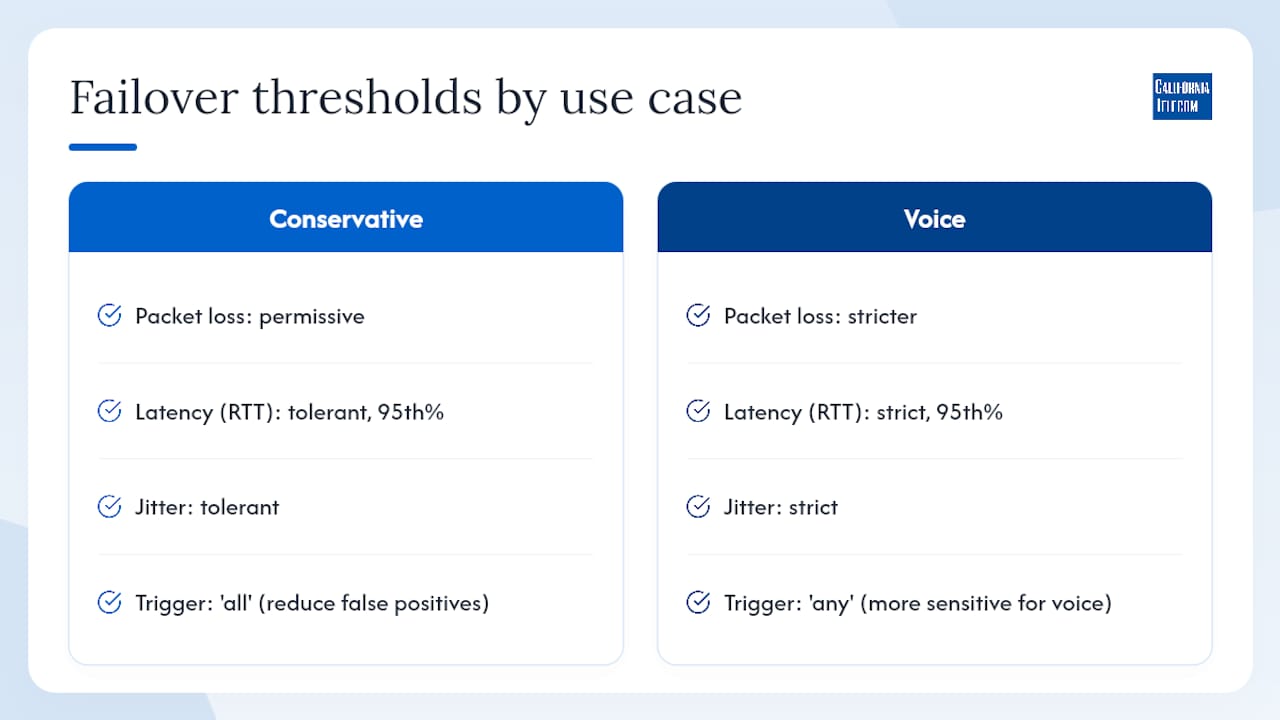
The three primary metrics are packet loss, latency (round-trip), and jitter. For voice-sensitive deployments, add MOS (Mean Opinion Score) if your platform supports it, and always track IPsec/TLOC tunnel health as a binary up/down signal alongside the continuous metrics.
Baseline methodology matters as much as the numbers. Sample at 10-second intervals during a 24–72 hour window that spans at least two full business days. Capture both mean and 95th-percentile values for each metric.
Pro Tip: Use 95th-percentile thresholds rather than raw instantaneous values. A single 500 ms latency spike during a BGP reconvergence event should not trigger a failover that disrupts 200 active sessions. Most platforms let you configure a measurement window (e.g., average over the last 60 seconds) — use it.
SD-WAN is increasingly treated as a QoE management platform rather than a pure connectivity layer, which means your thresholds are really QoE controls. Voice gets stricter thresholds than bulk backup traffic. That separation is the whole point.
Which detection mechanisms should you combine for reliable failure detection?
No single detection method catches every failure mode. The right design layers fast tunnel-level detection with application-aware probes and control-plane signals.
BFD (Bidirectional Forwarding Detection) is the fastest option for detecting tunnel and adjacency failures. High-availability designs combine BFD with redundant control-plane components so that remaining controllers and routers take over immediately when a component fails. BFD is ideal for IPsec tunnel drops and SD-WAN overlay adjacency failures but does not detect brownouts on its own.
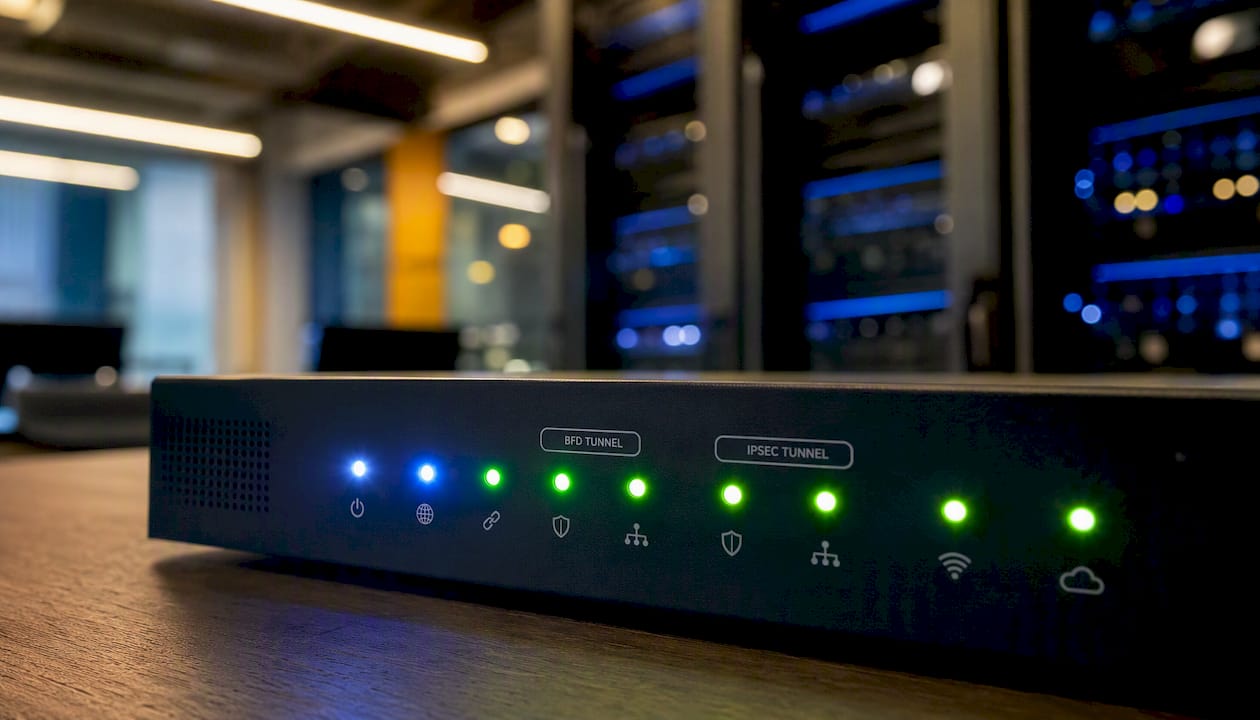
Active probes (IP SLA-like checks) fill the brownout gap. These are synthetic ICMP, TCP, or HTTP transactions sent at regular intervals to a known target (a DNS server, a cloud endpoint, or a probe reflector). When response time or loss exceeds threshold, the platform reclassifies the path. Brownouts — degraded performance without a clean link-down signal — are often worse than outages because they degrade user experience without triggering BFD. Measurement-based probes catch them.
Link-layer probes and carrier signals detect physical interface failures. Most SD-WAN edge devices monitor carrier detect and interface up/down state as a near-instant signal. These are reliable for fiber cuts and modem failures but useless for a congested or degraded link that stays physically up.
Control-plane signals: OMP and BGP. In Cisco Catalyst SD-WAN, OMP (Overlay Management Protocol) carries route and policy information between vSmart controllers and WAN edge routers. An OMP session drop signals a control-plane problem. BGP route withdrawal from a provider signals upstream reachability loss. Both are slower than BFD but provide richer context about what failed and why.
Recommended combination:
- BFD for tunnel drops (fast, sub-second detection).
- Active probes with a 30–60 second measurement window for brownout detection.
- Link-layer carrier signals as an immediate backup trigger.
- OMP/BGP monitoring for control-plane health and upstream reachability.
Pro Tip: Do not rely on ICMP alone to assess VoIP path health. ICMP is deprioritized by many carrier QoS policies and will show a healthy path while RTP packets are being dropped. Probe SIP transaction performance or RTP stream quality directly if your platform supports it.
How do you translate failover concepts into actual configuration?
The configuration pattern below is vendor-agnostic. Exact syntax varies by platform — vendor community resources and KB articles show how these concepts map to specific CLI commands and GUI objects. Use this as your conceptual checklist, then translate it into your platform's terminology.
Step-by-step configuration pattern:
- Define WAN interfaces and TLOCs. Identify each physical or virtual WAN interface. In overlay-based platforms, each interface maps to a TLOC (Transport Location). Assign color labels (e.g., "mpls," "biz-internet," "lte") to distinguish paths.
- Create SD-WAN policies or actions. Define which traffic classes (voice, VPN, general data) use which routing method. Assign "Failover" as the routing method for traffic that needs a primary/backup relationship.
- Attach measurement settings. For each SD-WAN action, select the metrics to monitor (loss, latency, jitter). Set the trigger logic ("any" or "all"). Configure the probe target and probe interval.
- Enable BFD on IPsec tunnels. Confirm BFD is active on all overlay tunnels. Set hello interval and multiplier to match your detection-time target.
- Set failback behavior. Choose Immediate, Gradual, or No Failback per traffic class. Configure connection draining timers for Gradual mode (typically 30–120 seconds).
- Attach policies to interfaces or zones. Apply the SD-WAN policy to the relevant traffic selectors (source/destination prefix, application, DSCP).
- Save, version, and stage. Commit the configuration to version control before pushing. Deploy to a lab or pilot branch first.
CLI vs. GUI workflow differences:
- GUI workflows typically use named policy objects (SD-WAN rules, performance profiles, SLA objects) that you create once and reuse across multiple traffic classes.
- CLI workflows define the same constructs inline or in named sections, giving finer control over ordering and inheritance but requiring more careful syntax validation.
- Both approaches should produce the same functional result; the GUI is faster for initial setup, the CLI is faster for bulk changes across many sites.
Never push threshold changes to all sites simultaneously. A misconfigured threshold that causes flapping at scale will generate more tickets than the outage it was meant to prevent.
How should you handle failback, and what happens to active sessions?
Failback is where most production problems originate. Getting failover right is the easier half; deciding when and how to return to the primary path is where flapping, dropped calls, and payment terminal timeouts happen.
The three standard failback modes each suit a different traffic profile:
- Immediate failback: The platform switches back to the primary path the moment it recovers. Fast, but risky. Any instability on the recovering link causes repeated failover/failback cycles (flapping). Use only for best-effort traffic where session continuity does not matter.
- Gradual failback (connection draining): New sessions route to the primary path as it recovers. Existing sessions on the backup path complete naturally before being moved. This is the right default for most enterprise traffic.
- No failback: Traffic stays on the backup path until an administrator manually triggers the return. Eliminates flapping entirely. Use for payment terminals, active SIP trunks during business hours, and any flow where a second disruption is worse than staying on a slightly suboptimal path.
Session persistence during failover depends on the protocol. VPN tunnels renegotiate — expect 2–10 seconds of reconnection time. SIP calls typically drop and must be re-established by the endpoint. Long TCP sessions (database queries, file transfers) may time out depending on the application's TCP keepalive settings. Failover does not combine bandwidth or preserve sessions the way bonding does, so for mission-critical workloads, the session-drop window is a real cost to quantify before choosing failover over bonding.
Use-case recommendations:
- Voice/UCaaS: Gradual failback, 60-second drain timer. Consider no-failback during business hours with a scheduled manual failback at night.
- Payment terminals: No failback. Require NOC sign-off before returning to primary.
- VPN backhaul: Gradual failback, 30-second drain timer.
- General office (HTTP/S, email): Immediate failback is acceptable.
Pro Tip: For production sites with heavy voice or payment traffic, configure gradual failback plus a manual approval step in your NOC runbook. The 90 seconds of drain time is far cheaper than a dropped payment transaction or a disconnected contact center call.
How do you test and validate SD-WAN failover before it matters?
Testing is not optional. A failover configuration that has never been exercised under realistic conditions is a liability, not a safety net.
Pre-test preparation:
- Capture a baseline snapshot: record current latency, loss, jitter, MOS (if applicable), and active session counts for each WAN path.
- Notify stakeholders of the test window. Even a controlled test can cause brief disruption.
- Confirm NMS/monitoring alerts are active and will fire during the test.
Controlled failover simulation:
- Simulate a clean link failure by administratively shutting down the primary WAN interface on the edge device.
- Measure time-to-failover: from interface down to traffic flowing on the backup path. Target under 10 seconds for BFD-enabled tunnels.
- Restore the primary interface and observe failback behavior. Confirm the configured failback mode (Immediate/Gradual/No Failback) behaves as expected.
- Simulate a brownout by applying traffic shaping or a rate limiter to the primary interface to inject artificial loss (6–8%) and latency (450 ms). Confirm measurement-based failover triggers without a physical link-down event.
Service-specific validation:
- VoIP: Place an active call during failover simulation. Record whether the call drops, the reconnect time, and MOS before and after.
- VPN: Confirm tunnel renegotiation completes within your SLA window. Check for split-tunnel policy enforcement on the backup path.
- Payment terminals: Run a test transaction during the failover window if your payment processor allows it in a test environment.
Acceptance criteria and rollback triggers:
- Failover time under 10 seconds for BFD-protected tunnels; under 30 seconds for probe-only detection.
- No more than one dropped VoIP call per simulated failover event in a 20-call test.
- NMS alert fires within 60 seconds of failover trigger.
- If failover does not trigger within 60 seconds of a brownout condition exceeding thresholds, roll back the configuration and review probe target reachability and measurement window settings.
What does a production operational runbook look like?
A runbook is only useful if it is specific enough to follow at 2 AM. Here is a practical framework.
Daily monitoring actions:
- Review WAN path performance dashboards for each site. Flag any path where 24-hour average loss exceeds 1% or latency exceeds 200 ms.
- Check for failover events in the last 24 hours. Any site that failed over more than twice in a day needs a root-cause review before end of business.
- Verify BFD session state on all active tunnels. A BFD session that is up but flapping is a leading indicator of an unstable link.
Weekly actions:
- Compare current baselines to the original post-deployment baseline. Drift of more than 20% in any metric warrants a carrier conversation or threshold review.
- Audit application classification policies. An app that was reclassified by a software update may now be routed over the wrong path.
- Review SD-WAN best practices for any platform firmware updates that affect measurement behavior or failover logic.
Alerting matrix:
| Event | Severity | Response |
|---|---|---|
| WAN interface down | Critical | Page on-call NOC; open carrier ticket within 5 minutes |
| Measurement threshold exceeded (sustained 5+ min) | High | NOC review; confirm failover triggered; check backup path health |
| Failover event (any) | High | Log event; check for flapping; notify site contact |
| BFD session flapping | Medium | Investigate carrier stability; consider raising BFD multiplier |
| Baseline drift >20% | Low | Schedule carrier review; update threshold documentation |
Change control checklist for threshold adjustments:
- Document current thresholds and baseline metrics before any change.
- Test the new threshold in a lab or pilot site for 48 hours.
- Deploy during a maintenance window with a rollback plan ready.
- Monitor for 24 hours post-change before closing the change ticket.
NOC escalation ladder: Tier 1 NOC confirms failover and opens carrier ticket → Tier 2 network engineering reviews if failover does not resolve within 15 minutes → Tier 3 senior engineer engages if the site is down more than 30 minutes or if flapping continues after initial mitigation.
Pro Tip: Correlate NMS performance timelines with user-reported incident timestamps. If users reported slowness 10 minutes before your monitoring showed a threshold breach, your measurement window is too long or your probe interval is too infrequent. Tighten the probe interval first.
When should you use failover vs. load balancing vs. WAN bonding?
The right answer depends on three variables: traffic sensitivity, budget, and how much session disruption your business can absorb.
| Use case | Recommended approach | Why |
|---|---|---|
| General office (email, web, SaaS) | Measurement-based failover | Cost-effective; brief reconnects are acceptable |
| VoIP / UCaaS (under 20 concurrent calls) | Failover with tight thresholds | Stricter SLA settings handle most scenarios |
| VoIP / UCaaS (20+ concurrent calls) | Active-active load balancing | Distributes call load; single-link failure affects fewer calls |
| Payment terminals | No-failback failover or bonding | Session drop on payment is a compliance and revenue risk |
| Live video streaming / broadcast | WAN bonding | Packet-level aggregation prevents visible artifacts |
| VPN backhaul (hub-and-spoke) | Failover with gradual failback | Tunnel renegotiation is acceptable; bonding adds unnecessary cost |
SD-WAN should be configured with application-aware policies so high-sensitivity traffic uses stricter thresholds than background flows. That single design principle covers the majority of enterprise branch scenarios without requiring bonding at every site.
Cost and timeline considerations:
- Measurement-based failover is included in most SD-WAN platforms at no additional per-site cost. Deployment time for a single site is typically 2–4 hours for an experienced engineer.
- Active-active load balancing requires both links to be active simultaneously, which means paying for two circuits at full capacity. Deployment complexity is similar to failover.
- WAN bonding often requires a third-party service or specialized hardware and adds $100–$500 per site per month depending on provider and bandwidth tier. Deployment typically adds 1–2 days per site for provisioning and testing.
For business continuity planning across multiple locations, the most cost-effective architecture is usually measurement-based failover at the majority of sites with bonding reserved for the handful of locations where session continuity is a hard business requirement.
How do you troubleshoot brownouts, flapping, and asymmetric routing?
The most common production problems with SD-WAN failover are not outages — they are subtle misconfigurations that cause intermittent behavior.
Brownouts (degraded performance without link-down):
- Symptom: Users report slowness; monitoring shows no failover event.
- Likely cause: Measurement thresholds are set too high, or the measurement window is too long to catch sustained degradation.
- Fix: Lower the loss or latency threshold by 20–30%. Reduce the measurement window from 60 seconds to 30 seconds. Confirm probe targets are not themselves congested.
Route flapping:
- Symptom: Failover events occur repeatedly within minutes; NMS shows alternating primary/backup path.
- Likely cause: The primary link is hovering at or near the threshold value. Immediate failback is configured.
- Fix: Switch to Gradual failback. Add a hysteresis period (a minimum time the primary must remain healthy before failback triggers). Raise the threshold slightly above the link's normal variance.
Asymmetric routing:
- Symptom: Outbound traffic uses one path; return traffic arrives on a different path. Stateful firewall drops return packets.
- Likely cause: BGP or static routes on the provider side do not match the SD-WAN path selection policy.
- Fix: Verify that the SD-WAN policy and the underlying routing table agree on which interface handles each flow. Check NAT translations — a session NATed on the primary interface will break if return traffic arrives on the backup interface.
False-positive probe failures:
- Symptom: Failover triggers during periods when users report no issues.
- Likely cause: Probe target is unreliable (a public DNS server under load, a cloud endpoint with variable response times).
- Fix: Use multiple probe targets and require failures on all of them before triggering failover. Switch to a dedicated probe reflector you control.
Pro Tip: When a site reports intermittent issues that do not appear in your NMS, pull the raw probe response logs rather than relying on aggregated dashboards. A 30-second spike that averages out in a 5-minute dashboard view can still drop a VoIP call.
What the thresholds tell you that the dashboards don't
Most teams spend their first six months tuning thresholds down — making them more aggressive — because they want faster failover. That instinct is usually wrong. The sites that generate the most NOC tickets are the ones with the tightest thresholds on the noisiest links.
The real lesson from operating multi-carrier SD-WAN across dozens of enterprise locations is that the failover configuration is only as good as the baseline it was built on. A threshold set without baselining is a guess. A failback policy chosen without testing during business hours is a liability.
Californiatelecom's 24/7 U.S.-based NOC monitors these metrics continuously across customer sites, with alerting tied to per-site baselines rather than generic defaults. That distinction matters operationally: a 200 ms latency spike on a fiber circuit is a carrier event worth escalating; the same spike on a shared broadband link at 5 PM on a Friday is normal variance. Treating them identically generates noise and desensitizes the team to real alerts.
The other underappreciated point: test during business hours, not just maintenance windows. A failover that works cleanly at 2 AM with 10 active sessions may behave very differently at 2 PM with 200. Session counts, NAT table size, and firewall state table entries all affect failover behavior under load.
Californiatelecom manages SD-WAN failover so your team doesn't have to
Running a measurement-based failover design across 10, 50, or 200 locations requires consistent baselining, threshold management, and a NOC that knows the difference between a carrier event and a config problem. That operational overhead is exactly what Californiatelecom handles for multi-location businesses nationwide.You get multi-carrier redundancy, real-time AI-powered monitoring through Vergepoint hardware, and a single engineer's number when something needs attention — not a carrier queue.
For engineering-led deployments, the managed LAN/WAN services page covers the technical scope in detail. For a full picture of nationwide coverage and multi-location managed network services, visit Californiatelecom. To talk through your specific failover requirements with an engineer, request a free consultation at Californiatelecom.
FAQ
How does SD-WAN failover differ from load balancing and WAN bonding?
They are distinct strategies with fundamentally different session-persistence and user-impact characteristics. Failover redirects traffic when a path degrades or fails; load balancing spreads traffic across paths; bonding combines paths into one logical link. SD-WAN can implement any of the three — conflating them leads to the wrong architecture for the problem.
What failover thresholds actually work?
Measurement-based failover triggers on loss, latency, and jitter thresholds — but no threshold should be set before collecting 24–72 hours of per-site performance data. Thresholds copied from another site or a vendor default cause either missed failures or constant flapping.
Why is failback harder than failover?
Failback is where most production problems originate: returning to the primary path too eagerly causes flapping, dropped calls, and payment terminal timeouts. A gradual failback policy is the correct baseline for enterprise networks.
How do you test SD-WAN failover before it matters?
Exercise it under realistic conditions on a schedule, not just at deployment. A failover configuration that has never been tested is a liability, not a safety net.
Sources
The following resources are worth bookmarking when you move from this vendor-agnostic runbook to platform-specific configuration. Use this article's conceptual framework and translate the specific CLI/GUI syntax from your vendor's documentation.
- SD-WAN vs. load balancing: How are they different? | TechTarget
- About SD-WAN Methods | WatchGuard
- WAN Bonding vs Failover vs Load Balancing Guide | Livewire
Recommended
- Types of Business Continuity Network Solutions: 2026 Guide | California Telecom
- How SD-WAN transforms connectivity for multi-location businesses | California Telecom
- SD-WAN Hospitality Implementation: A 2026 Enterprise Guide | California Telecom
- What Is a Managed SD-WAN Service? 2026 Guide | California Telecom