

Number Porting Process: How Businesses Avoid Rejections and DowntimeNumber porting transfers your existing phone number to a new carrier while shutting down the old line automatically once the switch completes. A simple port must finish within one business day under FCC rules, but the one rule that matters most is this: never cancel your old service until the new carrier confirms the port is done.
TL;DR:
- Number porting usually completes within one business day for simple mobile-to-mobile transfers if all documents are correct and submitted before 1 p.m.
- The most common causes of rejection include mismatched account details, unauthorized signatures on LOAs, or unresolved account locks or pending orders.
- Confirm your account number, transfer PIN, and billing details with your current provider before starting the porting process to avoid delays.
- Verify the port completion immediately after the scheduled date by testing calls, texts, voicemail, and emergency services before canceling your old service.
- Complex ports, multi-line transfers, or business accounts benefit from managed providers with dedicated support to prevent downtime and streamline validation.
Table of Contents
- What Does Number Porting Mean, and Which Numbers Qualify?
- How Do You Complete the Number Porting Process Step by Step?
- How Long Does Number Porting Take?
- What Documents Do You Need Before Starting a Port?
- Why Do Number Ports Get Rejected, and How Do You Fix Them?
- How Do Business and Multi-Line Ports Reduce Downtime?
- How Does a Managed Provider Handle Complex Ports?
- What Should You Check Before You Port a Number Yourself?
- Ready to Port Without the Guesswork?
- Where Can You Find the Official Porting Rules?
- Sources
What Does Number Porting Mean, and Which Numbers Qualify?
Porting moves a working phone number permanently from one carrier to another. It's not the same as call forwarding, which just redirects calls temporarily and leaves the number sitting with the original carrier. Once a port completes, the losing carrier's line closes automatically, and the number belongs entirely to the new provider.
Most numbers qualify, but not all moves are equally simple. Mobile-to-mobile transfers are the most straightforward, and landline-to-wireless or wireless-to-VoIP ports add extra validation steps because the systems involved don't talk to each other the same way.
Here's what typically ports without friction, and what needs extra attention:
- Mobile numbers: Portable between virtually any two carriers, assuming the account is active and unlocked.
- Landline numbers: Portable to mobile or VoIP, but often slower because legacy telecom infrastructure requires manual validation steps.
- VoIP numbers: Portable in both directions, though some VoIP providers require extra documentation to release a number.
- Toll-free numbers: Portable, but managed through a separate registry (RespOrg) and typically take longer than standard local numbers.
A few eligibility snags trip people up. Numbers must stay within the same "rate center," or general geographic service area, though most urban and suburban markets have enough overlap that this rarely blocks a move. Rural carriers sometimes get temporary waivers on port timing due to older switching equipment. And a number that's been disconnected for more than a brief window may already be recycled, which means it's gone for good, not sitting somewhere waiting to be claimed back.
How Do You Complete the Number Porting Process Step by Step?
The number porting process follows the same basic sequence no matter which carriers are involved: gather your credentials, sign up with the new carrier, let them submit the request, confirm a completion date, test everything at cutover, and only then close the old account. Carrier terminology for credentials varies by market and platform, but the five stages are consistent globally.
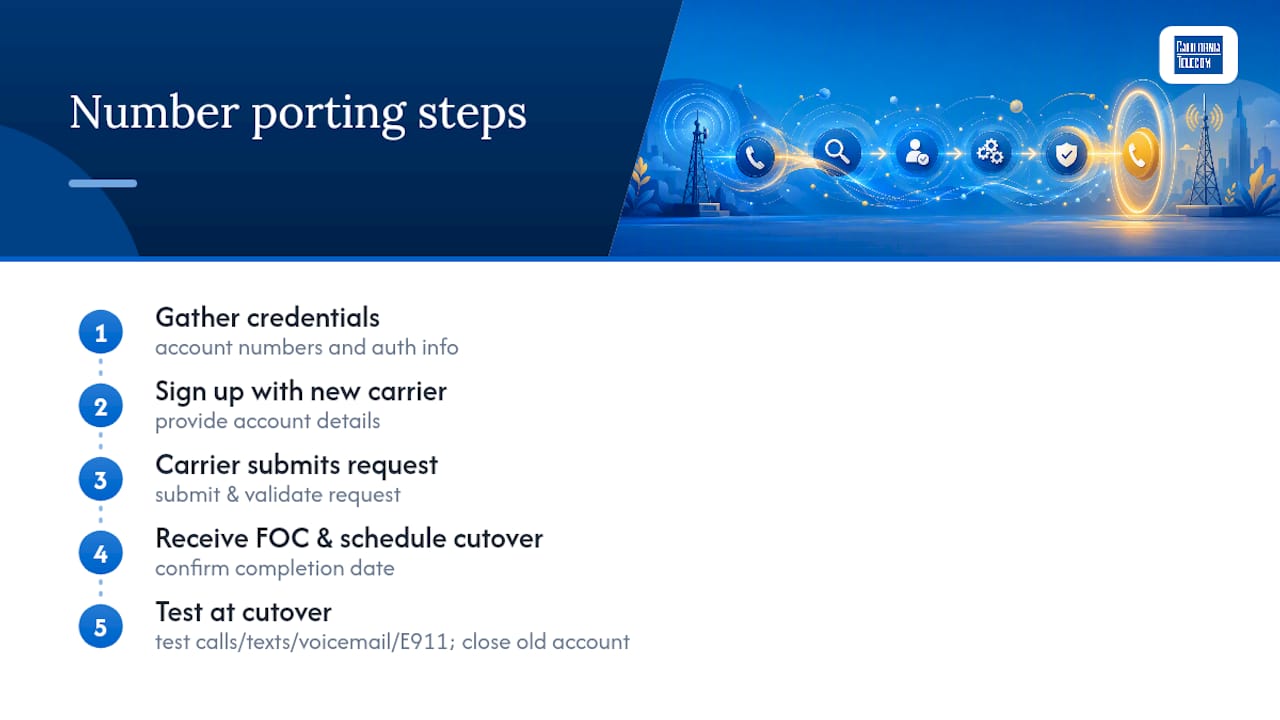
Here's how each step actually plays out.
Step 1: Gather your exact account information
Before you contact anyone new, log into your current carrier's account and pull three things: your account number, your transfer PIN (sometimes called a port-out PIN or passcode), and the exact billing name and service address on file. "Exact" is not a suggestion here. If your account lists "John A. Smith" and you write "John Smith" on the port request, that mismatch alone can trigger a rejection. Small discrepancies in address formatting, like "St." versus "Street," cause more failed ports than any technical glitch.
Step 2: Sign up with the new carrier and select "keep my number"
During checkout or account setup with your new provider, choose the option to port your existing number rather than get a new one. You'll be prompted to enter the account number, transfer PIN, and billing details you gathered in Step 1. Some carriers also ask for the last four digits of the account holder's Social Security number or a business tax ID, depending on account type.
Step 3: The new carrier submits the port request and validation begins
Once you submit your information, the new carrier files a port-in request with your current provider. This is where the losing carrier checks your submitted details against its own records. If everything matches, the request moves forward automatically. If not, it bounces back for correction. Most carriers now offer a status dashboard where you can track the request in real time rather than waiting on hold to ask what's happening.
Step 4: Receive your Firm Order Commitment and prepare for cutover
Once validated, you'll get a Firm Order Commitment (FOC), which is essentially a scheduled date and time when the port will execute. For simple ports this might be same-day or next-day. For business or multi-line ports, the window could be days out. Use this lead time to prepare, not to relax: back up voicemail greetings, note any call-forwarding rules you rely on, and tell anyone who needs a heads-up that there might be a brief service gap.
Step 5: Verify everything the moment cutover happens
When the port executes, test it immediately. Make an outbound call, have someone call you, send and receive a text, and check that voicemail is capturing messages correctly. Confirm your device displays the right caller ID name. If you rely on the number for emergency services (E911), verify that your new carrier has the correct registered address on file. This is not a step to skip, since ported VoIP numbers sometimes need a manual address update before 911 routing works correctly.
Step 6: Cancel your old service only after confirming success
Once you've verified calls, texts, and voicemail on the new carrier, and not a minute before, cancel the old account. Canceling early is one of the few porting mistakes that can be genuinely unrecoverable, since the old carrier may release the number back into the general pool once service is terminated on their end.
- Gather account number, transfer PIN, and exact billing details from your current carrier.
- Sign up with the new carrier and select the "port my number" option.
- Let the new carrier submit the port-in request and monitor validation status.
- Receive your Firm Order Commitment and prepare for the cutover window.
- Test calls, texts, voicemail, and E911 routing immediately after cutover.
- Cancel the old account only after full verification.
Pro Tip: Screenshot your port confirmation and FOC date. If a dispute comes up later about when service transferred, that timestamp is your best evidence.
How Long Does Number Porting Take?
Timing depends heavily on what kind of port you're running, and expecting every port to move at the same speed is where most frustration comes from. The FCC's one-business-day rule applies specifically to simple ports, generally a single line with no complex equipment changes, and only when the request is received complete between 8 a.m. and 1 p.m. A request submitted after 1 p.m. is treated as received the next business day.
Simple mobile-to-mobile ports often finish in minutes to a few hours in practice, well inside the regulatory floor.
Beyond the simple case, timing spreads out considerably:
- Mobile to mobile: Minutes to a few hours in most cases.
- Landline to mobile or VoIP: Typically several days, since legacy infrastructure requires more manual validation.
- Small business, multi-line ports: Usually 3 to 7 business days.
- PBX, PRI, or toll-free numbers: Can stretch to several weeks depending on carrier coordination and equipment changes.
What actually causes the delays? Mismatched account data is the biggest one, followed by pending orders already sitting on the account (you can't have two things happening to a line at once), port-out protection settings that block the release until disabled, and simple inter-carrier scheduling friction when the losing and gaining carriers use different validation systems.
What Documents Do You Need Before Starting a Port?
Carriers validate a specific set of fields, and having them ready before you start saves you from the back-and-forth that stalls most ports. Pull these together first:
- Account number and transfer PIN: Found in your online account portal or by calling customer service; some carriers issue a temporary port-out PIN valid only for a short window.
- Billing name and address exactly as printed: Copy it character-for-character from your latest bill or online statement, not from memory.
- Letter of Authorization (LOA), for business ports: A signed document authorizing the transfer, which must match the Customer Service Record (CSR) on file with the losing carrier.
- Customer Service Record (CSR): Request this from your current carrier before filling out the LOA. It's the authoritative source of truth the losing carrier checks your LOA against.
- Device unlock status: Confirm your phone is unlocked if you're switching wireless carriers, or the port can complete but leave you without a working device.
- Port-out protection: Check whether your current account has this enabled and disable it in advance, since it exists specifically to block unauthorized transfers.
Pro Tip: Request your CSR at least a day before you plan to submit a business port. Carriers don't always generate it instantly, and waiting on it mid-process just adds delay to a request you could have submitted clean the first time.
Why Do Number Ports Get Rejected, and How Do You Fix Them?
Most rejections trace back to one of a handful of predictable causes, and nearly all of them are fixable without restarting the whole request.
- Name or address mismatch: Pull your CSR and copy the billing name and address exactly, down to abbreviations and punctuation. This single issue causes the majority of failed business ports.
- Unauthorized signer on the LOA: Confirm who is listed as the authorized account contact with your current carrier before anyone signs the authorization form. A signature from the wrong person kills the request even if every other field is correct.
- Account locks, pending orders, or port-out protection: Call your current carrier and ask directly whether any of these are active. Pending equipment changes or unresolved balances can quietly block a release even though carriers can't legally refuse a port over an unpaid balance alone.
- What to do after a rejection: Identify the specific field that failed, correct only that field, and resubmit. You'll get a new FOC date rather than losing your place in line. If both carriers stall without resolving it, that's when you escalate to the FCC.
How Do Business and Multi-Line Ports Reduce Downtime?
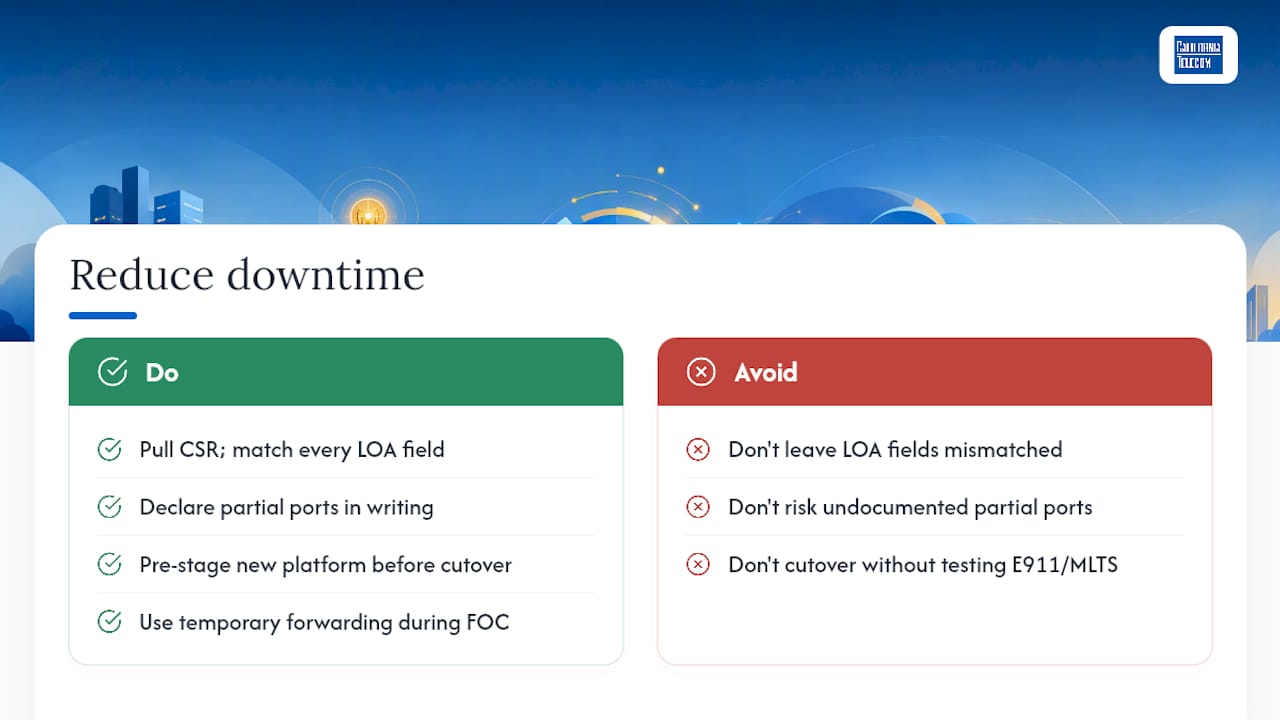
Business ports carry more moving parts, and the extra prep work pays for itself in avoided outages. Start by pulling a CSR and setting every LOA field to match it exactly, since this single step prevents most of the rejections that plague enterprise ports.
If you're only porting some numbers off a multi-line account, say so explicitly in writing to the losing carrier. Partial ports that aren't clearly documented risk the carrier closing the entire account instead of just the numbers you're moving, taking working lines down with it.
For contact centers and PBX environments, pre-stage the new platform before cutover day arrives. Use temporary call forwarding during the FOC window so incoming calls never hit dead air if timing slips by an hour or two, and test your E911 and MLTS routing before you rely on it in production. Build in a planning buffer of several extra days beyond the carrier's quoted timeline, since enterprise cutovers rarely land exactly on schedule the first time.
How Does a Managed Provider Handle Complex Ports?
Multi-location businesses porting a dozen lines across several carriers face a coordination problem more than a technical one. Californiatelecom handles that coordination directly: one engineer's number and one bill replace the usual scramble across carrier support lines, backed by a 24/7 U.S.-based NOC watching the process end to end.
- Pulls CSRs and builds LOAs that match losing-carrier records field for field, which is where most business rejections start.
- Pre-stages numbers on the new platform before cutover, so validation catches problems before they become downtime.
- Handles POTS replacement and contact center migrations against agreed SLAs rather than best-effort timelines.
What Should You Check Before You Port a Number Yourself?
Three checks catch nearly every problem before it starts: pull your CSR, confirm your transfer PIN is current, and verify the person signing any LOA is actually the authorized contact on file. Skip these and you're gambling on a clean first submission.
My rule of thumb: if you're porting more than five numbers, or you run anything resembling a contact center, bring in a managed provider instead of doing it solo. The coordination overhead across multiple carriers eats more time than the actual technical work, and a botched multi-line port can take down working phones you never intended to touch.
Keep whoever depends on those lines, staff, customers, vendors, informed of the exact cutover window in advance. A five-minute heads-up before the switch prevents a dozen confused calls during it.
— Jim
Ready to Port Without the Guesswork?
If you're managing more than a handful of lines, coordinating a port yourself means juggling losing-carrier support queues, LOA paperwork, and cutover timing across every location at once. Californiatelecom handles that coordination as one engineer-led process instead of a dozen separate carrier calls, backed by 99.999% uptime on voice service and a 24/7 U.S.-based NOC watching every cutover in real time.That means fewer rejected LOAs, pre-staged validation before cutover day, and someone who actually answers the phone when a port stalls at 4:55 p.m. on a Friday. Whether you're replacing legacy POTS lines, migrating a contact center, or consolidating numbers across retail locations, the same team that designs your network handles the port. Request a free network consultation and get a realistic port timeline for your specific setup before you submit anything.
Where Can You Find the Official Porting Rules?
For the regulatory text and carrier-specific tools behind everything covered here:
- FCC guidance on porting and consumer rights covers the one-business-day rule and what happens if a carrier delays your port improperly.
- 47 CFR Part 52 Subpart C is the underlying federal regulation establishing number portability intervals and validation requirements.
- Most carriers, including T-Mobile's port-in support page, publish their own transfer PIN process and status dashboards for tracking a submitted request.
Sources
- Porting: Keeping Your Phone Number When You Change Providers (FCC)
- Transfer your phone number (T-Mobile support)
- MNP step-by-step (Sim-Finder)
- How to submit a business number port (Viirtue)