

Runbook First Network Cutover Plan for Network EngineersA network cutover plan is a rehearsed, minute-by-minute runbook paired with objective rollback criteria and final pre-window backups, all built to move traffic on a schedule with defined success metrics. The best practice is simple to state and hard to execute: rehearse the sequence at least once before the live window, set data-driven rollback thresholds in advance, and confirm backups the moment before you start. Success means every dependency comes back clean, error rates stay under threshold, and nobody is guessing at 2 a.m.
TL;DR:
- Inventory and map all network dependencies, configurations, and credentials beforehand to prevent outages caused by overlooked details during cutover.
- Set clear, measurable success criteria and thresholds for errors, latency, and connectivity checks before the window opens, with stakeholder sign-off.
- Rehearse the entire procedure multiple times and build a detailed, step-by-step runbook to ensure smooth execution and effective rollback capabilities.
- Confirm final backups, run database syncs, and verify data integrity just prior to starting, treating this as a critical, scheduled step.
- Use a single command center with designated roles, structured communication, and real-time monitoring to coordinate the cutover and handle issues promptly.
Table of Contents
- What Goes Into a Network Cutover Plan Before You Design It
- How Do You Define Success for a Cutover?
- Big-Bang, Phased, or Parallel: Which Cutover Approach Fits?
- Pre-Cutover Readiness Checklist: What to Verify Before T-0
- Building a Minute-by-Minute Cutover Runbook
- Final Backups and Data Sync Before the Window Opens
- Setting Rollback Criteria So No One Has to Guess
- Why Rehearsals Catch What Checklists Miss
- Running the Command Center During the Cutover Window
- Confirming Stability After the Cutover
- How California Telecom Applies These Practices in Live Deployments
- What I've Learned Watching Cutovers Go Right and Wrong
- Get Cutover Execution Without Betting It on One Internal Team
- Templates and Guidance Worth Bookmarking
- Sources
- FAQ
What Goes Into a Network Cutover Plan Before You Design It
You cannot sequence what you have not inventoried. Before writing a single runbook step, pull a full device list with current configs, topology diagrams, VLAN assignments, and ACL rules, because gaps here surface as outages later, not on paper.
Map every service dependency the network touches:
- DHCP scopes and lease times, since a short lease window can force clients to renegotiate mid cutover
- DNS zones, TTLs, and any records pointing at IPs you are about to retire
- Active Directory sites and subnets tied to physical locations
- Database connections, load balancer pools, and any hardcoded IPs in application configs
Confirm credentials and out-of-band management access work before the window, not during it, and list monitoring endpoints so you know what "healthy" looks like beforehand. Finally, classify each service by risk. A guest WiFi VLAN and a core payment gateway do not deserve the same rollback tolerance.
How Do You Define Success for a Cutover?
Write the objective as one paragraph: scope, downtime window, and the exact systems in play. Vague scope is where cutover plans quietly fail.
Attach measurable criteria to it. Set an error rate threshold (say, under 1% sustained), a list of connectivity checks that must all pass, and an acceptable latency ceiling versus baseline. Require sign-off from network, application, and business stakeholders before the window opens, not during it. If a stakeholder cannot commit to a go/no-go call time, that is a scheduling problem to solve now, not a risk to inherit later.
Big-Bang, Phased, or Parallel: Which Cutover Approach Fits?
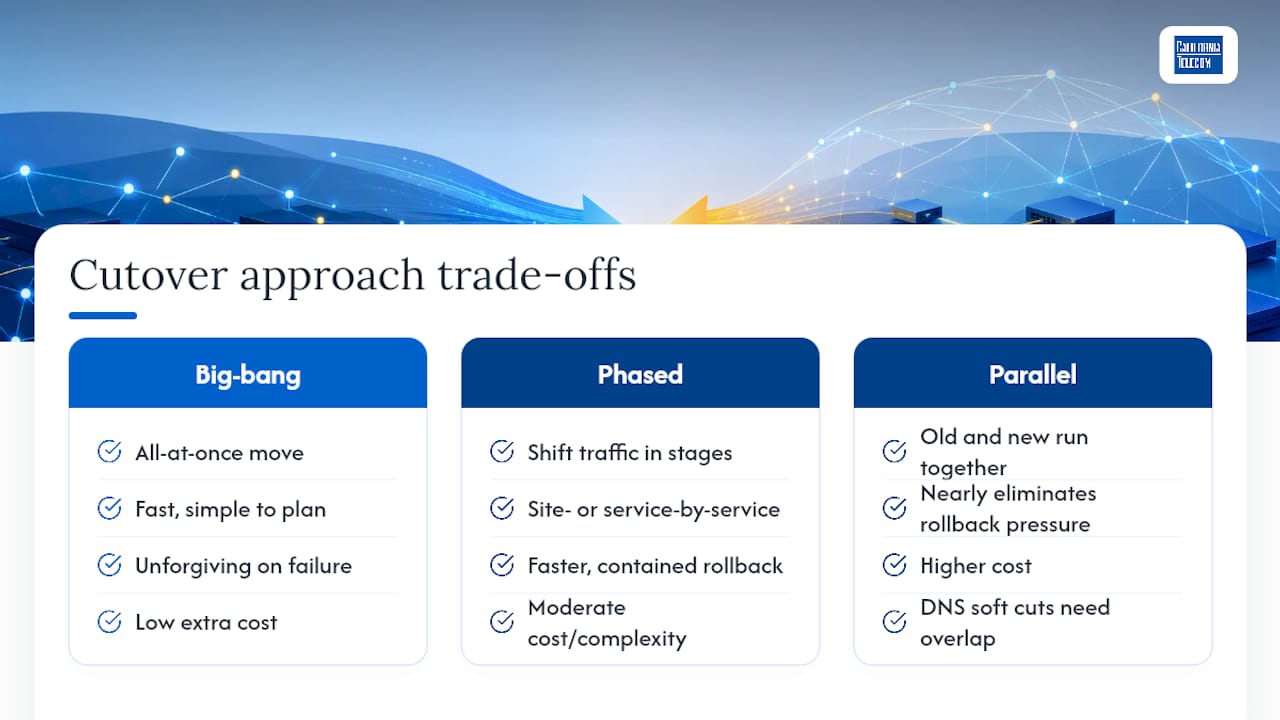
Big-bang cutovers move everything at once. They are fast and simple to plan but unforgiving if something breaks, since AWS's prescriptive guidance frames this trade-off directly when comparing all-at-once versus phased migration cutovers.
Phased cutovers shift traffic in stages, site by site or service by service, which gives you a faster, more contained reversion if one segment misbehaves. Parallel running, where old and new systems operate simultaneously, adds cost but nearly eliminates rollback pressure since the source stays live as a fallback.
DNS-based soft cuts feel gentle but carry a trap: propagation delay means some clients keep hitting the old IP for hours, so both networks need to stay live long enough for clients to catch up. Plan for that overlap window explicitly, or you will chase phantom failures that are really just stale DNS caches.
Pre-Cutover Readiness Checklist: What to Verify Before T-0
Readiness review starts days out, not hours out. Run a full walkthrough of the runbook with every owner present at T-3 days, and freeze non-essential configuration changes once that review passes.
Work backward from the window:
- T-3 days: Operational readiness review with all task owners; confirm test completion
- T-1 day: Configuration freeze in effect; final communication templates approved
- T-2 hours: Escalation roster confirmed and reachable; monitoring dashboards staged
- T-0 minutes: Final backup verification and data sync confirmed complete
The GSA's cutover framework treats this kind of staged readiness review, covering assessment, workforce, and change control, as a formal gate rather than an informal checklist, and that distinction matters when auditors or executives ask what "ready" meant.
Pro Tip: Build your escalation roster with backup contacts for every role. The person who wrote the DNS rollback step is not useful to you if they are asleep and unreachable at 1 a.m.
Building a Minute-by-Minute Cutover Runbook
A runbook is not a checklist with times attached. It is a script detailed enough that someone tired and stressed can execute it without improvising, and that only happens when every row carries the same fields.
- Task ID — sequential number for reference during execution
- Action — the exact command or change, not a summary of it
- Owner — one named person, never a team or role
- Duration — planned time, kept to 5 to 15 minutes per project management cutover templates, since anything longer hides drift and removes natural checkpoints
- Success criteria — the specific check that confirms the step worked
- Rollback action — what to do immediately if it did not
A router config push might get five minutes with a ping sweep as success criteria. A DNS TTL cutover might get fifteen, with success defined as resolution matching the new record from three geographic test points. Record actual timestamps next to planned ones as you go. That gap between planned and actual is often the first sign something downstream is about to slip.
Final Backups and Data Sync Before the Window Opens
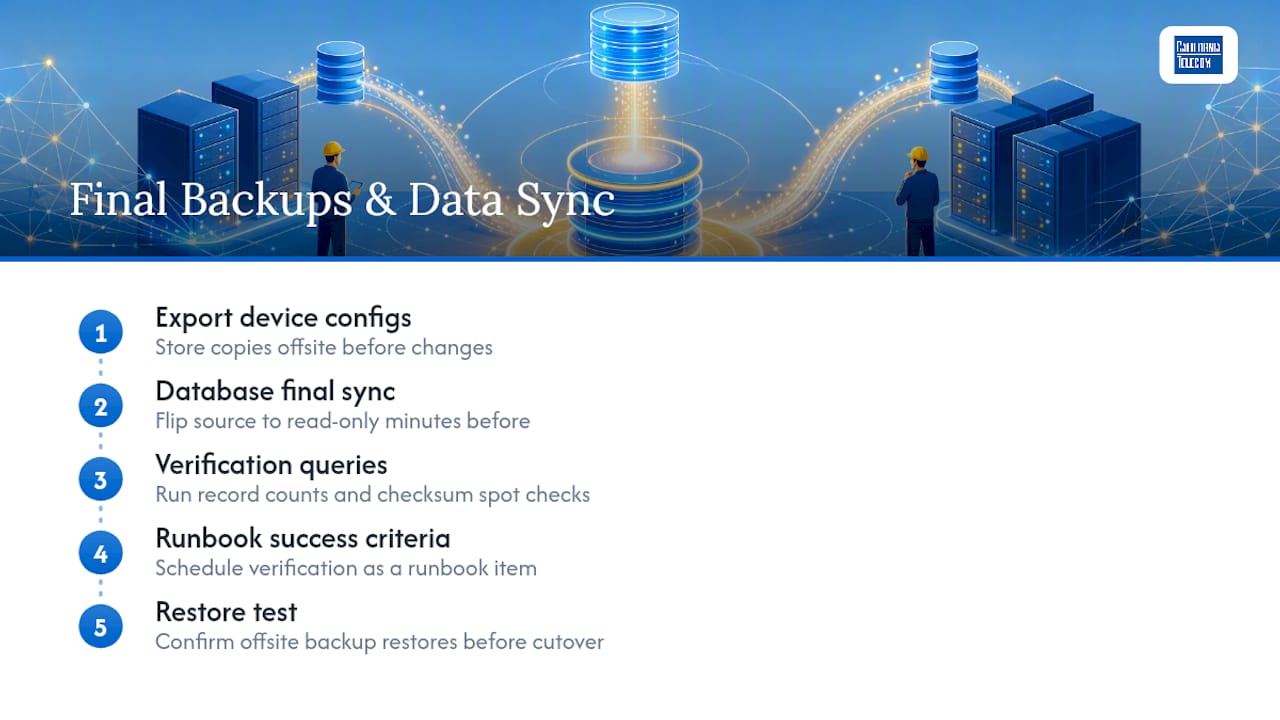
Export running configs from every router, switch, and firewall touched by the cutover, and store copies offsite before you touch anything live. This is the cheapest insurance in the entire plan, and it is the step most teams shortcut when they are behind schedule.
For databases, run a final sync and, where the application allows it, flip the source to read-only a few minutes before cutover starts to prevent last-second writes from getting lost. Run quick verification queries, record counts, checksum spot checks, against source and target to confirm the sync actually completed. AWS's runbook guidance treats this verification step as a scheduled runbook line item with its own success criteria, not an assumption. Confirm you can restore from the offsite backup before you need to, not after.
Setting Rollback Criteria So No One Has to Guess
Rollback decisions fail when they are subjective. "It feels broken" is not a threshold; "error rate exceeds 1% sustained for five minutes" is, and cutover practitioners increasingly treat that kind of data-driven line as standard rather than optional rigor.
- Define exact thresholds in advance: error rate, consecutive failed health checks, latency ceilings
- Name the single person with authority to call rollback, and set a hard time limit for that decision
- Script the rollback steps themselves: revert DNS, restore prior configs, re-enable the source system
- Log the rollback with timestamps and reasons, then schedule the retry window before the team disperses
Phased approaches make this easier because reverting a single segment's load balancer or DNS rule is far less disruptive than unwinding an entire big-bang cutover.
Pro Tip: Rehearse the rollback, not just the forward path. Teams that only practice the happy path freeze when the rollback trigger actually fires.
Why Rehearsals Catch What Checklists Miss
A tabletop walkthrough gets the team talking through the runbook out loud, catching missing owners or unclear success criteria before anyone touches a device. A partial dry-run executes a slice of the plan, often in a lab or off-peak window, to validate the riskiest steps specifically.
A full dress rehearsal runs the entire sequence end to end, timing included, ideally against a staging environment that mirrors production. Success looks like hitting your planned durations and having every rollback step actually work when triggered on purpose. Triage what breaks, update the runbook, and if rehearsal surfaces a serious gap, reschedule the live window rather than hoping it goes better the second time for free.
Running the Command Center During the Cutover Window
One room, one call bridge, one shared document. Multiple sources of truth during a live cutover is how conflicting status reports turn a contained issue into a chaotic one.
- Cutover lead: owns the go/no-go call and the master timeline
- Technical execution leads: run the actual runbook steps per domain (network, voice, database)
- Communications owner: pushes status updates on a fixed cadence, not on demand
- Monitoring watch: owns the dashboards and flags threshold breaches immediately
Set a communication cadence, every 15 or 30 minutes, so stakeholders get predictable updates instead of silence punctuated by panic.
Confirming Stability After the Cutover
Run immediate health checks and transaction tests the moment traffic moves, then verify data reconciliation between old and new systems. Keep heightened monitoring active for at least the first 72 hours, since intermittent issues often surface under real load, not synthetic tests.
Set alert thresholds tighter than normal during this window, then document lessons learned while details are still fresh and feed them back into the runbook template for the next cutover.
How California Telecom Applies These Practices in Live Deployments
California Telecom runs cutovers for multi-site clients backed by a 24/7 U.S.-based NOC, with engineers designing and executing each site's sequencing rather than handing you a template and walking away. Managed execution means one point of contact owns the runbook, the rollback call, and the network monitoring that catches drift before it becomes an outage, a meaningful difference from a self-managed cutover where those responsibilities scatter across internal teams already stretched thin.
What I've Learned Watching Cutovers Go Right and Wrong
Rehearse the sequence, define rollback thresholds before you need them, and take your final backup immediately before the window, not the night before. I've seen teams skip rehearsal and lose an hour to a config step nobody tested. I've seen teams with a rehearsed runbook and clear rollback math finish early, with time to spare for coffee.
— Jim
Get Cutover Execution Without Betting It on One Internal Team
California Telecom is the alternative to running a multi-site cutover on internal bandwidth alone: you get engineers who design and execute the runbook, a 24/7 U.S.-based NOC watching the window, and 99.99% uptime SLAs on the connectivity behind it, all through one point of contact instead of chasing multiple carriers mid-cutover.That matters most when a cutover spans several locations at once, where a single missed dependency at one site can cascade into a rollback call across all of them. Whether the move involves Managed SD-WAN across sites or a straight dedicated fiber migration, the runbook discipline described above is exactly how California Telecom's engineers plan the window before they ever touch a device. If a cutover is on your calendar, start a free consultation and get the runbook built before the date gets fixed, not after.
Templates and Guidance Worth Bookmarking
For deeper reference, AWS's cutover runbook guidance includes a sample template, the GSA's go-live framework covers federal-grade change control, and Project Management Formula's cutover template offers a practical rollback matrix worth adapting.
Sources
- AWS Prescriptive Guidance - Best practices for cutting over network traffic to AWS during a migration
- 4.17 Develop and Execute Cutover Plan for Go-Live
- Cutover Plan Template – Project Management Formula
FAQ
What Is a Cutover in Networking?
A cutover is the planned moment a network switches from an old system, carrier, or configuration to a new one, usually within a defined maintenance window. It covers everything from a carrier swap to a full data center migration, and it always carries the risk of the new system not behaving like the old one.
What Should Be Included in a Cutover Plan?
A complete plan includes a discovery inventory, defined success metrics, a minute-by-minute runbook with owners and rollback actions, a final backup and sync step, and documented rollback decision criteria. It also needs a communication plan and a rehearsal, since AWS's migration guidance treats rehearsal as a standard part of a workable cutover workbook, not an optional extra.
What Is the Purpose of a Cutover Plan?
The purpose is to remove guesswork from a high-risk change window by pre-defining every step, owner, and decision point in advance. That preparation is what turns a live cutover from an improvised scramble into an executable sequence with a clear go or no-go signal at every stage.
What Does "Cutover Plan" Mean in Practice?
In practice, it means a document and a rehearsed process, not just a schedule. It pairs a sequenced runbook with objective rollback thresholds and confirmed backups, so the team executing the window is following a script rather than reacting in real time.
Can California Telecom Manage the Cutover for Us?
Yes. California Telecom designs and executes network cutovers for multi-site businesses through its own engineers, backed by a 24/7 U.S.-based NOC and runbook-driven sequencing rather than a handoff template. Pricing depends on scope and site count, and current details are available through a free consultation.