

Network Engineers: 5 Step Runbook for Firewall High AvailabilityFirewall high availability pairs two or more firewalls, one active and one or more standing by, so a hardware failure, software crash, or maintenance window doesn't take your network security offline. The primary appliance handles traffic while the secondary mirrors its session state through a dedicated sync link, ready to take over quickly, typically within a few seconds. Deploy it for anything mission-critical or bound by compliance requirements like PCI DSS or HIPAA; for smaller, less regulated sites, weigh the licensing and operational overhead against simpler alternatives like dual ISP links before committing.
TL;DR:
- Active/standby mode is the most common and simplest HA configuration, ensuring quick failover with synchronized session states, but it halves capacity.
- Failover detection relies on dedicated links: a low-bandwidth failover link for health checks and separate high-bandwidth sync links for session data, both requiring proper sizing.
- Practical failover times are often several seconds under real traffic loads, so testing HA with actual production conditions is essential to verify recovery time.
- Proper design includes matched hardware and firmware, separate physical links for failover and sync, and alignment with upstream routing protocols to prevent misconfigurations.
- Continuous monitoring of sync latency, heartbeat packets, interface errors, and resource usage on both firewalls is critical to prevent silent failures and ensure reliable HA operation.
Table of Contents
- What Firewall High Availability Means and Why It Matters
- HA Modes and Topologies: Active/Standby, Active/Active, N+1, and Clustering
- How Firewall Failover Actually Works: Links, Timing, and State
- Design Considerations: Topology, Interfaces, and FHRP Integration
- Split-Brain, Sync Overload, and the Other Ways HA Fails
- The Operational Runbook: Deploying and Testing HA the Right Way
- Monitoring, Maintenance, and Keeping HA Reliable Over Time
- When Firewall HA Isn't the Right Call
- How California Telecom Approaches HA for Multi-Location Businesses
- Managed Firewall HA, Backed by a 99.99% Uptime SLA
- Sources
What Firewall High Availability Means and Why It Matters
A single firewall is a single point of failure. Power supply dies, an operating system bug forces a reboot, someone fat fingers a config push, and every session running through that device drops. No warning, no graceful handoff, just a hard stop until someone drives to the data center or remotes into the console.
Firewall high availability solves this by putting a second, identically configured appliance in the path, silently tracking every session the active unit handles. When the active device fails a health check, the standby takes over the same IP addresses, MAC addresses, and connection table. To the rest of the network, nothing changed. A high-availability cluster is the general pattern behind this: multiple nodes arranged so a service survives the loss of any single member, and firewall vendors from Cisco to Fortinet to Palo Alto Networks all build their HA implementations on that same principle.
The real goals HA delivers go beyond "don't go down":
- Session preservation. Stateful failover means an active VPN tunnel, a database connection, or a voice call doesn't get reset when the primary firewall drops.
- Elimination of a single point of failure. No single hardware fault, power event, or software crash can take the whole security boundary offline.
- Maintenance without downtime. You patch, upgrade firmware, or swap hardware on one unit while the other carries traffic, then flip roles.
- Predictable recovery time. Instead of an unknown outage window measured in the time it takes someone to notice and respond, failover happens quickly and is testable in advance.
Not every environment needs this. A single branch office running a guest Wi-Fi network and nothing else probably doesn't justify the licensing cost and operational complexity of a matched HA pair. Data centers, headquarters sites, e-commerce infrastructure, healthcare networks handling PHI, and financial services environments are the classic candidates, anywhere an outage translates directly into lost revenue, compliance exposure, or patient safety risk. For a branch office or a low-traffic remote site, a resilient internet connection and a fast recovery process might deliver equivalent real-world uptime for a fraction of the cost, a point worth revisiting once you understand what HA actually requires operationally.
HA Modes and Topologies: Active/Standby, Active/Active, N+1, and Clustering
Choosing a topology is really choosing a trade-off between simplicity and throughput. Here's how the main options stack up.
-
Active/standby (active/passive). One firewall processes all traffic. The other sits idle, synchronized and ready, doing nothing but waiting. This is the default HA mode on the vast majority of enterprise firewall deployments because it's simple to configure, simple to troubleshoot, and every major platform supports it without exception. Cisco's Secure Firewall documentation describes the dedicated failover and stateful links this mode requires to keep the standby's session table current with the active unit. The trade-off is capacity: you have two firewalls but normally use only one at a time.
-
Active/active. Both firewalls forward traffic simultaneously, sharing the load rather than one sitting idle. This sounds like an obvious win until you account for asymmetric routing. If a session's outbound packets traverse firewall A and the return packets arrive at firewall B, and B has no record of that session in its state table, it drops the traffic or has to consult A over the sync link for every packet, which adds latency and sync-link load. Active/active earns its complexity in high-throughput environments where you genuinely need the combined capacity of both appliances, and it demands careful routing design so traffic stays symmetric. Practical testing from network engineers running these clusters under production loads confirms the pattern: active/standby delivers cleaner, more predictable failover in most real deployments, while active/active only pays off when the throughput math actually requires it.
-
N+1 and clustering. Beyond two-node HA, some platforms support clusters of three or more firewalls presenting a single logical control plane to the rest of the network. This is less about failover and more about horizontal scale, spreading session load across N active members with one or more standing by as spare capacity. Clustering matters most in carrier-grade or very large data-center deployments where a single appliance, no matter how big, can't handle peak throughput. Non-stop forwarding, keeping routing protocol adjacencies like BGP alive across a cluster member failure, becomes the harder engineering problem here, and it's worth confirming your platform's graceful-restart behavior before you assume a cluster failure won't ripple into your routing table.
One constraint trips up a lot of teams during initial design: virtual firewall appliances running in cloud or virtualized environments often only support active/standby, not active/active or clustering, regardless of what the physical appliance line supports. If your architecture plan assumes active/active on a virtualized firewall, check the platform's HA documentation before you build the network around that assumption. Palo Alto Networks, Fortinet, and Cisco all publish platform-specific HA configuration guides that spell out exactly which modes each hardware and virtual model supports, and that page is worth bookmarking before you finalize a design.
How Firewall Failover Actually Works: Links, Timing, and State
Two separate physical (or logical) links do the work behind every HA pair, and confusing their jobs is a common design mistake.
The failover link (sometimes called the hello or heartbeat link) carries the health check traffic: are you alive, are you healthy, do you agree on who's active. It's low bandwidth but latency sensitive, because the whole failover decision hinges on how fast a missed heartbeat gets detected. The stateful synchronization link is a different animal entirely: it carries the actual session table, every active connection, its state, its NAT translation, its VPN security association, replicated in near real time from active to standby. Cisco's HA documentation is explicit that these are logically distinct functions, even when some platforms let you run both over the same physical interface on lower-throughput deployments. On anything carrying meaningful session volume, separate them onto dedicated interfaces.
When failover happens, the standby doesn't just start passing traffic, it takes over identity. That means:
- A virtual IP address shared by both units moves its active binding from the failed unit to the standby.
- A virtual MAC address moves with it, so downstream switches and routers don't need to relearn anything through ARP. Without MAC takeover, every connected device would need to flush its ARP cache and relearn the gateway's MAC, adding seconds of disruption right when you need none.
- The standby's synchronized session table already contains the state for every active connection, so TCP sessions, VPN tunnels, and NAT mappings continue rather than reset.
Pro Tip: Size your sync link for peak session churn, not average throughput. A firewall doing heavy TLS inspection or handling a burst of new connections during a DDoS event generates far more state-sync traffic per second than its steady-state bandwidth suggests, and an undersized sync link is the single most common cause of failover misbehavior.
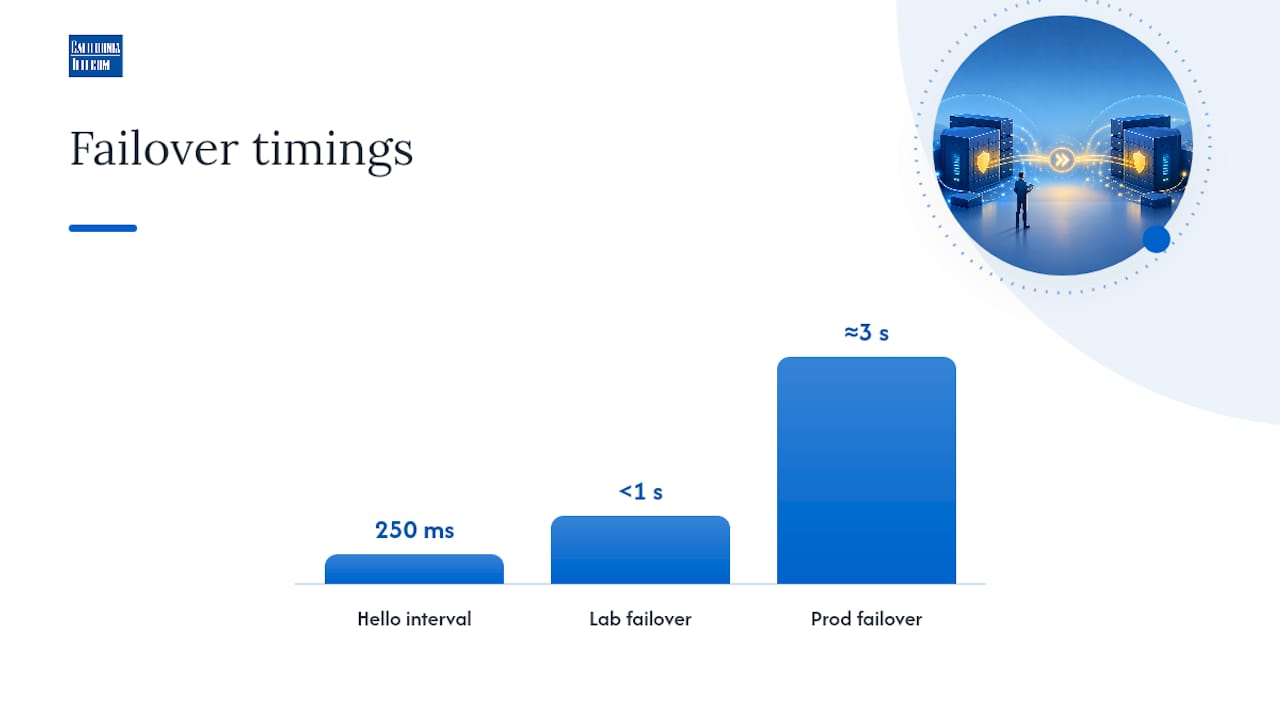
Detection timing is where "subsecond failover" marketing claims meet reality. Modern platforms can detect a dead peer and complete failover in under a second under clean lab conditions, hello intervals as tight as 200 to 300 milliseconds with a few missed beats triggering the switch. But that number assumes the sync link isn't saturated and the standby's state table is fully current. Under real production load, with long-lived sessions, high connection-creation rates, and TLS inspection all competing for CPU and sync bandwidth, failover often lands in the low single-digit seconds rather than the marketing sheet's subsecond figure. Testing HA failover under conditions that actually resemble your production traffic, not a clean lab benchmark, is the only way to know your real recovery time, a distinction that matters enormously if your SLA promises a specific recovery window.
Design Considerations: Topology, Interfaces, and FHRP Integration
Getting HA right starts before you rack the second firewall. A few decisions made at design time determine whether the pair behaves predictably under failure or becomes a source of mystery outages six months later.
Pair versus cluster comes down to your actual uptime and throughput requirements, not what sounds more robust on paper. Most enterprise deployments, even large ones, are well served by a two-node active/standby pair. Reach for a cluster only when a single appliance's maximum throughput genuinely can't cover your peak load, because clustering adds control-plane complexity that a simple pair doesn't carry.
Interface redundancy deserves the same scrutiny as the firewall pairing itself. An HA pair with two perfectly healthy firewalls but a single point of failure on the switch side hasn't actually solved the problem. Build in:
- Redundant physical cabling to each firewall from separate switches where the budget allows it.
- EtherChannel or link aggregation on interfaces carrying meaningful throughput, so a single cable or transceiver failure doesn't force a full firewall failover for what should be a non-event.
- Diverse upstream paths so both firewalls in the pair have independent routes to the internet or WAN, not a shared upstream chokepoint.
The interaction between firewall HA and first-hop redundancy protocols, HSRP, VRRP, or GLBP, is where a lot of designs quietly break. If your firewall pair sits behind a router pair running VRRP, and the firewall's virtual IP takeover timing doesn't align with the router's failover detection, you can end up with a window where the router thinks the path is up but the firewall hasn't finished its own transition. Design both failover domains together, and test the combined failure scenario, not just each device in isolation, because a passing HA test on the firewall alone tells you nothing about how the stack behaves when both layers fail in sequence.
Before deployment, confirm licensing covers HA operation (some platforms license the standby unit separately), that both units run matched hardware models and firmware versions, and that your chosen throughput tier has headroom for the sync-link and health-check overhead HA adds on top of normal traffic processing. A pair with mismatched firmware is a common cause of failovers that succeed in testing but fail unpredictably in production, since state-table formats can shift between versions.
Split-Brain, Sync Overload, and the Other Ways HA Fails
HA is supposed to eliminate downtime, not create a new category of it. But a handful of failure modes show up again and again in practitioner troubleshooting notes, and knowing them in advance cuts diagnosis time from hours to minutes.
-
Split-brain. Both firewalls believe they're the active unit and both try to claim the same virtual IP and MAC address simultaneously. This is almost always caused by a failed or overloaded heartbeat link that makes each unit think the other has died. The fix starts with dedicating the sync and failover links to HA traffic alone, never sharing them with general data-plane traffic, and confirming both units agree on priority and preemption settings so there's no ambiguity about which one should win a tiebreak.
-
Under-provisioned sync links. A sync link sized for the firewall's launch-day traffic volume, but never revisited as session counts grew, becomes a bottleneck that shows up as delayed state replication, intermittent session drops during normal operation, and, eventually, split-brain under load. Capacity planning here isn't optional; it's a recurring maintenance task tied to your traffic growth.
-
Asymmetric routing in active/active. When outbound and return traffic for the same session traverse different cluster members, the member that never saw the outbound leg has no state for the return packets. Symptoms look like random, hard-to-reproduce connection drops that correlate with specific routing paths rather than firewall health. Packet captures on both cluster members during a reported issue, compared side by side, usually reveal the asymmetry within minutes.
-
Upgrade and maintenance missteps. Pushing a firmware update to both HA members at the same time, rather than one at a time with a verified failover in between, is one of the most common ways teams accidentally cause the exact outage HA was supposed to prevent.
The most persistent lesson from practitioner troubleshooting threads: under-provisioned or shared-bandwidth sync links are the root cause behind a disproportionate share of split-brain incidents, and isolating that link is a fix, not a workaround.
The Operational Runbook: Deploying and Testing HA the Right Way
A firewall HA pair is only as good as the last time someone actually tested it. Configuring HA and never forcing a real failover is how teams discover, mid-outage, that the standby unit has been silently broken for months.
Pre-deployment checklist:
- Confirm both firewalls run matched hardware models and identical firmware versions, no exceptions.
- Verify configurations are identical outside of HA-specific settings like unit priority, and reconcile any drift before enabling HA.
- Provision dedicated physical interfaces for the failover/hello link and the stateful sync link, separate from data-plane traffic.
- Confirm licensing covers HA operation on both units and that throughput tier and session-table capacity have headroom for your actual traffic, not just today's baseline.
- Document virtual IP and MAC assignments and confirm they don't collide with anything else on the segment.
Planned failover test:
- Schedule the test during a low-traffic maintenance window and notify anyone monitoring dashboards so a forced failover doesn't trigger a false-alarm page.
- Force failover manually rather than pulling a power cable, most platforms have a documented command for this, then confirm the standby assumes active role within the expected detection window.
- Watch the sync link and CPU utilization on the newly active unit during the transition; a spike that doesn't settle within a few seconds signals undersized capacity.
- Confirm active sessions, an ongoing VPN tunnel or a long-lived TCP connection, survive the transition without resetting.
Post-failover verification:
- Check that routing adjacencies, BGP or the FHRP protocol running upstream, reconverged cleanly and within their own expected timers.
- Run smoke tests against critical services: a VPN client reconnect, an internal application transaction, a DNS lookup, confirming each completes normally.
- Pull logs from both units covering the failover window and archive them, this is your baseline for comparing against an unplanned failover later.
- Fail back deliberately and repeat the verification, since a pair that fails over cleanly but fails back badly is only half tested.
If a unit needs physical replacement, isolate it from the HA pair first, confirm the remaining unit is stable and fully synced solo, then bring the replacement in with matched firmware before rejoining it to the pair. A staged runbook like the one California Telecom documents for SD-WAN failover testing follows the same logic: test in a controlled window, verify at every step, and never assume a config that looks right will behave right until you've forced the failure yourself.
| Runbook stage | What to verify | Why it matters |
|---|---|---|
| Pre-deployment | Matched hardware, firmware, and configs | Mismatches cause failovers that pass testing but fail in production |
| Forced failover test | Session survival, sync link load, CPU spike | Confirms failover behaves the same under load as in a clean lab |
| Post-failover checks | Routing reconvergence, service smoke tests | Confirms the network, not just the firewall, recovered fully |
| Failback | Repeat verification in reverse | A pair that fails over cleanly can still fail back badly |
Monitoring, Maintenance, and Keeping HA Reliable Over Time
HA degrades silently if nobody's watching it. The most dangerous state for an HA pair isn't an active failure, it's a standby unit that's quietly out of sync and nobody notices until the day it's needed.
The metrics worth alerting on:
- Sync latency between active and standby, rising latency is an early warning of link saturation.
- Hello or keepalive loss rate, even occasional missed heartbeats point toward a link or CPU problem worth investigating before it causes a false failover.
- Interface errors on the dedicated failover and sync links specifically, not just aggregate interface health.
- CPU, memory, and session-table depth on both units, since a standby running near capacity can't actually absorb the active unit's load if failover happens.
Vendor monitoring guidance consistently points to these same four categories as the leading indicators of HA health, and building alerts around them catches most problems before they become outages. A managed network monitoring setup that tracks these metrics continuously, rather than relying on someone checking a dashboard periodically, closes the gap between "HA is configured" and "HA actually works when called on."
Pro Tip: Schedule forced failover drills on a calendar, not as an ad hoc "we should probably test this sometime" task. Quarterly is a reasonable baseline for most enterprise pairs; monthly if your environment changes configuration frequently enough that drift between units is a real risk.
Firmware and patch strategy matters just as much as monitoring. Stagger upgrades, patch the standby first, confirm it's healthy and stable, force a failover so it becomes active, then patch the former active unit. Never patch both simultaneously. Combine this with periodic configuration audits comparing both units' running configs (outside HA-specific settings) to catch the slow drift that accumulates from one-off changes made under pressure and never mirrored to the peer.
When Firewall HA Isn't the Right Call
HA isn't free, and pretending otherwise leads teams to deploy it everywhere regardless of whether the site actually needs it. Two firewalls cost more than one, both in hardware and in licensing, and someone has to understand HA well enough to troubleshoot it when something goes wrong at 2 a.m.
Some practitioners make a reasonable case that firewall HA is oversubscribed as a default relative to the actual risk it addresses at smaller or lower-criticality sites, and the argument holds up: a branch office with a redundant internet connection and a same-day hardware replacement contract might achieve equivalent real-world availability without the ongoing operational burden of a synchronized pair.
Consider skipping HA, or at least questioning the default, when:
- The site has low traffic and isn't running anything transaction-critical or compliance-bound.
- A multi-path internet setup already provides connectivity resilience, and a firewall outage would mean a short manual failover rather than a hard business stop.
- Your team lacks the bandwidth to properly test and maintain an HA pair, an untested HA pair is arguably worse than no HA at all, because it creates false confidence.
- Automation and fast hardware replacement (spare unit on the shelf, configs backed up, a documented swap procedure) can restore service within an acceptable window without the ongoing sync-link and monitoring overhead.
The decision really maps to two questions: how much does an hour of downtime cost this specific site, and does a compliance framework mandate redundancy regardless of that cost? Answer both honestly before defaulting to a matched pair everywhere.
How California Telecom Approaches HA for Multi-Location Businesses
Every design principle above holds up in a lab. What separates a lab-clean HA pair from one that survives a real production incident is whether anyone tested it under conditions that actually resemble your traffic, and whether anyone's watching the sync link at 3 a.m. on a Tuesday.
California Telecom builds firewall HA into multi-location network designs the same way we approach dual ISP failover: sourcing connectivity from 50+ carriers so the sync and failover links themselves aren't riding a single point of failure, dedicating bandwidth to state synchronization rather than sharing it with production traffic, and running forced failover tests on a documented runbook cadence rather than trusting a configuration nobody's touched since install day.
A managed model earns its keep specifically where in-house teams are stretched thin across multiple sites and can't dedicate someone to owning HA testing and monitoring full time. Our 24/7 U.S.-based NOC watches the same hello-loss and sync-latency metrics this article covers, across every location, so a degrading standby unit gets flagged before it becomes a failed failover. If your team has the depth to own this in-house, do it. If HA is one of a dozen things competing for attention across distributed sites, that's exactly the gap a managed operation is built to close.
— Jim
Managed Firewall HA, Backed by a 99.99% Uptime SLA
If you've read this far, you already know firewall HA done right takes dedicated sync links, matched hardware, disciplined testing, and someone watching the metrics every day, not just during the quarterly drill. California Telecom builds all of that in from day one, sourcing connectivity across 50+ carriers so your failover links and internet paths never share a single point of failure, and backing the whole design with a 99.99% uptime SLA on data services.Our engineers design and deploy the HA pair at each of your sites individually, then our 24/7 U.S.-based NOC monitors it continuously and runs the forced-failover drills this guide describes, so you're not relying on a configuration nobody's tested since installation. That's the difference between HA that looks right on paper and HA you can actually trust during a real outage. Whether you're standardizing firewall resilience across a handful of locations or a few hundred, our managed firewall services handle design, deployment, and ongoing operation as one contract with one engineer's number to call, not a stack of vendors to coordinate.
If your team is stretched across multiple sites and HA testing keeps sliding down the priority list, request a consultation and we'll walk through what a managed HA deployment looks like for your specific network.
Sources
For command-level configuration, go straight to the vendor. Cisco's Secure Firewall HA documentation covers failover and stateful link setup in detail, while Palo Alto Networks' HA guide breaks down platform-specific mode support and licensing requirements. Fortinet's community threads on split-brain troubleshooting are worth bookmarking for the exact symptom-to-cause mapping practitioners rely on in the field.
For the underlying cluster theory, the Wikipedia entry on high-availability clusters lays out the general pattern behind every vendor's implementation. For monitoring specifics, ManageEngine's HA monitoring guidance lists the metrics worth alerting on. And for a runbook template you can adapt, California Telecom's SD-WAN failover runbook follows the same test-verify-document structure this guide recommends for firewall HA.
- High-availability cluster — Wikipedia
- High Availability for Devices — Cisco Secure Firewall
- High Availability Monitoring in Firewall Analyzer — ManageEngine
- High-availability split brain — Fortinet Community