

MS Teams Direct Routing: Enterprise Planning and SetupDirect Routing is the right call when your enterprise needs to keep existing PSTN carrier contracts, connect legacy PBX or paging systems, or route calls through a specific certified SBC instead of Microsoft's own carrier network. If you fit that profile, your next move isn't reading another explainer. It's a three-item inventory: confirm you have a certified SBC (or budget for one), audit your current PSTN trunk contracts for portability, and check whether your Microsoft 365 tenant already has the licensing to support Teams Phone. If any of those three is missing, you have your starting point.
Direct Routing gives you full control over routing logic, carrier relationships, and billing, which is exactly why enterprises with bespoke telephony needs — contact centers, compliance recording, overhead paging — pick it over Operator Connect or a Microsoft Calling Plan. That control comes at a cost: you now own SBC lifecycle management, certificate rotation, and carrier relationships instead of handing them to Microsoft.
- Inventory your current PSTN trunks and confirm carrier portability terms.
- Check your Microsoft 365 tenant for Phone System and Calling Plan license status.
- Contact a certified SBC vendor or a managed services provider to scope hardware or virtual appliance needs.
Direct Routing exists for one reason: it lets an enterprise keep its carrier relationships and legacy integrations while still putting Teams in front of every user's desk phone. If you don't need that flexibility, Operator Connect will get you there faster. If you do, treat the SBC as the project's central nervous system, not an afterthought.
Microsoft's own Plan Direct Routing documentation, the RFC standards Microsoft cites for SIP behavior, and DigiCert's root CA list are the three references you'll return to most during deployment. Everything below maps those official requirements to the operational decisions that actually determine whether your rollout succeeds.
Key Takeaways
Direct Routing succeeds when the SBC, certificate lifecycle, and carrier relationships are treated as ongoing operational responsibilities, not one-time setup tasks.
| Point | Details |
|---|---|
| Choose Direct Routing for control | Pick it when you need legacy PBX integration, custom routing, or existing carrier contracts Operator Connect can't accommodate. |
| Validate FQDN and licensing first | Confirm your SBC's domain is registered in the tenant with a licensed user before attempting the pairing. |
| Use only certified SBCs | Vendors like AudioCodes and Ribbon Communications must run certified firmware, or Microsoft support is void. |
| Keep root CAs current | Ensure your SBC trusts DigiCert and other Microsoft-listed root CAs, and test changes at the published testing endpoint before rollout. |
| Own the operational lifecycle | HA design, E911, and number porting are customer and carrier responsibilities, not Microsoft's, so budget for them accordingly. |
| Consider managed deployment | Californiatelecom's managed voice and multi-carrier sourcing model gives enterprises SLA-backed Direct Routing operations without building an in-house voice engineering team. |
Bookmark these resources for design and troubleshooting
- Plan Direct Routing covers infrastructure prerequisites, IP ranges, and licensing requirements in full detail.
- Configure Direct Routing walks through the SBC pairing and user enablement sequence with exact PowerShell syntax.
- Certified Session Border Controllers lists supported vendors and firmware versions, plus Microsoft's support boundary policy.
- Direct Routing protocols and RFCs documents the SIP standards Teams implements and the specific deviations SBC configurations must account for.
- Direct Routing: what's new tracks upcoming certificate and infrastructure changes along with the testing endpoint for validating SBC trust ahead of rollout.
Table of Contents
- What Infrastructure Does MS Teams Direct Routing Require?
- Which Microsoft Licenses Affect Teams Voice Routing?
- Which SBCs Are Certified for MS Teams Direct Routing?
- What Certificates and Root CAs Does Direct Routing Require?
- How Does SIP Signaling Work in Direct Routing?
- What Media Traffic and Codec Requirements Apply?
- What RFC Standards Does Direct Routing Follow?
- How Do You Configure MS Teams Voice Routing Step by Step?
- Who Handles High Availability, E911, and Number Porting?
- How Do You Troubleshoot Direct Routing Call Failures?
- Should You Manage Direct Routing In House or Hire a Provider?
- Get Help Deploying and Managing MS Teams Direct Routing
- Sources
What Infrastructure Does MS Teams Direct Routing Require?
Before you touch a configuration screen, six components need to exist and be validated: a certified SBC, one or more PSTN trunks, an active Microsoft 365 tenant with the right licensing, a public FQDN dedicated to the SBC, a publicly trusted certificate issued to that FQDN, and a static public IP or a NAT design that Teams can reliably reach.
The FQDN requirement trips up more teams than anything else early on. Microsoft requires that the domain backing your SBC's FQDN be registered in your Microsoft 365 tenant, and that domain needs at least one licensed user before Teams will accept the FQDN during SBC pairing. Skip this step and your SBC connection attempt fails with an error that has nothing obviously to do with licensing.
| Component | Requirement | Common failure point |
|---|---|---|
| SBC | Must appear on Microsoft's certified SBC list | Using outdated or uncertified firmware |
| PSTN trunk | Active carrier connection terminating on the SBC | Carrier contract doesn't support the required call volume |
| Microsoft 365 tenant | Phone System license assigned to voice users | Licensing applied to the wrong user or group |
| Public FQDN | Domain owned and verified in the tenant | Domain not registered, or no licensed user exists on it |
| TLS certificate | Publicly trusted CA, matching the FQDN exactly | Self-signed certs or expired chains |
| Network path | Static IP or documented NAT, correct ports open | Firewall blocking signaling or media ports |
Run through pre-deployment validation in this order: confirm SBC firmware is on the certified version, verify the FQDN resolves publicly and matches the certificate's subject name, then open a support case with your carrier to confirm trunk capacity matches expected concurrent call volume. Missing any one of these turns your cutover weekend into a troubleshooting weekend.
Pro Tip: Build a lab SBC pairing in a test tenant before touching production. A second Teams tenant or a test domain costs you almost nothing and catches FQDN, certificate, and licensing mistakes before they affect a single live user.
Which Microsoft Licenses Affect Teams Voice Routing?
Direct Routing itself requires no special SKU beyond a Phone System license assigned to each user who needs calling. But the licenses you stack on top of that change call behavior in ways that surprise a lot of admins during their first deployment.
Audio Conferencing and Calling Plans both interact with Direct Routing in ways worth knowing before go-live:
- Phone System is the baseline requirement — without it, a user cannot be enabled for any form of Teams calling, Direct Routing included.
- Audio Conferencing lets external participants dial into a Teams meeting by phone. If a user has both Audio Conferencing and Direct Routing configured, misrouted dial-in numbers sometimes get handled by the conferencing bridge instead of your voice route, which throws off call detail records if your reporting assumes all PSTN traffic flows through the SBC.
- Calling Plans and Direct Routing are mutually exclusive per user for outbound PSTN calling. A user can be licensed for both in theory, but only one routing method can be active for that user's outbound calls at a time — mixing them on the same tenant without clear per-user assignment is the single most common licensing mistake teams make.
Before configuration begins, verify tenant-level prerequisites: confirm you have Teams Administrator or Global Administrator rights, that PowerShell access to the Microsoft Teams module is unblocked by conditional access policies, and that voice routing policies can actually be created and assigned in your tenant. A surprising number of "Direct Routing doesn't work" support tickets trace back to an admin without the right role trying to run voice-routing cmdlets that fail silently or return permission errors.
Which SBCs Are Certified for MS Teams Direct Routing?
Microsoft only supports Teams Phone with Direct Routing when it runs against a device on its certified SBC list, and that certification is tied to specific firmware versions, not just a vendor name. Running a certified SBC brand on uncertified firmware gets you the same support rejection as running an SBC that was never certified at all.
Two vendors dominate enterprise Direct Routing deployments for good reason: AudioCodes and Ribbon Communications both maintain extensive certified device lines spanning physical appliances for branch offices and virtual SBCs for cloud and data center deployments. Your selection between them, or another certified vendor, should come down to a checklist specific to your environment, not brand familiarity:
- Concurrent call capacity matched to your actual peak usage, not average usage.
- Media bypass support if you need to keep media traffic local between sites for latency-sensitive call centers.
- ELIN and E911 location conveyance capabilities if you operate across multiple physical sites.
- High availability and clustering options, since a single SBC is a single point of failure for every PSTN call in your organization.
- Local media optimization for multi-site deployments where routing all media through one central appliance adds unacceptable latency.
Microsoft's support model puts the SBC vendor first in the troubleshooting chain. Before Microsoft engages on a Direct Routing case, they typically expect a vendor investigation report documenting what the SBC vendor has already ruled out. Skip that step and your escalation stalls.
Pro Tip: Ask your SBC vendor directly what their average time-to-response is for Direct Routing tickets and whether they've handled an escalation with Microsoft before. A vendor with a documented, repeatable escalation process saves you days during an outage.
What Certificates and Root CAs Does Direct Routing Require?
Every certified SBC needs a publicly trusted TLS certificate issued to its FQDN, not a self-signed or internal CA certificate. Microsoft's infrastructure will refuse the TLS handshake if it can't chain your SBC's certificate back to a root it trusts, and that trust store changes periodically as CAs rotate keys.
DigiCert issues certificates that appear repeatedly across enterprise SBC deployments because of broad trust chain compatibility, and Microsoft explicitly lists DigiCert roots among the CAs it trusts for SBC certificate validation. The FQDN on that certificate has to exactly match the domain you registered in your Microsoft 365 tenant. A mismatch, even a subdomain difference, fails validation.
Microsoft periodically rotates or adds root CAs to its trusted list, and it publishes these changes in advance along with a testing endpoint so you can validate your SBC's trust store before a production rollout. That test endpoint, sip.g1.pstnhub.microsoft.com on port 5061, lets you confirm your SBC accepts the new certificate chain without waiting for the change to land in production and break calls unexpectedly.
Certificate lifecycle changes are staged and can span days across different geographic regions. Testing against the published endpoint before a rollout is the difference between a non-event and an unplanned outage that starts with confused users reporting dropped calls.
Azure Communication Services documentation reinforces the same baseline: SBCs need TLS 1.2 support and compatible cipher suites in addition to a valid certificate chain, since an outdated TLS stack on the SBC side fails the handshake even when the certificate itself is perfectly valid.
How Does SIP Signaling Work in Direct Routing?
Teams routes SIP signaling through three fully qualified domain names: sip.pstnhub.microsoft.com, sip2.pstnhub.microsoft.com, and sip3.pstnhub.microsoft.com. Your SBC needs to be configured to accept traffic from and send traffic to all three, because Microsoft uses DNS-based failover across them rather than a single fixed endpoint.
The geography behind those three FQDNs matters for latency and failover behavior. Microsoft maps sip.pstnhub.microsoft.com to your primary datacenter region based on your tenant's location, with sip2 and sip3 serving as secondary and tertiary failover targets in different regions. If your SBC's DNS resolution or connection retry logic doesn't correctly cycle through all three when the primary is unreachable, calls fail during a Microsoft-side regional event even though nothing on your network is wrong.
Connection behavior matters as much as the port list. Microsoft's SIP proxy applies a two-minute idle timeout on established connections, so your SBC needs to actively reuse TCP/TLS connections and renew them at least once an hour rather than opening a fresh connection for every call. SBCs that don't handle this correctly see intermittent call setup failures that look random until you check connection age against that one-hour mark.
Pro Tip: Configure your SBC to log every DNS resolution against the three pstnhub FQDNs, not just connection attempts. When a regional Microsoft failover happens, that log is the fastest way to confirm your SBC actually followed it instead of hanging on a dead primary connection.
What Media Traffic and Codec Requirements Apply?
Media traffic flows separately from signaling, and it terminates on a different set of Microsoft infrastructure entirely: dedicated media processors whose IP ranges and ports are published and updated periodically by Microsoft. Your firewall rules need to whitelist that full range, not just the addresses active on the day you deployed, since Microsoft adds capacity to these ranges over time.
Codec support determines call quality more directly than almost any other configuration choice. Direct Routing supports AMR-WB (Adaptive Multi-Rate Wideband) for HD voice quality alongside standard codecs, but codec negotiation depends on what your SBC advertises and what the PSTN carrier on the other end of the trunk actually supports end to end.
- Plan for a defined port range per concurrent call rather than a single fixed port, since media flows use dynamic port allocation within the range your SBC and Microsoft's media processors negotiate.
- DTMF handling and comfort noise generation need explicit verification during testing. Some carrier-side PSTN gateways handle DTMF differently (RFC 2833 versus in-band), and mismatches show up as touch-tone menus that silently fail for end users.
- Codec mismatch between the SBC-Teams leg and the SBC-PSTN leg forces transcoding, which adds latency and CPU load on the SBC. Confirm your SBC's transcoding capacity if your carrier trunk doesn't support the same codec set Teams prefers.
The bigger architectural decision is media bypass versus non-bypass. With media bypass enabled, RTP media flows directly between the Teams client and the SBC, skipping the Microsoft media processor entirely for that leg. That cuts latency meaningfully for real-time call quality, particularly across multi-site deployments where routing every packet through a distant Microsoft datacenter adds noticeable delay. The trade-off is that media bypass requires your network to support ICE (Interactive Connectivity Establishment) correctly, and NAT traversal becomes your responsibility rather than Microsoft's. Enterprises running high call volumes from a single site with a well-understood network topology see the clearest benefit from bypass; distributed, NAT-heavy environments sometimes find non-bypass simpler to operate reliably even at the cost of a few extra milliseconds per call.
What RFC Standards Does Direct Routing Follow?
Direct Routing runs in one of two modes: with media bypass, where RTP flows directly between the Teams client and the SBC, or without it, where all media routes through Microsoft's media processors regardless of where the SBC sits. Choose bypass when call volume and latency sensitivity justify the added NAT and ICE complexity; choose non-bypass when simplicity and predictable troubleshooting matter more than shaving milliseconds off call setup.
Microsoft's Direct Routing implementation is built on a defined set of SIP and media RFCs, including RFC 3261 for core SIP signaling, RFC 3325 for asserted identity, RFC 4244 for history info, RFC 3711 for Secure RTP, and RFC 5245 for ICE. Voice engineers configuring an SBC for the first time often assume full RFC compliance, but Microsoft documents specific, deliberate deviations that your SBC configuration needs to account for.
The most commonly missed deviation involves call hold. Standard SIP implementations support multiple methods for signaling hold, but Teams' Direct Routing implementation only supports the a=inactive attribute in SDP for putting a call on hold, not the older a=sendonly convention some legacy PBX and SBC configurations default to. An SBC configured against the wrong assumption here produces calls that appear to hold correctly on one side while the other party hears dead air or a stuck audio stream.
- Hold and resume behavior depends specifically on
a=inactiveSDP signaling, not legacy alternatives. - DTMF relay method needs explicit alignment between the SBC's Teams-facing leg and PSTN-facing leg to avoid dropped touch-tone input.
- Transfer scenarios (blind and attended) rely on SIP REFER handling that some older PBX integrations implement inconsistently.
Documented RFC deviations aren't bugs to work around quietly. They're the specific configuration points where a generic SBC template fails and a Direct Routing specific template succeeds. Read the protocol documentation before you copy a configuration template from a different SIP trunking project.
How Do You Configure MS Teams Voice Routing Step by Step?
The configuration sequence Microsoft documents follows a specific order, and skipping ahead (enabling users before the SBC connection is validated, for instance) creates errors that are hard to diagnose because the symptom shows up somewhere other than its actual cause.
- Connect and validate the SBC. Pair the SBC's FQDN with your Microsoft 365 tenant using
New-CsOnlinePSTNGateway, then confirm the pairing succeeded before moving forward. - Enable users for Direct Routing. Assign Phone System licenses, then run
Set-CsPhoneNumberAssignmentandGrant-CsOnlineVoiceRoutingPolicyto give each user a number and a routing path. - Configure voice routing. Build voice routes with
New-CsOnlineVoiceRoutethat map dialed number patterns to the correct PSTN gateway (your SBC). - Set up number translation rules. Use
New-CsTeamsTranslationRuleto normalize dialed and calling numbers into the format your carrier trunk expects, since mismatched number formats are a frequent cause of failed outbound calls that otherwise look correctly configured. - Test end to end. Place inbound and outbound test calls, verify caller ID presentation, and confirm DTMF and hold behavior before expanding to your full user base.
For multi-tenant or multi-SBC scenarios, run smoke tests per SBC individually before combining traffic.
- Validate signaling first with a simple inbound test call before testing outbound, since inbound failures usually point to FQDN or certificate issues while outbound failures usually point to routing or translation rules.
- Confirm the SBC logs show a successful OPTIONS ping exchange with Microsoft before troubleshooting anything call-related; a failed OPTIONS handshake means nothing downstream will work.
- Test hold, transfer, and conference scenarios explicitly rather than assuming basic call setup success covers them.
Who Handles High Availability, E911, and Number Porting?
Direct Routing's flexibility comes with a real shift in operational responsibility. Microsoft manages the Teams client and its own cloud infrastructure, but high availability for your SBC, number porting execution, and emergency location conveyance for E911 sit with you and your carrier, not Microsoft.

Building resilient HA typically means clustering at least two SBCs behind a shared FQDN or load-balanced configuration, paired with geo-redundant PSTN trunks so a single carrier outage doesn't take down calling for the whole organization. Media bypass distribution across multiple sites reduces the blast radius further, since a failure at one site's SBC doesn't necessarily disrupt calling for users at another site, provided your voice routing policies were designed with that separation in mind from the start. Regular failover testing, not just initial deployment testing, catches configuration drift that creeps in after firmware updates or carrier changes.
Number porting and E911 responsibilities split across three parties, and getting the division wrong is one of the more expensive mistakes an enterprise can make during migration:
| Responsibility | Owner | What to verify |
|---|---|---|
| Number porting execution | Carrier, coordinated by customer | Port date confirmed in writing, no service gap during cutover |
| E911 location database | Customer, via SBC or third-party provider | Every physical location has an accurate registered address |
| SBC uptime and configuration | Customer or MSP | Clustering, failover, and firmware patching schedule |
| Teams client and cloud infrastructure | Microsoft | Service health dashboard for regional incidents |
| PSTN carrier network | Carrier | SLA terms for trunk uptime and call quality |
Before you escalate any issue, know which party owns it. A dropped call caused by carrier trunk congestion isn't a Microsoft support case, and a Teams client crash isn't something your SBC vendor can fix. Collect documentation early: carrier SLA terms, SBC vendor support contract details, and your own internal E911 location records, all before you need them during an actual incident.
Multi-location businesses running SD-WAN for their underlying connectivity often find that the same network quality-of-service design that protects data traffic pays off directly for Direct Routing media bypass performance, since both depend on predictable, low-jitter paths between sites.
How Do You Troubleshoot Direct Routing Call Failures?
Most Direct Routing incidents trace back to one of four categories, and checking them in this order saves time versus troubleshooting randomly.
- TLS handshake failures usually mean a certificate chain issue: an expired cert, a mismatched FQDN, or a root CA your SBC's trust store hasn't been updated to include.
- Codec negotiation failures show up as calls that connect but produce no audio or garbled audio; check whether the SBC and the far-end PSTN trunk actually share a common codec or whether transcoding is silently failing.
- NAT and firewall drops typically affect media only, not signaling, since media traffic uses a much wider port range that's easier to misconfigure than the single signaling port.
- SIP OPTIONS failures mean Microsoft's infrastructure can't confirm your SBC is alive and reachable, which blocks all subsequent call setup regardless of what else is configured correctly.
When you escalate to your SBC vendor or to Microsoft, come prepared with a specific package of evidence rather than a description of symptoms. Microsoft's support model requires a vendor investigation report before it engages directly, so collect SIP traces showing the failed call flow, the full TLS certificate chain from your SBC, and timestamped call IDs for the specific failed calls, not just a general "calls are failing" ticket.
Pro Tip: Keep a standing relationship with your SBC vendor's support team, not just a support contract. Vendors who already know your specific deployment and configuration history resolve tickets faster than a cold escalation, and that familiarity is what shortens mean time to resolution when Microsoft requires a vendor report before stepping in.
Should You Manage Direct Routing In House or Hire a Provider?
Some organizations have the internal bench to run Direct Routing entirely in house: a voice engineering team comfortable with PowerShell, SIP troubleshooting, and SBC firmware management, plus the bandwidth to handle certificate rotations and carrier relationship management as an ongoing responsibility, not a one-time project.
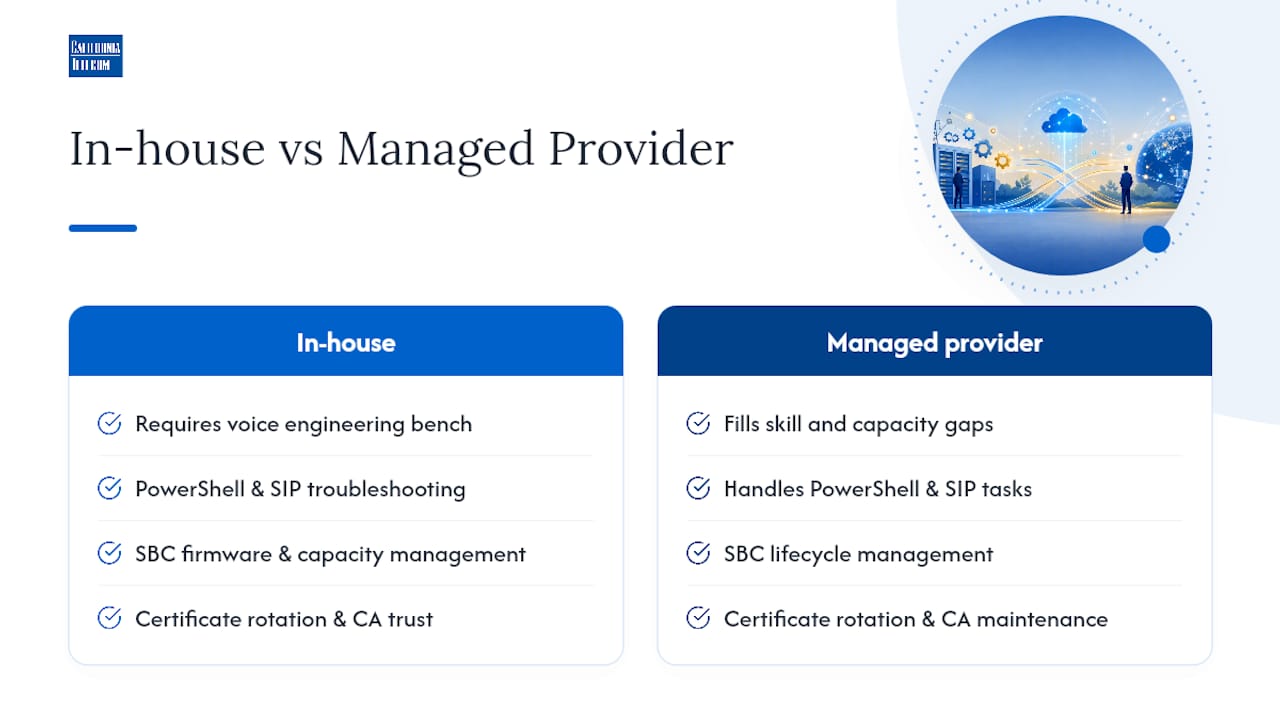
Most mid-market and enterprise IT teams don't have that bench sitting idle, and that's exactly the gap a managed network services provider fills. The tasks organizations most commonly hand off include SBC lifecycle management (firmware updates, capacity monitoring), certificate rotation and CA trust store maintenance, carrier contract negotiation and multi-carrier sourcing, and 24/7 network operations center coverage for incident response outside business hours.
Before deciding, run an honest internal capability check: do you have someone who can read a SIP trace and identify a codec mismatch without escalating? Do you have a documented certificate renewal process with calendar reminders that actually get acted on? Is your team available at 2 a.m. when a carrier trunk drops? If the answer to any of these is no, that's the specific gap a managed provider closes, not a general argument for outsourcing everything.
The organizations that struggle most with Direct Routing aren't the ones with complex requirements. They're the ones who treated it as a one-time configuration project instead of an ongoing operational responsibility that needs a named owner after go-live.
Pro Tip: If you're evaluating a managed provider, ask for a pilot scope covering a single site or department before committing to a full rollout. A defined pilot with clear SLA terms and an escalation path tells you more about a provider's operational maturity than any sales conversation will.
Long-term considerations: when Direct Routing remains the strategic choice
Direct Routing tends to scale better than the alternatives specifically when an organization's telephony needs are heterogeneous: multiple carrier relationships across regions, legacy equipment that can't simply be replaced, or contact center integrations that require SIP-level control Operator Connect doesn't expose. Where Direct Routing gets expensive isn't the initial SBC purchase. It's the years of certificate renewals, firmware patch cycles, and carrier relationship management nobody budgeted for past year one. Enterprises that treat SBC governance as a standing IT function, not a project that ends at go-live, are the ones who avoid the certificate expiration outage that takes down calling for an entire region on a random Tuesday.
Pro Tip: Write a formal governance policy covering certificate renewal timelines and firmware update cadence before your first SBC goes into production, not after your first outage. A one-page policy with named owners prevents the single most common cause of avoidable Direct Routing downtime.
Get Help Deploying and Managing MS Teams Direct Routing
Design, deployment, and ongoing operation of Direct Routing require the SBC expertise, carrier relationships, and 24/7 monitoring most IT teams don't have sitting idle.Working with Californiatelecom on your Microsoft Teams calling deployment means:
- One provider, one bill, and one engineer's number instead of juggling an SBC vendor, a carrier, and a separate support line for each.
- SLA-backed voice and data across every site, not a patchwork of individual carrier agreements.
- 24/7 U.S.-based network operations center coverage for incident response, so a 2 a.m. trunk failure doesn't wait for business hours.
- Reduced vendor complexity for multi-location businesses managing SD-WAN, firewalls, and voice as separate line items today.
If your team is weighing whether to manage SBC lifecycle and carrier relationships in house or hand that operational load to a partner who does it daily, request a consultation and get a specific scope for your environment before your next contract renewal deadline forces the decision for you.
FAQ
What is MS Teams Direct Routing?
Direct Routing connects Microsoft Teams Phone to the public telephone network through your own certified session border controller (SBC) and carrier trunks. You choose it when you need control over call routing, carrier relationships, and integration with existing telephony systems rather than handing all of that to Microsoft.
What infrastructure does Direct Routing require?
Six components need to exist and be validated before configuration: a certified SBC, one or more PSTN trunks, an active Microsoft 365 tenant with the right licensing, a public FQDN dedicated to the SBC, and a publicly trusted TLS certificate issued to that FQDN. Self-signed or internal-CA certificates are refused.
Do you need special Microsoft licenses for Direct Routing?
Direct Routing itself requires no special SKU beyond a Phone System license assigned to each user who needs calling. The licenses you stack on top of that, however, change call behavior in ways that often surprise admins during a first deployment.
Who handles E911 and number porting with Direct Routing?
You do, not Microsoft. Microsoft manages the Teams client and its own cloud infrastructure, but high availability for your SBC, number porting execution, and emergency location conveyance for E911 remain your operational responsibility — or your provider's.
Should you manage Direct Routing in-house or use a provider?
In-house works when you have a voice engineering team comfortable with PowerShell, SIP troubleshooting, and SBC firmware management, plus bandwidth for certificate rotations and carrier relationships. Without that bench, a managed provider carries the SBC expertise, carrier relationships, and 24/7 monitoring for you.
Sources
- Plan Direct Routing - Microsoft Teams
- Configure Direct Routing - Microsoft Teams
- Session Border Controllers certified for Direct Routing - Microsoft Teams
- Teams Phone Direct Routing: Definitions and RFC standards - Microsoft Learn
- Direct Routing: what's new - Microsoft Teams