

How to Switch Managed Services Providers in CaliforniaSwitching your managed services provider in California is a defined process of transferring IT management, network access, and support responsibilities from one provider to another without disrupting business operations. For multi-location businesses, the stakes are high. A missed credential, an unverified tenant ownership, or a single cutover date can take down connectivity across every site simultaneously. The good news: a structured approach built around asset audits, parallel operations, and credential handovers makes the difference between a clean transition and a costly outage. This article walks you through each phase.
What pre-switch preparation steps ensure a smooth MSP transition?
Preparation is the phase most businesses underestimate. MSP transitions typically take 30–90 days and can cost between $5,000 and $25,000 depending on network complexity and site count. That range reflects real variation in how prepared a business is before the first termination notice goes out.
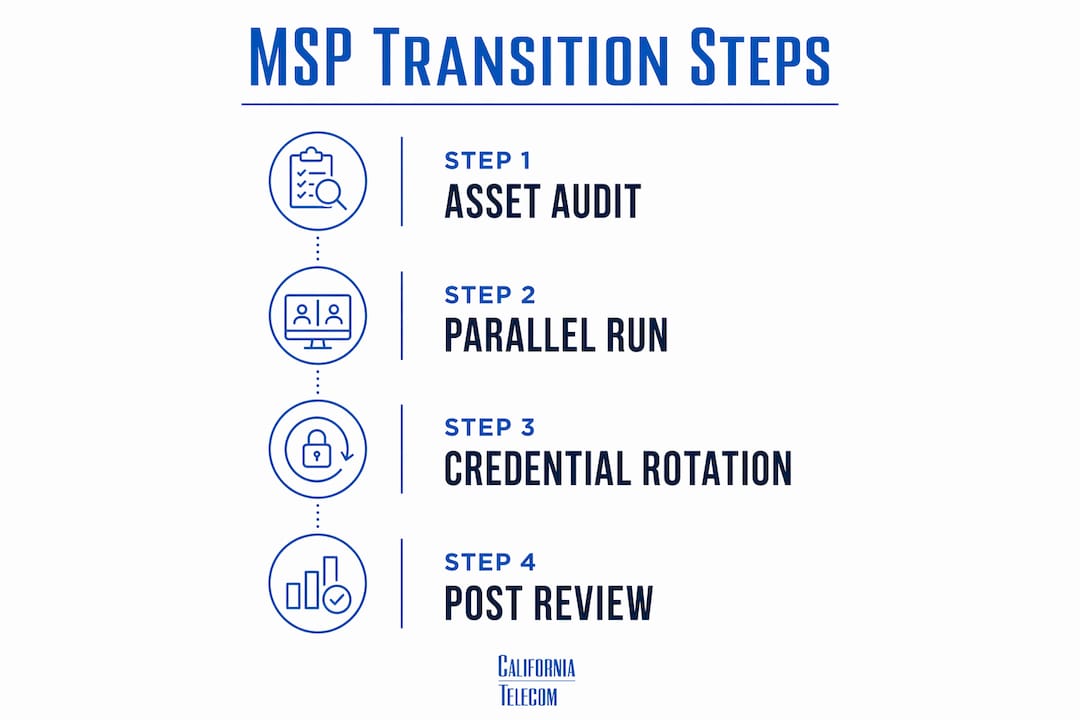
The single most important pre-switch task is verifying ownership of your critical digital assets. Many businesses discover too late that their outgoing MSP holds the primary account on their Microsoft 365 or Google Workspace tenant. Tenant ownership controls licensing and data, and transferring it can take weeks if the MSP is the primary account holder. Confirm ownership before you send any termination notice.
Here is what to audit before you formally end the relationship:
- Microsoft 365 and Google Workspace tenants: Confirm your organization is listed as the owning entity, not the MSP.
- Domain registrations: Verify your company holds the registrar login for every domain your business uses.
- Firewall and switch credentials: Collect admin usernames and passwords for every network device at every site.
- Backup console access: Confirm you can log into your backup platform independently and run a restore test.
- Software licenses: Identify which licenses are tied to the MSP's account versus your own.
- User accounts and permissions: Document every admin account and its associated permissions across all systems.
Pro Tip: Assign one internal project lead before you contact your outgoing MSP. This person owns the asset audit, coordinates with both providers, and serves as the single point of accountability throughout the transition. Multi-site organizations that skip this step routinely lose weeks to miscommunication.
Understanding your contract's termination clause is equally critical. Contract notice periods typically run 30–90 days. Missing that window can lock you into additional billing cycles or create legal friction around data handover. Read the exit clause before you begin any vendor conversations.
How does running a parallel operation period minimize downtime?
Zero downtime during an MSP switch does not happen by accident. Achieving zero downtime requires a structured parallel run phase of 4–8 weeks where both the incoming and outgoing MSPs operate simultaneously. This overlap period is the single most effective tool for protecting multi-location network continuity.

During the parallel run, the new MSP performs discovery, deploys monitoring tools, and maps your network while the outgoing provider still handles day-to-day support. The new MSP should produce a first-day discovery report rather than relying on the outgoing provider's documentation. Legacy documentation is often incomplete, outdated, or written in shorthand only the original engineer understands.
A well-run parallel operation follows this sequence:
- New MSP onboarding kickoff: The incoming provider receives all available credentials and begins its own independent discovery.
- Monitoring tool deployment: The new MSP installs its remote monitoring and management tools across all sites without removing the outgoing MSP's tools yet.
- Ticket boundary definition: Both providers agree in writing on which issues each handles during the overlap period.
- Staged site takeover: The new MSP assumes full responsibility for one site at a time, confirming stability before moving to the next.
- Final cutover: Once all sites are confirmed stable under the new MSP, the outgoing provider's access is formally revoked.
Pro Tip: Never schedule your final cutover during a high-traffic business period. End-of-quarter, tax season, or a product launch are the wrong times to complete an MSP switch. Build your parallel run timeline around your operational calendar, not the other way around.
Avoiding a single cutover date and using staged takeovers instead protects against the most common failure mode: discovering a missing credential or undocumented dependency only after the outgoing MSP has lost access. The parallel run gives you time to surface those gaps before they become outages.
What are common challenges when switching your MSP?
The most disruptive transitions share a common pattern: the outgoing MSP becomes uncooperative after receiving a termination notice. This is not rare. Credential withholding, delayed documentation, and slow responses to handover requests are all documented friction points in MSP switches.
Credential lockout and data loss risks are minimized by securing all credentials and performing backup validation before transition. The time to collect credentials is before you send the termination notice, not after. Once a provider knows they are losing the account, their responsiveness often drops.
When an outgoing MSP refuses to hand over credentials, administrative control can often be recovered through vendor-tier support channels. Microsoft offers tenant reset processes through its support escalation path. Domain registrars can transfer ownership when you provide proof of business identity. These recoveries take time, but they are available. Document every request you make in writing so you have a paper trail if legal action becomes necessary.
Compliance-heavy environments require documented runbooks and architecture decision records that go beyond generic security certifications. If your business operates under HIPAA, PCI DSS, or California-specific data regulations, your incoming MSP needs audit-ready documentation from day one. Accepting a verbal handover or a disorganized folder of screenshots is not sufficient.
Other common challenges include:
- Incomplete network maps: Outgoing MSPs rarely document every VLAN, firewall rule, or site-specific configuration. Your new provider must build its own map during discovery.
- License ownership disputes: Software vendors sometimes require the original purchaser to authorize transfers. Start this process early.
- Backup inaccessibility: Backup restore tests are a critical pre-switch step. If you cannot restore from backup independently, you are exposed during the transition window.
For multi-location businesses evaluating how to choose a managed network provider, reviewing ISP contract terms before signing with any new provider prevents many of these disputes from arising in the first place.
What post-transition steps stabilize your new MSP relationship?
The transition is not complete when the new MSP takes over the last site. Post-transition activities like credential rotation, security baseline validation, and documentation updates are essential to stabilize the new MSP relationship. Skipping these steps leaves your network in a half-finished state that creates security exposure and operational confusion.
Pro Tip: Schedule a formal 30-day post-transition review with your new MSP. Bring your internal project lead, your IT manager, and at least one site-level operations contact. Review open tickets, confirm SLA performance, and identify any gaps in documentation before they become problems.
The table below outlines the core post-transition tasks and their purpose:
| Task | Purpose |
|---|---|
| Rotate all privileged credentials | Remove outgoing MSP access and reset passwords on firewalls, servers, and admin accounts |
| Validate MFA enforcement | Confirm multi-factor authentication is active on all admin and user accounts across every site |
| Update network documentation | Ensure network maps, runbooks, and vendor contacts reflect the current environment |
| Verify backup integrity | Run a full restore test to confirm backup data is accessible and current |
| Set measurable SLAs | Establish response time, uptime, and escalation targets in writing with the new provider |
Security baseline validation deserves particular attention for California businesses. California's data privacy laws, including the California Consumer Privacy Act, create legal exposure if a transition leaves access controls in a degraded state. Confirm that endpoint policies, patch management schedules, and access logs are all active and reporting correctly before you close the transition project.
For businesses with multi-site network management needs, the post-transition period is also the right time to standardize configurations across locations. A new MSP relationship is the cleanest opportunity to eliminate the site-by-site inconsistencies that accumulate over years with a single provider.
Key Takeaways
Switching managed services providers in California requires asset ownership verification, a 4–8 week parallel run, and post-transition credential rotation to protect multi-location network continuity.
| Point | Details |
|---|---|
| Audit assets before termination | Verify ownership of Microsoft 365 tenants, domain registrations, and firewall credentials before notifying your outgoing MSP. |
| Run parallel operations | Overlap both MSPs for 4–8 weeks to surface missing credentials and undocumented dependencies before final cutover. |
| Stage the site takeover | Transfer responsibility one site at a time to confirm stability before moving to the next location. |
| Rotate credentials post-transition | Remove outgoing MSP access and reset all privileged passwords immediately after the final handover. |
| Document everything in writing | Maintain a written record of every credential request, handover step, and SLA commitment throughout the process. |
What I've learned from watching multi-site MSP switches go wrong
Most MSP transitions that fail do not fail because of technology. They fail because of process gaps that were visible weeks before the cutover date and ignored anyway.
The pattern I see most often: a business decides to switch providers, sends a termination notice the same week, and then discovers its outgoing MSP holds the admin credentials for every critical system. The transition stalls. The business pays two providers simultaneously for months while lawyers exchange letters. The new MSP cannot do meaningful work because it has no access. Productivity drops. Morale follows.
The fix is not complicated. An internal champion who understands all facets of the IT environment is the single highest-leverage investment a multi-location business can make before starting a switch. This person does not need to be a network engineer. They need to know where the credentials are, who owns each system, and how to escalate when the outgoing provider goes quiet.
Pricing is the wrong primary filter when selecting a new MSP. A provider that charges less but lacks a documented onboarding process will cost more in lost productivity than the savings justify. Ask every candidate for a sample transition plan before you sign anything. A controlled transition plan with defined change controls and measured stabilization is the clearest signal that a provider has done this before and knows what can go wrong.
California's multi-site environments add a layer of complexity that generic MSP transition guides do not address. Site-specific firewall rules, carrier contracts that vary by location, and local compliance requirements all need individual attention. Build that specificity into your transition plan from the start.
— Jim
Californiatelecom's approach to MSP transitions for multi-location businesses
Multi-location businesses in California need more than a new provider. They need a transition partner who has done this work across dozens of sites and knows where the gaps appear.Californiatelecom designs custom transition plans for managed network services across multi-site environments, coordinating directly with outgoing providers to collect credentials, map existing configurations, and deploy monitoring tools before the first site goes live. Every deployment runs through Californiatelecom's own engineers, backed by a 24/7 U.S.-based NOC and a 99.99% uptime SLA on data. Businesses work with one provider, one bill, and one engineer's direct number. For organizations ready to assess their current environment, Californiatelecom offers a free transition consultation to identify risks and build a realistic timeline before any contracts change hands.
FAQ
How long does it take to switch managed services providers?
MSP transitions typically take 30–90 days, depending on network complexity and the number of locations involved. Multi-site businesses should plan for the longer end of that range.
What is a parallel run in an MSP transition?
A parallel run is a 4–8 week period where both the incoming and outgoing MSPs maintain access simultaneously, allowing the new provider to complete discovery and deploy tools without disrupting active support.
What happens if my outgoing MSP refuses to hand over credentials?
Administrative control can often be recovered through vendor-tier support channels such as Microsoft tenant resets or domain registrar transfers, though these processes take additional time. Document every request in writing to support any legal escalation.
What should I verify before signing with a new managed IT provider in California?
Ask for a sample transition plan, confirm the provider's onboarding process includes an independent discovery report, and verify that SLAs are defined in writing before the contract is signed. Reviewing what to look for in a managed network provider helps set the right evaluation criteria.
How do I protect data during an MSP switch?
Run a full backup restore test before the transition begins, confirm your organization holds independent access to all backup consoles, and rotate all privileged credentials immediately after the final handover is complete.
Recommended
- How to Choose a Managed Network Provider for Multi-Site | California Telecom
- Nationwide Managed Network Services | California Telecom
- Managed network guide for California multi-location IT | California Telecom
- Picking a Managed Network Services Provider When Your IT Team Is Small | California Telecom