
Avoid $33,333/Minute Outages with 5G Failover for Enterprise IT5G failover is an effective automatic backup path for most business sites, but only once you've validated RF signal quality and carrier diversity at the actual installation point. The main caveats are signal strength, choosing the right carrier for the location, and tuning health checks so the system doesn't flap. None of it works without SD-WAN policy tuning behind it, because an untuned setup just trades one outage for a slower, quieter one.
TL;DR:
- Verifying RF signal quality and carrier diversity at the installation site is crucial before deploying 5G failover solutions.
- Health checks must include reachability tests like ICMP, DNS, and HTTP probes, not just link-up status, to detect real-world failures.
- Multi-carrier setups should support dual-SIM and external MIMO antennas, with site-specific testing of signal strength and supported bands.
- Policy tuning, especially for failback timers, is vital to prevent unnecessary bouncing during flaky primary connections.
- Implementing security best practices, such as firewall rules, VPN renegotiation, SIM locking, and traffic logging, is essential during failover setup.
Table of Contents
- How 5G Failover Works: Architectures and What Changes When You Switch to Cellular
- Router and Modem Checklist: Bands, SIMs, and Antenna Placement
- SD-WAN and Policy Integration: Detecting Brownouts Before They Detect You
- Site Survey Checklist: RSRP, RSRQ, SINR, and Multi-Carrier Testing
- Tuning Failover Thresholds: The Numbers That Actually Matter
- Commissioning Runbook: How to Verify Failover Before You Trust It
- Tradeoffs and Limitations: When 5G Isn't the Right Backup
- Security Considerations and Best Practices for 5G Failover Connections
- Cost Implications and Budgeting for 5G Failover
- Compatibility With Existing Network Infrastructure
- Regulatory and Compliance Considerations for 5G Failover Deployments
- Publisher Perspective: When to Hire a Managed Provider vs. Do It Yourself
- Get Managed 5G Failover That's Built, Tested, and Monitored for You
- Sources
- FAQ
How 5G Failover Works: Architectures and What Changes When You Switch to Cellular
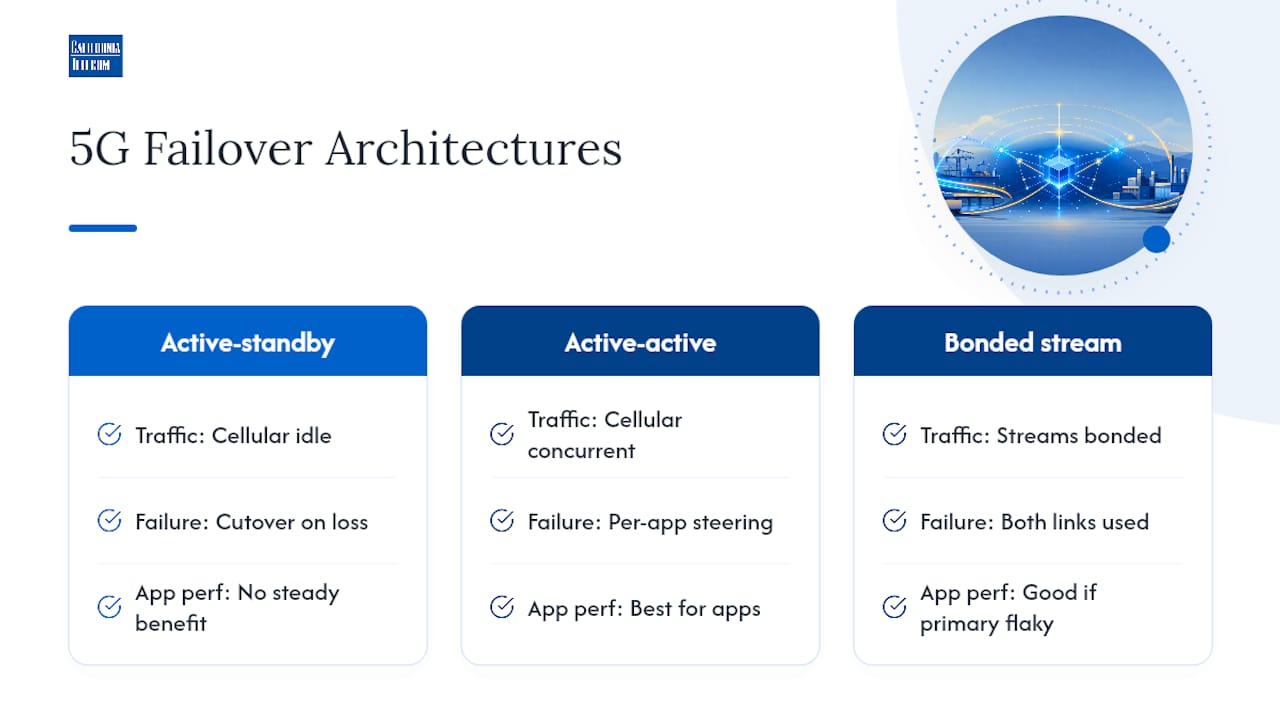
Most deployments run one of two models. Active-standby keeps 5G idle until the primary WAN fails, then cuts traffic over. Active-active runs cellular alongside fiber or cable all the time, steering specific app traffic to whichever path scores better. Active-active generally wins on app performance, while bonding a single stream across both links works better when the primary connection is already flaky rather than fully down.
Health checks matter more than the failover mechanism itself. A router that only checks whether the interface is "up" misses most real-world failures. Reliable systems use reachability tests like ICMP, DNS, and HTTP probes aimed at both the SD-WAN hub and a public target, because link-up status alone can look fine while the actual path is dead upstream.
Switching to cellular also changes the network underneath your applications. NAT behavior shifts, VPN tunnels may need to renegotiate, SIP registrations can drop and need re-registration, and session persistence for anything stateful (shopping carts, active file transfers, RDP sessions) often breaks mid-failover unless your SD-WAN platform preserves session state across the switch.
Router and Modem Checklist: Bands, SIMs, and Antenna Placement
The router hardware decides whether your 5G failover internet actually performs when you need it. Before you sign a contract or mount anything, confirm the device supports these basics:
- Policy-based routing so specific traffic classes can be steered independently of the default route.
- Configurable health checks with custom probe targets, not just a link-state check.
- External antenna ports (SMA or equivalent) for MIMO antennas, not just an internal whip antenna.
- Dual-SIM or multiple modem slots so you can run two carriers for true carrier diversity, not just two SIMs on the same tower.
Match your modem's supported bands to what your target carriers actually broadcast at the site. Sub-6 midband spectrum tends to deliver more consistent indoor throughput than millimeter wave, which struggles with walls and distance. During the site walk, mount test antennas at the final planned location, not somewhere convenient, and log signal readings there before you commit to a mounting plan.
SD-WAN and Policy Integration: Detecting Brownouts Before They Detect You
A dead link is easy to catch. A brownout, where the connection is technically up but too degraded to carry voice or transactional traffic, is what actually breaks most businesses' backup plans. SD-WAN platforms handle this by scoring link health continuously using active probes that measure packet loss, latency, and jitter against defined targets, not just checking whether the interface responds.
The scoring only matters if your policies react to it correctly:
- Set voice and video traffic to fail over fast and at a low tolerance, since a two-second stutter on a customer call is unacceptable.
- Set transactional and general business traffic to a looser tolerance so you're not flapping links every time there's a brief congestion spike.
- Route bulk or non-critical traffic (backups, large file syncs) last, since it can tolerate the most delay before it needs to move.
Failback deserves as much attention as failover. Switching back to the primary link the instant it looks stable is how you end up bouncing traffic back and forth every few minutes during a flaky recovery. Build in a hold-down timer, and consider an application-first failback approach where critical traffic stays on the stable backup link a little longer than best-effort traffic.
Pro Tip: Test your failback timers under a simulated flapping primary link, not just a clean cable pull. A link that goes up, down, up, down for ten minutes will expose bad hysteresis settings that a single clean failure test never will.
Site Survey Checklist: RSRP, RSRQ, SINR, and Multi-Carrier Testing
Coverage maps tell you what's theoretically possible. Testing SIM cards from multiple carriers at the actual mounting location tells you what's actually true, and the gap between the two is often larger than IT teams expect.
Before commissioning any 5G failover internet connection, record and log:
- RSRP, RSRQ, and SINR readings at the antenna's final mounting height and orientation, not at ground level near the router.
- Throughput, latency, and jitter, tested at multiple times of day, since cellular congestion shifts with local traffic patterns.
- Results for every carrier you're considering, scored against a written acceptance threshold rather than a gut feeling.
- Whether the plan assigns a static IP or routes through CGNAT, which matters immediately if you need inbound VPN or remote access.
Note APN requirements and any data caps or throttling clauses in the carrier contract before you finalize the plan.
Tuning Failover Thresholds: The Numbers That Actually Matter
A working 5G backup solution moves through a defined sequence of states: Normal, Suspect, Failed, Backup, Recovering, Stable, and Failback. Skipping straight from "link down" to "switch now" without the Suspect stage is exactly how false positives trigger unnecessary failovers during brief hiccups.
Reasonable starting thresholds, tuned per site:
- Trigger voice failover when packet loss exceeds 2 to 3% for 10 to 20 seconds.
- Trigger transactional or general business traffic failover when loss exceeds 5% for 20 to 30 seconds.
- Require 3 to 5 consecutive failed probes before declaring a link Failed, not a single missed probe.
- Hold at Stable for 2 to 5 minutes minimum before initiating Failback.
A brief but costly number to keep in mind: enterprises hit by IT outages report a median cost of $33,333 per minute of downtime, which is exactly why shaving 30 seconds off a false-positive failover trigger matters less than avoiding one entirely.
Watch MTU size and VPN fragmentation closely. Cellular links often carry a lower MTU than fiber, and tunnels sized for a wired path can silently drop packets over 5G unless you apply MSS clamping and confirm both hub-side and public-target probes reflect real conditions.

Commissioning Runbook: How to Verify Failover Before You Trust It
A second WAN link isn't resilience until you've tested every state transition end to end. A defined design covers detection, switching logic, traffic policy, monitoring, recovery, and failback, and each of those needs its own verification step during commissioning, not just at initial install.
- Baseline the primary link's normal performance before touching anything, so you have a comparison point.
- Force a controlled failover and confirm the router actually switches, not just that it detects a failure.
- Verify each critical application (voice, POS, VPN) functions correctly on the 5G path, not just that ping succeeds.
- Run an extended stress test, letting the connection carry real traffic for at least a few hours under load.
- Force failback and confirm the hold-down timer and hysteresis behave as configured.
Collect probe failure logs, RSRP trend data, and packet loss history from each test; a one-time clean failover tells you far less than a log showing behavior over days.
Pro Tip: Keep a written contact for who to call when a failover doesn't behave as expected. A runbook without an escalation contact just becomes a document nobody opens during an actual outage.
This kind of documentation is built into every managed deployment, sourcing carriers from multiple options and monitoring links through a 24/7 U.S.-based NOC so the commissioning runbook doesn't just sit in a drawer after installation.
Tradeoffs and Limitations: When 5G Isn't the Right Backup
5G failover isn't free once you look past the router cost. Carrier data plans are typically metered, and heavy backup usage during an extended primary outage can run up real overage charges fast. Cellular traffic can also get deprioritized during network congestion, which matters most exactly when everyone else is also switching to backup capacity during a regional event.
CGNAT is the other constraint that trips up teams. If your carrier plan doesn't include a static IP, inbound VPN connections and remote access tools may not work over the backup link at all. For sites running mission-critical workloads across multiple locations, wired diversity, bonded circuits, or active-active SD-WAN across two physical paths is usually the more durable long-term answer.
Security Considerations and Best Practices for 5G Failover Connections
Cellular backup connections often get configured in a hurry, right after a primary outage, and rushed configuration is where security gaps creep in. Treat the 5G path with the same scrutiny as your primary WAN, not as a temporary exception.
Start with the firewall policy. A backup link that bypasses your normal firewall rules to "just get traffic through" during an emergency creates an open door that often stays open long after the emergency ends. Apply the same segmentation, the same inbound rules, and the same logging to the cellular interface as you do to fiber or cable.
VPN configuration needs particular attention because failover changes NAT and tunnel behavior in ways that can weaken encryption negotiation if not handled correctly. Confirm your VPN client renegotiates a full tunnel over the cellular path rather than falling back to a degraded or unencrypted connection when the primary tunnel drops.
SIM security matters more than most teams assume. A physical SIM in an unattended router at a remote site is a physical attack surface. Lock the SIM to the specific device using carrier-side device locking where available, and disable the SIM immediately if a router is ever reported stolen or decommissioned.
Router management access deserves its own hardening pass. Disable remote management over the cellular interface unless it's explicitly required, since a backup router exposed to the public internet through a carrier IP is a common target for opportunistic scanning. Rotate default admin credentials, enforce multi-factor authentication where the platform supports it, and keep firmware current, since cellular routers running outdated firmware are a documented weak point in branch network security.
Finally, log everything the 5G interface does during an active failover. Security incidents during outages are harder to investigate after the fact if the backup path wasn't logging traffic the same way your primary link does.
Cost Implications and Budgeting for 5G Failover
Budgeting for wireless failover for business means accounting for more than the router purchase price. The upfront hardware, a capable dual-SIM or multi-modem router with external antenna support, is usually the smallest line item over a multi-year horizon.
Recurring carrier costs make up the bulk of ongoing spend. Data plans for backup connections are typically metered rather than unlimited, and pricing scales with the data allotment you choose. Underestimate usage and you'll pay overage fees during exactly the extended outage the backup line exists to cover; overestimate and you're paying for headroom you rarely touch.
Multi-carrier setups double the recurring line item, since running two SIMs from two different carriers for genuine diversity means two monthly bills instead of one. That expense buys real protection, though, since a single-carrier backup fails right alongside the primary during a carrier-specific tower or backhaul outage in the area.
Installation and site survey costs vary by site complexity. A straightforward retail location with clean signal might need only a few hours of technician time. A warehouse with metal racking and weak indoor signal may need external antenna mounting, cable runs, and a more involved RF survey, which adds labor cost before the connection ever goes live.
Weigh all of that against the outage cost data New Relic reported: a median $33,333 per minute of downtime and a median annual outage expenditure of $76 million for affected enterprises. Even a fully loaded multi-carrier 5G failover setup, run across several sites, is a rounding error against a single extended outage at that scale.
Compatibility With Existing Network Infrastructure
Integrating 4G LTE failover or 5G backup into an existing network rarely drops in cleanly, and most of the friction shows up in places IT teams don't expect until testing starts.
Firewall compatibility is the first checkpoint. Your existing firewall needs to support the new WAN interface, including its own set of policy rules, and older firewall hardware sometimes lacks the interface count or throughput headroom to add a third or fourth WAN path without a hardware refresh. Review firewall high availability design before assuming your current edge stack can simply absorb another link.
VoIP systems are a common integration headache. SIP trunks and registrations built around a single static WAN path often don't re-register cleanly when traffic shifts to a cellular interface with different NAT behavior, which is why voice traffic needs its own tested failover policy rather than inheriting the default one.
Legacy routing setups create friction too. Sites still running static routes instead of dynamic, policy-based routing may need a configuration overhaul just to support conditional traffic steering, not just a new device plugged into an open port.
SD-WAN orchestration platforms generally handle multi-WAN integration more gracefully than standalone routers, since they're built around centralized policy management from the start rather than per-device configuration. If your current infrastructure is a patchwork of standalone routers across multiple sites, standardizing on a single SD-WAN platform before adding cellular failover usually saves more integration headaches than adding 5G directly to the existing patchwork.
Regulatory and Compliance Considerations for 5G Failover Deployments
Regulatory obligations don't pause just because traffic moved to a backup connection, and that's the detail compliance teams miss most often during failover planning.
Healthcare environments bound by HIPAA need the same encryption, access control, and audit logging on the cellular backup path as on the primary connection. A backup link that carries protected health information without the same safeguards is a compliance gap waiting to surface during an audit, not a temporary exception the regulation forgives. Review healthcare-specific connectivity requirements before assuming a generic cellular router meets the bar.
Financial services and payment processing environments carry similar obligations under PCI DSS. Cardholder data traversing a cellular backup connection still needs to meet the same segmentation and encryption standards required on the primary network, and auditors increasingly ask specifically how backup paths are secured, not just the primary one.
Data residency matters for multi-location businesses operating across state or national boundaries. Cellular carriers route traffic through their own backhaul infrastructure, which can differ from your primary ISP's routing path, and that occasionally raises questions about where data physically transits during a failover event.
Carrier contracts themselves carry compliance implications too. Acceptable-use policies for cellular data plans sometimes restrict certain traffic types or usage patterns, and violating those terms during a genuine emergency failover is a contractual risk worth reading into the fine print before you need the backup link, not after.
Publisher Perspective: When to Hire a Managed Provider vs. Do It Yourself
A single site with a straightforward setup can often handle 5G failover in-house. Multi-site operations running mission-critical workloads are a different calculation since sourcing carriers, monitoring links, and maintaining SLAs across a dozen locations spreads a network team thin fast. That's when a managed provider earns its cost, offering one point of contact instead of a rotating cast of carrier support lines.
— Jim
Get Managed 5G Failover That's Built, Tested, and Monitored for You
A managed provider can be an alternative to piecing together carrier plans, router firmware, and SD-WAN policies on your own: one source for carriers, engineers design and test the failover configuration at your site, and a 24/7 U.S.-based NOC watches the link after it's live.That last part is what most DIY setups skip entirely. A router sitting in a rack with a SIM card isn't a resilience plan until someone is watching its probe failures at 2 a.m. and someone else is accountable for the SLA when it doesn't switch correctly.
If you're planning 5G network redundancy across more than one site, start with a free consultation to get your locations assessed and a failover design scoped before you commit to hardware.
Sources
Core references to include New Relic's outage cost data, the 5G WAN failover design guide, and Californiatelecom's own SD-WAN failover runbook.
- New Relic press release - 2025 outage cost data
- SD-WAN for Cellular Primary and Failover: Ultimate Guide - 5Gstore Blog
- 5G WAN failover design: Router features that prevent branch downtime - Robustel
FAQ
What Is a 5G Router With Failover Capabilities?
It's a router with a built-in or attached 5G modem, plus policy-based routing and health checks, that automatically switches traffic to the cellular connection when the primary WAN link fails or degrades.
What Is LTE Failover?
LTE failover uses a 4G LTE cellular connection as the backup path instead of 5G, and it remains a reliable option in areas with limited 5G coverage or when 5G modem hardware isn't yet cost-justified for the site.
What Are the Downsides of 5G as Backup Internet?
The main downsides are metered data plans that get expensive during extended outages, potential traffic deprioritization during network congestion, and CGNAT restrictions that can block inbound VPN connections unless the plan includes a static IP.
Is Load Balancing or Failover Better for Business Continuity?
They solve different problems: load balancing runs active-active to optimize everyday performance, while failover runs active-passive purely for redundancy, and most enterprise 5G backup solutions actually combine both approaches by traffic class.
Does Californiatelecom Provide Managed 5G Failover?
Yes.