

WPA3-Enterprise Preflight: 5 Checks IT Teams Must RunWPA3-Enterprise closes the gaps WPA2-Enterprise left open for two decades: mandatory Protected Management Frames, SHA-256 authentication key management, and an optional 192-bit mode built on the CNSA suite. If your access points support 6 GHz, you have no choice but to move, since transition mode does not work on that band. For everyone else, the right move is a staged rollout: validate device compatibility, enforce EAP-TLS with proper RADIUS certificate checks, pilot on a segmented SSID, then cut over.
TL;DR:
- Most WPA3-Enterprise deployments fail due to incompatible client firmware or outdated AP firmware rather than cryptographic issues, so thorough inventory checks are essential beforehand.
- Transition mode, which allows WPA2 and WPA3 coexist on the same SSID, should only be used temporarily, as it introduces downgrade risks and is not supported on 6 GHz bands required by Wi-Fi 6E and Wi-Fi 7.
- WPA3-Enterprise requires strict enforcement of certificate validation and support for EAP-TLS, with weak EAP types like PEAP-MSCHAPv2 phased out to maintain security integrity.
- For environments handling sensitive data, 192-bit mode offers enhanced security but demands full hardware support and should only be used where breach consequences justify operational complexity.
- Pilot testing with segmented SSIDs, monitoring authentication and roaming performance, and defining rollback thresholds are critical steps for a successful transition across multiple locations.
Table of Contents
- What Is WPA3-Enterprise and How Does It Differ From WPA2-Enterprise?
- What Are the WPA3-Enterprise Modes and Their Crypto Requirements?
- What Do You Need Before Enabling WPA3-Enterprise?
- How Do You Plan and Roll Out a WPA3-Enterprise Migration?
- Why Do WPA3-Enterprise Deployments Fail, and How Do You Fix Them?
- In-House Migration or Managed Rollout? A Practitioner's Take
- Get Help Planning Your WPA3-Enterprise Rollout
- Where to Go Deeper on WPA3-Enterprise
- Sources
What Is WPA3-Enterprise and How Does It Differ From WPA2-Enterprise?
WPA2-Enterprise trusted the network more than it should have. Management frames traveled unencrypted, so an attacker could forge disassociation packets and knock devices off the network without cracking a single key. WPA3-Enterprise fixes that by making Protected Management Frames mandatory rather than optional, closing off a whole class of denial-of-service and deauthentication attacks that plagued WPA2 deployments for years.
The bigger shift happens under the hood, in the authentication key management (AKM) suite. WPA2-Enterprise typically ran on SHA-1 based AKMs. WPA3-Enterprise requires SHA-256, and the WPA3 spec ties that requirement directly to PMF enforcement in WPA3-only and 192-bit modes.
Certificate validation matters more here than most administrators expect. A client that skips RADIUS server certificate checks is a client that will authenticate against a rogue AP handing out a fake certificate, and that is exactly how man-in-the-middle attacks against enterprise Wi-Fi have historically worked. WPA3-Enterprise doesn't automatically fix careless client configuration, but it gives you the cryptographic foundation to enforce validation properly.
Where does 192-bit mode fit? Reserve it for environments where a breach carries outsized consequences:
- Financial institutions handling wire transfers or account data over wireless
- Healthcare networks transmitting patient records across distributed sites
- Government contractors or defense-adjacent businesses under CNSA-aligned compliance mandates
- Any organization where a regulator or auditor has already flagged wireless encryption as a gap
For most commercial deployments, standard WPA3-Enterprise (SHA-256, PMF required) delivers the security uplift without the operational overhead 192-bit mode demands.
What Are the WPA3-Enterprise Modes and Their Crypto Requirements?
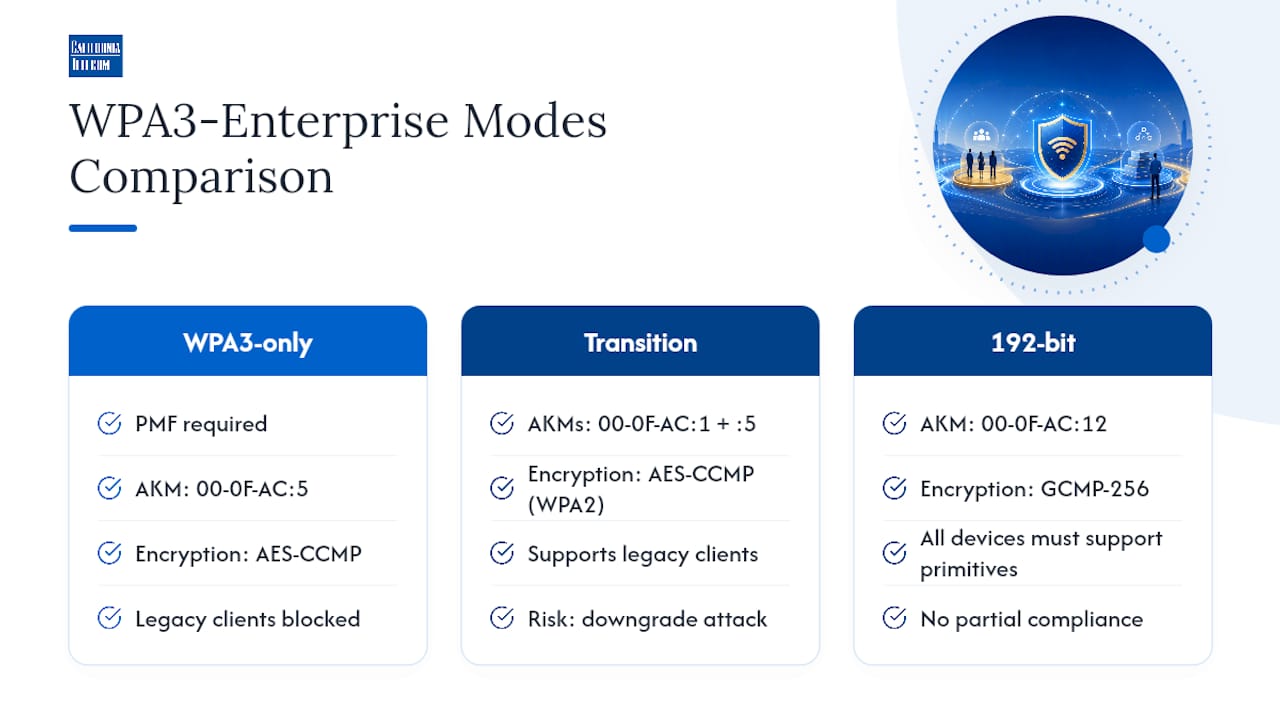
Three modes exist, and picking the wrong one for your environment is the single most common planning mistake IT teams make.
WPA3-Enterprise only requires every client to support PMF and the SHA-256 AKM selector (00-0F-AC:5). No fallback. Any device that can't negotiate these terms simply won't connect. This is the mode the Wi-Fi Alliance's technology overview treats as the baseline target for new deployments.
Transition mode lets WPA2 and WPA3 clients share the same SSID, broadcasting both AKM suites (00-0F-AC:1 for WPA2 and 00-0F-AC:5 for WPA3) so legacy hardware doesn't get locked out during migration. It's convenient and it's also a liability if left running indefinitely, since it permits weaker AKMs and gives a downgrade attacker room to force a connection back to WPA2 terms rather than negotiating the stronger suite. Treat transition mode as a bridge with an expiration date, not a permanent configuration.
192-bit mode (sometimes called CNSA mode) locks the AKM selector to 00-0F-AC:12 and mandates GCMP-256 for encryption rather than the AES-CCMP used in standard modes. Every device on the SSID, client and infrastructure alike, must support these primitives end to end. There's no partial compliance option.
Here's the constraint that catches teams off guard: 6 GHz operation under Wi-Fi 6E and Wi-Fi 7 requires WPA3-only. Transition mode isn't an option on that band at all. If you're rolling out Wi-Fi 7 hardware and expecting a gentle mixed-mode migration the way you handled the WPA2 to WPA3 transition on 5 GHz, you'll be disappointed. Every client that wants 6 GHz access needs WPA3 support on day one, full stop.
What Do You Need Before Enabling WPA3-Enterprise?
Compatibility failures, not cryptography failures, cause most botched WPA3 rollouts. Work through this list before you touch a production SSID:
- Inventory client PMF and WPA3 support. Pull firmware and driver versions across laptops, badge scanners, VoIP handsets, and IoT devices. Older chipsets, particularly in point-of-sale terminals and industrial scanners, often lack PMF support entirely.
- Confirm AP firmware readiness. Vendor guidance from Meraki and Aruba consistently flags firmware version as the first thing to check, since older AP code may not expose WPA3-only or 192-bit as configurable options at all.
- Select EAP-TLS as your authentication method. For 192-bit and CNSA alignment, EAP-TLS is the recommended path because it supports the certificate-based mutual authentication those modes require.
- Retire weak EAP types. PEAP-MSCHAPv2 and other password-based methods should be phased out on any SSID moving to WPA3-Enterprise, since they undercut the certificate trust model the protocol depends on.
- Lock down RADIUS certificate policy. Configure clients to validate the RADIUS server's certificate chain against a trusted root, not to blindly accept whatever certificate is presented. This single setting is what actually prevents rogue AP impersonation.
Pro Tip: Export your client PMF support status from your NAC or MDM platform before you schedule any migration date. A five-minute query can save you a week of help desk tickets from badge printers and handheld scanners that silently drop off the network.
How Do You Plan and Roll Out a WPA3-Enterprise Migration?
Migration succeeds or fails based on how much testing happens before the SSID goes live for everyone. Rushing straight to WPA3-only across every site is how a Monday morning turns into a help desk emergency.
Start with groundwork:
- Build a complete device inventory mapped against firmware and driver versions, flagging anything more than two years out of date for replacement or upgrade before migration.
- Document your certificate lifecycle, including issuance authority, renewal cadence, and revocation process, since certificate expiration mid-migration is a common self-inflicted outage.
- Map out which sites or device classes can tolerate WPA3-only immediately versus which need transition mode as a temporary bridge.
Then pilot before you scale:
- Stand up a segmented pilot SSID, isolated from production, and move a representative device sample onto it, covering laptops, handhelds, and any specialty hardware.
- Run authentication tests against your actual RADIUS infrastructure, not a lab simulation, to catch certificate trust and cipher negotiation issues early.
- Test roaming behavior specifically. Devices moving between APs during reauthentication is where PMF misconfigurations tend to surface.
- Monitor authentication success rate, average connection time, and reauthentication failures for at least one full business cycle before expanding the pilot.
Watch these signals during the pilot phase:
- A spike in authentication timeouts on specific device models points to a firmware or driver gap, not a RADIUS problem.
- Roaming failures concentrated at cell edges usually trace back to inconsistent PMF settings across APs in the same zone.
- Any unexpected drop in 6 GHz client counts after enabling WPA3-only likely means those devices never had 6 GHz WPA3 support to begin with.
Set a hard rollback threshold before you start. If authentication failure rates exceed a level your team defines as acceptable during the pilot window, revert the SSID configuration and address the failing device class before trying again. Managed WiFi deployment workflows built around phased site surveys follow essentially this same staged logic, just formalized across dozens or hundreds of locations instead of one pilot group.
Why Do WPA3-Enterprise Deployments Fail, and How Do You Fix Them?
Most WPA3 failures fall into three buckets, and each one leaves a distinct fingerprint in your logs.
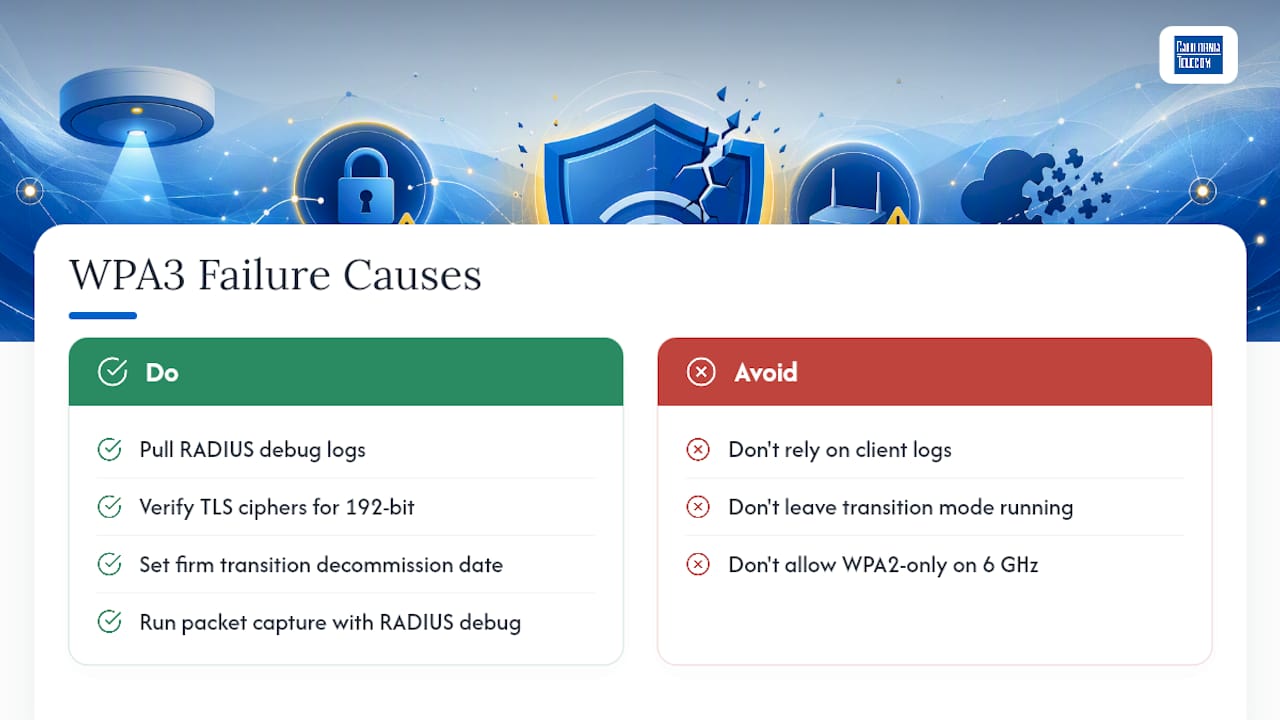
RADIUS and EAP timeouts. When clients report a generic authentication timeout, don't stop at the endpoint log. Pull RADIUS debug output, because the real story is usually a TLS handshake failure that never surfaces clearly on the client side. This is especially common right after enabling stricter certificate validation, when a client trust store is missing the correct root CA.
192-bit handshake failures from cipher mismatches. 192-bit mode demands specific TLS cipher suites on both the RADIUS server and the client supplicant, and P-384 elliptic curve support isn't universal across older EAP-TLS stacks. When a device that worked fine under standard WPA3-Enterprise suddenly fails after you flip on 192-bit mode, cipher suite mismatch is the first thing to check, not the certificate.
Downgrade exposure in transition mode. A network stuck in transition mode for months rather than weeks is quietly accepting the risk that an attacker forces a WPA2-terms connection instead of negotiating WPA3, since transition mode by design permits both AKMs on the same SSID. Set a firm decommission date for transition mode when you launch it, not after you notice it's still running six months later.
6 GHz roaming anomalies. Since transition mode simply isn't available on 6 GHz radios, any device that appears to roam onto a 6 GHz AP and then immediately drop is almost certainly a WPA2-only client that has no business being there. Check your band steering configuration before assuming it's a WPA3 bug.
A useful diagnostic habit: run full packet capture alongside RADIUS debug logging during any pilot phase. The client side will almost always just say "authentication failed," but the RADIUS logs and packet capture together usually pinpoint the exact TLS negotiation step where things broke.
In-House Migration or Managed Rollout? A Practitioner's Take
A single-site network with a modern, well-documented client fleet is a project a competent internal team can run in a few weeks. The complexity multiplies fast once you're coordinating a dozen sites with different AP vendors, inconsistent firmware baselines, and IT staff stretched across too many priorities already. That's the point where doing it in-house stops being about capability and starts being about bandwidth nobody actually has.
Managed engagements structure the work differently than most internal teams can, mainly because pilot testing and monitoring aren't squeezed between other tickets. The pilot SSID gets dedicated attention, RADIUS certificate policy gets set up once and documented properly, and rollback triggers get defined before anything goes live rather than improvised during a Friday afternoon outage.
Californiatelecom structures multi-site WPA3 work around a single point of contact, so you're not relaying the same authentication error to three different vendor support lines while your 24/7 U.S.-based NOC watches the rollout in real time. For a distributed retail chain or a healthcare network with two dozen locations, that single-thread accountability tends to matter more than any individual configuration setting.
— Jim
Get Help Planning Your WPA3-Enterprise Rollout
Running a WPA3-Enterprise migration across one office is manageable with a weekend and a good checklist. Running it across fifteen locations with mismatched AP vendors, aging client fleets, and a RADIUS server nobody has touched since it was configured is a different problem entirely, and it's the exact problem managed WiFi teams handle every week.A free consultation with Californiatelecom starts with a real site assessment: what your current APs support, where your certificate infrastructure has gaps, and which locations need firmware or hardware upgrades before WPA3-only becomes realistic. From there, our engineers design a phased rollout, handle RADIUS configuration and certificate policy setup, run the pilot testing themselves, and keep monitoring the network after cutover through our 24/7 NOC. You get one engineer's direct number instead of a support queue split across your AP vendor, your RADIUS provider, and your ISP. Schedule a free consultation to get a migration plan built around your actual site inventory, not a generic template.
Where to Go Deeper on WPA3-Enterprise
For the authoritative technical details behind everything covered here, start with the Wi-Fi Alliance's WPA3 Specification v3.4 and its companion Technology Overview. For vendor-specific configuration steps, consult Meraki's encryption guide or Aruba's WPA3-Enterprise documentation.
Sources
- WPA3 Encryption and Configuration Guide
- WPA3 Specification v3.4
- WPA3-Enterprise | TechDocs - WLAN, SD-Branch, & Location Services