
IT: Demand Proof Before Buying After Hours Network SupportAfter hours network support means someone qualified is watching your network, triaging alerts, and escalating real problems between the moment your office closes and the moment it reopens. The right move is simple: never buy this on a "24/7" slogan. Require a written SLA with named escalation contacts and a U.S.-based NOC or clearly defined on-call structure, then verify it before signing.
TL;DR:
- Most after-hours support covers remote monitoring and triage; on-site dispatch is rare and usually billed separately or omitted entirely.
- Effective SLAs should specify response times, escalation contacts, coverage windows, holiday schedules, and billing rules, not just broad promises.
- Verifying provider claims requires requesting sample reports, incident transcripts, severity models, and conducting simulated incident tests before signing.
- Relying solely on marketing promises is risky; actual performance during an incident reveals whether the support model is real or superficial.
- Budgeting typically adds a 15 to 35 percent premium over regular rates, with higher costs for staffed NOCs and 24/7 U.S.-based support.
Table of Contents
- What Does After-Hours Network Support Actually Cover?
- Staffed NOC vs On-Call Engineer vs Answering Service: Which Model Fits?
- What Should an Enforceable After-Hours SLA Say?
- How Do You Validate an After-Hours Provider Before Signing?
- The Contract Traps That Quietly Erode Your After-Hours Coverage
- What Should After-Hours Support Actually Cost?
- What Does Mature After-Hours Operations Actually Look Like?
- Why Most After-Hours Pitches Fail the One Test That Matters
- Ready to Put Your After-Hours Coverage to the Test?
- Sources
What Does After-Hours Network Support Actually Cover?
Most providers bundle four things under this label, and the gap between what you assume and what you're actually buying is where after-hours contracts go wrong.
- Monitoring: automated tools watch bandwidth, uptime, firewall status, and device health, flagging anomalies before a human ever gets involved.
- Remote triage: an engineer or answering service reviews the alert, decides whether it's noise or a real incident, and assigns severity.
- Help desk intake: after-hours callers or tickets get logged, acknowledged, and routed, though not every plan guarantees active remediation at 2 a.m.
- Vendor coordination: if the problem traces back to an ISP outage or a hardware failure under warranty, someone has to open that ticket and manage it.
- On-site dispatch rules: a technician physically drives to your location, which is rare and usually billed separately or excluded entirely.
That last point trips up a lot of buyers. On-site dispatch at night is uncommon; almost nothing genuinely requires a truck roll at 2 a.m., and most after-hours activity stays remote. The bulk of what you're paying for is monitoring-driven triage, not a technician standing by with a van.
There's also a meaningful line between monitoring-only coverage and active remediation. Monitoring-only means someone sees the alert and maybe calls you. Active remediation means they attempt a fix, restart a service, fail over to backup connectivity, or escalate to the right vendor without waiting for your permission. Read your contract closely here, because these get marketed identically but priced very differently.
Development work, code deployments, and configuration changes are almost always reserved for business hours regardless of tier. If your after-hours plan promises "full support," ask explicitly whether that includes anything beyond stabilization and triage.
Staffed NOC vs On-Call Engineer vs Answering Service: Which Model Fits?
The staffing model behind your after-hours coverage determines what actually happens the moment something breaks, and the three common structures behave very differently once the sun goes down.
- Staffed NOC (network operations center): a dedicated team monitors dashboards in real time, all night, every night. Response is typically fastest because someone is already watching when the alert fires, not being paged awake to look at it.
- Named on-call engineer: a rotation of individual engineers carries a phone. It works well for smaller environments but depends entirely on that person's availability, and burnout is a real risk if the rotation isn't managed with backups.
- Answering-service triage: a call center takes the message, follows a script, and pages the right person. This is the lightest and cheapest model, and it can work fine if it's tightly integrated with your ticketing system.
The integration piece matters more than most buyers realize. A workflow that pairs answering-service triage with PSA integration and a tiered escalation tree can rival a full NOC for a fraction of the staffing cost, provided the handoff between triage and engineer is automated rather than manual.
If you run healthcare systems, financial transaction processing, or any environment where an hour of downtime creates real liability, a staffed U.S.-based NOC stops being a nice-to-have.
Pro Tip: Ask any candidate provider to show you their escalation tree on a screen share. If they can't produce it in under two minutes, they don't actually have one.
What Should an Enforceable After-Hours SLA Say?
An SLA that doesn't name specifics isn't a contract, it's marketing copy. An enforceable after-hours SLA has to spell out the coverage window with time zone, the holiday schedule, who physically answers at night, and how severity gets assigned, because every one of those details determines whether "24/7" means something or nothing.
Look for these clauses specifically:
- Coverage window and time zone: "24/7" written without a time zone is meaningless if you operate across three of them.
- Holiday list: does coverage drop to a skeleton crew on Thanksgiving or the day after Christmas, and does that show up as a separate exhibit?
- Definition of "response": acknowledgement (a human saw the ticket) is not the same as active remediation (someone is actually fixing it). Both should have separate timers.
- Severity tiers with response targets: a critical outage might promise a 15-minute acknowledgement and 60-minute engagement, while a low-priority issue might sit until morning.
- Named escalation contacts: not a department, not "the on-call team," but an actual person or a defined chain with phone numbers.
- Billing rules for after-hours work: know exactly what's included in your monthly rate versus billed as a callout.
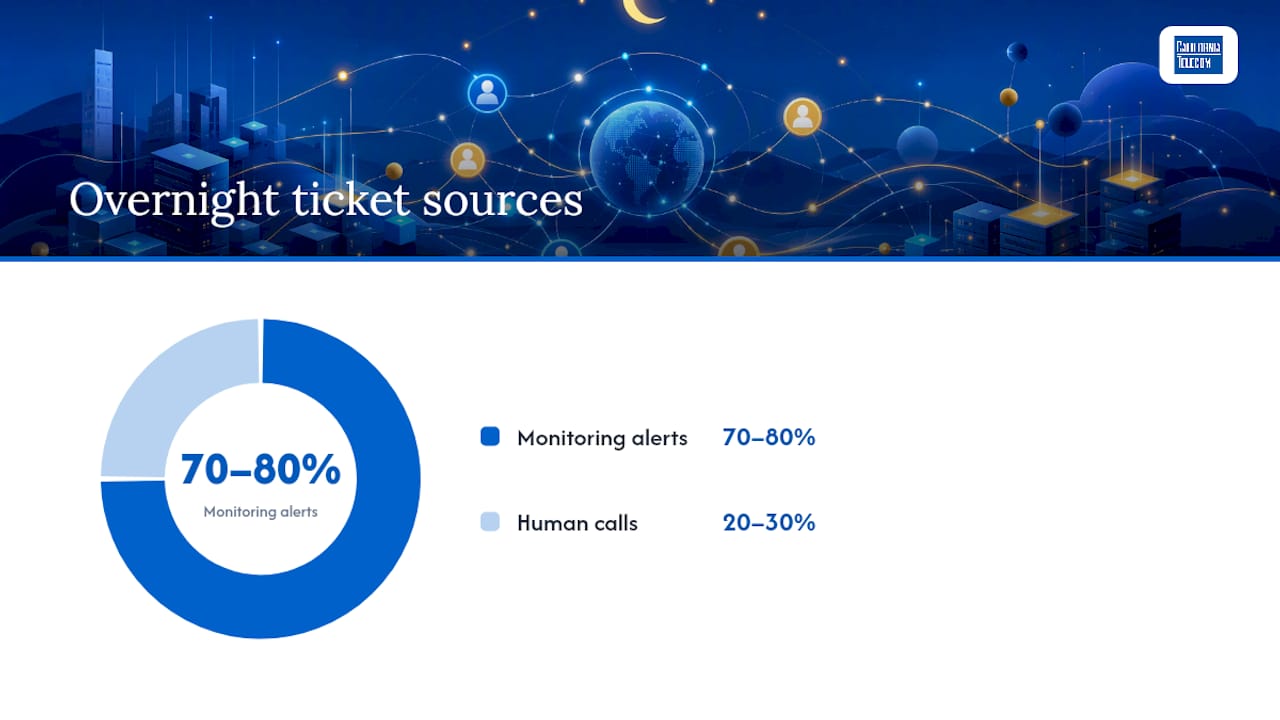
Most of what triggers these clauses overnight isn't a phone call at all. Roughly 70 to 80 percent of overnight tickets are automated monitoring alerts rather than someone calling in a problem, which is exactly why the SLA needs to define what happens when the tool fires the alert, not just when a human dials in.
Push for monthly after-hours reporting too: incident counts by severity, first-contact timestamps, and resolution times. If a provider can't produce that report, they probably aren't tracking it internally either.
How Do You Validate an After-Hours Provider Before Signing?
Marketing claims and contractual reality are two different things, and the only way to close that gap is to make the provider prove it before you sign anything.
- Request the severity model in writing. Ask for the exact definitions used to classify a Sev 1 versus a Sev 3, and who has authority to assign that classification. SLAs that leave severity assignment entirely to the provider create an easy way to downgrade tickets after hours to avoid breaching response targets, so push for client-assigned initial severity with a documented reclassification process.
- Ask for named escalation contacts, not job titles. A real operation can hand you an actual name and a direct line for at least the first two tiers of escalation.
- Request a sample monthly report. This should show incident volume by severity and first-contact timestamps, not a marketing summary.
- Ask for anonymized incident communications. Real transcripts or ticket threads (with client names redacted) show you how they actually communicate during a live incident, not how they say they do.
- Run a simulated incident test. Submitting a test alert outside business hours and timing the response is the single most reliable way to confirm the model is real rather than theoretical.
- Verify PSA integration. Ask whether tickets flow into your PSA automatically via webhook or whether someone is manually re-typing a phone message into your system at 3 a.m.
| What to request | Why it matters |
|---|---|
| Severity model document | Confirms who assigns urgency and prevents after-hours downgrading |
| Named escalation contacts | Proves a real chain exists, not just a phone tree |
| Sample monthly report | Shows whether metrics are actually tracked |
| Anonymized incident thread | Demonstrates real communication style during a live event |
| PSA webhook proof | Distinguishes automated intake from manual message-taking |
Contract exhibits should include the holiday list, the named contact roster, and the billing schedule for after-hours callouts, attached as appendices rather than buried in prose.
The Contract Traps That Quietly Erode Your After-Hours Coverage
The most expensive mistakes in after-hours contracts are the ones that look fine on page one and only reveal themselves during a real outage.
- Accepting "24/7 support" with no named contacts. If the SLA can't name who answers at 2 a.m., you're buying a promise, not a service.
- Assuming monitoring equals response. A tool that detects an outage and a person who fixes it are not interchangeable, and plenty of contracts blur this on purpose.
- Hidden after-hours billing. Some agreements bill every overnight touch as a separate line item; know the threshold before you're surprised by an invoice.
- Unspecified holiday coverage. If the contract is silent on holidays, assume reduced staffing and negotiate it explicitly.
Each of these has a fix: rewrite vague language into a specific clause with a name, a number, or a defined exception attached. If a provider resists naming an escalation contact in writing, treat that as the answer to whether their after-hours model is real.
What Should After-Hours Support Actually Cost?
Budgeting for after-hours coverage starts with understanding it as an add-on tier, not a separate product. After-hours coverage is typically sold as an uplift over business-hours service, with realistic premiums running 15 to 35 percent above your base rate, and full round-the-clock coverage with a staffed NOC runs meaningfully higher than that.
- Uplift model: your existing managed services contract gets an after-hours percentage added, usually the most cost-predictable option.
- Per-incident or callout billing: you pay a flat rate business hours, then a premium rate for anything triggered after close, which works if incidents are rare but gets expensive fast if they aren't.
- Tiered severity billing: critical incidents are included, lower-severity tickets queue until morning at no extra cost.
Most contracts include critical severity response as standard and treat everything below that as billable or deferred. The decision isn't really about the lowest number on the quote. It's about matching the premium to what an hour of downtime actually costs your business, then buying coverage that matches that number rather than matching your budget to whatever's cheapest on the page.
What Does Mature After-Hours Operations Actually Look Like?
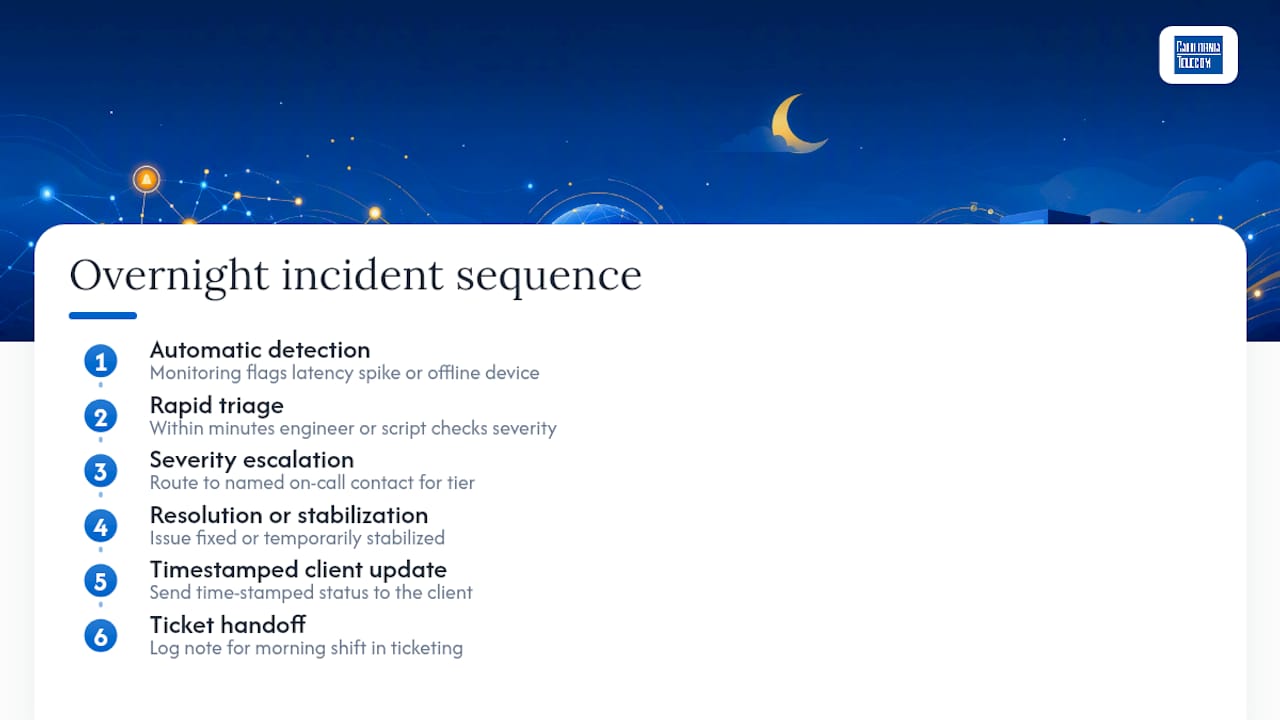
A real overnight incident follows a predictable sequence, and it's worth knowing what that looks like so you can compare a provider's claims against it. Detection happens automatically: monitoring flags a spike in latency or a device going offline. Triage follows within minutes, an engineer or answering-service script determines severity and confirms it isn't a false positive. Escalation routes to the named on-call contact for that severity tier. Resolution or stabilization happens, followed by a timestamped update to the client and a note in the ticketing system for the morning shift.
That workflow only holds together when the underlying network infrastructure and support sit with one accountable party instead of scattered across separate carrier and vendor relationships. Californiatelecom backs its managed network services with a 24/7 U.S.-based NOC, sourcing from 50 or more carriers and standing behind a 99.99% uptime SLA on data and 99.999% on voice. Consolidating connectivity and after-hours support under one provider removes the coordination drag of chasing three different vendors when an outage crosses network, carrier, and hardware boundaries at once.
Why Most After-Hours Pitches Fail the One Test That Matters
Almost every after-hours sales pitch sounds identical: 24/7 coverage, rapid response, peace of mind. None of that language is falsifiable, and that's the problem. The conventional advice tells IT managers to compare price and coverage hours. Better advice: compare evidence.
A provider that hesitates to name an escalation contact, produce a sample report, or survive a simulated test alert is telling you something true about their operation, regardless of what the sales deck says. The gap between marketed and actual after-hours capability rarely shows up in a proposal. It shows up at 3 a.m. during the first real incident, when you find out whether "24/7" meant a staffed NOC or a voicemail box that gets checked in the morning.
If there's one habit worth building before you sign anything, it's treating every after-hours claim as a hypothesis to test rather than a fact to accept. Run the simulated ticket. Ask for the anonymized transcript. Read the SLA's holiday exhibit before you read the pricing page. The providers confident enough to hand over that evidence are, almost without exception, the ones actually running the operation they're selling.
— Jim
Ready to Put Your After-Hours Coverage to the Test?
If you've read this far, you already have the checklist: named escalation contacts, a written SLA with severity definitions, and proof the model has actually been exercised, not just marketed. That's exactly what to bring to your next conversation with any provider, including us.Californiatelecom backs its after-hours coverage with a 24/7 U.S.-based NOC, multi-carrier sourcing from 50-plus providers, and a 99.99% uptime SLA on data, so you get one engineer's number instead of a rotating cast of vendors when something breaks at midnight. Before your next consult, pull together your current SLA, your PSA ticket logs from the last few overnight incidents, and a short list of the systems that can't afford downtime. That gives our engineers enough to design a realistic after-hours structure instead of guessing at your risk profile. Businesses evaluating scheduled expert coverage as an alternative model can also look at block-hour arrangements for reserved strategist time. For a straightforward next step, request a free consultation or explore nationwide managed network services to see how coverage maps to your locations.
Sources
- How to Validate Managed Service Responsiveness After Hours - Datapath Blog | Datapath
- After Hours IT Support SLA: What It Must Say | Uprite
- What 24-7 IT Support Really Means and Costs | On-Site Technology