
4 Milestones Define Your Fiber Installation Timeline for HomeownersMost fiber installations take anywhere from a few weeks to several months from the day you place your order to the day your service goes live, and the gap mostly comes down to whether new outside construction is needed or the fiber already runs near your property. Once a technician arrives, the in-home visit itself usually runs about 2 to 6 hours. Below, we break that window into stages, with a prep checklist so you know what to expect at each one.
TL;DR:
- Permitting and utility locates can add one to three weeks to the installation timeline, especially in areas with complex permits or backlog.
- If fiber already runs past your address, the installation can often be completed within two weeks, bypassing construction and splicing stages.
- Outside construction is the longest phase, with delays caused by utility marking, permit review, and physical trenching or boring, often lasting several weeks.
- The in-home installation typically takes 2 to 6 hours, but can extend if multiple Ethernet drops or complex wiring are involved.
- Milestones such as permit approval, construction start, and network cutover are better indicators of progress than general time estimates.
Table of Contents
- How the fiber installation process breaks down into stages
- What happens during outside-plant construction
- What the technician does during your in-home visit
- Why your timeline might differ from the published range
- How to prepare for your fiber installation appointment
- What installation and permit fees typically cost
- What to check after your fiber service goes live
- How managed deployments reduce installation delays
- Key milestones that mark real progress in your timeline
- Why timelines vary by region and provider
- How scheduling and booking typically works
- What support looks like after your install
- Does the timeline change for new builds versus upgrades or repairs
- What actually matters most in a fiber installation timeline
- Get a managed fiber installation with one point of contact
- FAQ
- Sources
How the fiber installation process breaks down into stages
The full fiber installation timeline runs through several distinct phases, each with its own pace and its own failure points. Understanding where you are in that sequence helps you ask the right questions when a provider's estimated date slips.
- Planning and order processing (days to a couple of weeks): your address gets verified against the serviceable footprint, a work order is created, and an initial site review happens before any crew is dispatched.
- Permits and 811 locates (1 to 3 weeks or more): construction crews cannot legally dig until underground utility lines are marked, and locate availability alone can add one to three weeks depending on the jurisdiction.
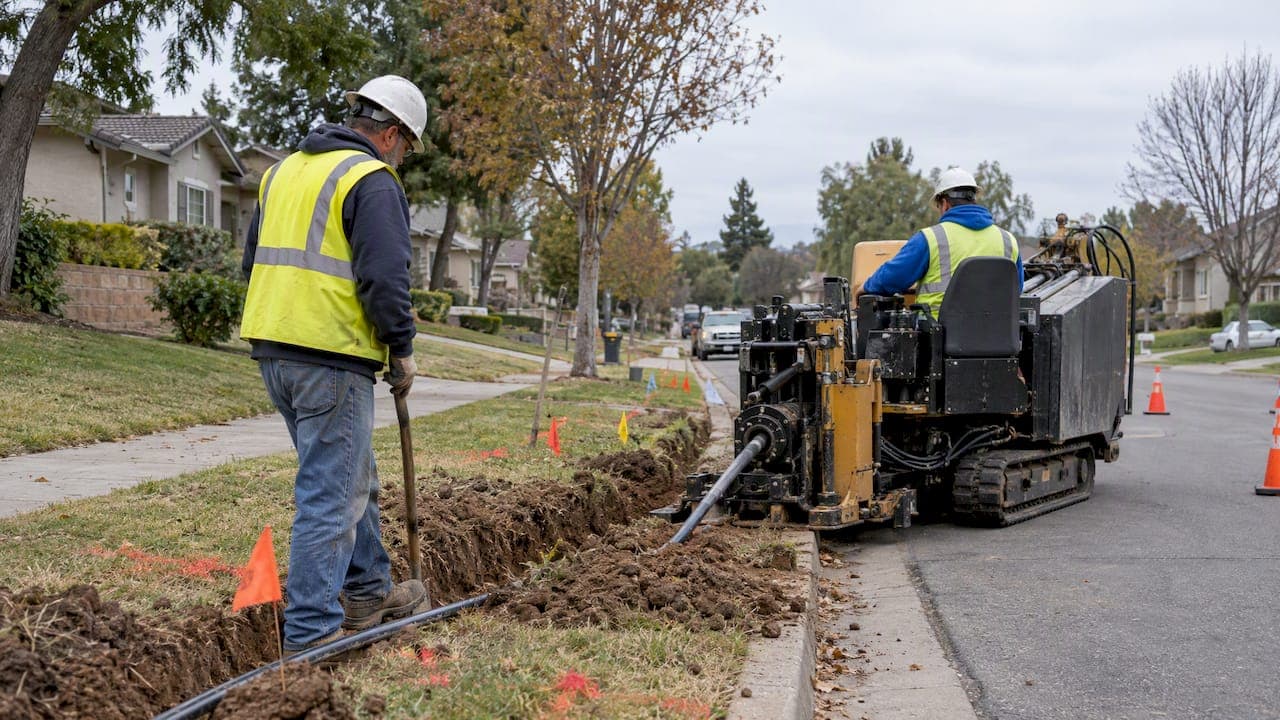
- Outside construction (days to several weeks): conduit boring, vault placement, and either aerial or underground cable deployment happen along the street or easement.
- Splicing and testing (days): technicians splice fiber strands and run quality checks before any home in the area can be scheduled for an install.
- Scheduling and activation (days to a couple of weeks): once the outside plant is complete and tested, your address becomes eligible for a booked appointment.
When the fiber infrastructure already exists on your street, the whole process can compress into one or two weeks, since you skip the construction and splicing stages entirely and go straight to scheduling. When new conduit, vaults, or aerial lines have to be built, the timeline stretches because permitting and construction dominate it.
| Stage | Typical duration | What determines the length |
|---|---|---|
| Planning and order processing | Days to 2 weeks | Address verification, work order creation |
| Permits and 811 locates | 1 to 3+ weeks | Municipal review speed, locator backlog |
| Outside construction | Days to several weeks | Boring distance, aerial vs. underground, crew availability |
| Splicing and testing | Days | Crew size, number of splice points |
| Scheduling and in-home install | Days to 2 weeks | Technician availability, appointment demand |
The practical takeaway: if a provider quotes a short window and your street has no visible fiber infrastructure yet, expect the permit and construction stages to push that estimate out. If fiber already runs past your address, a two-week estimate is realistic.
What happens during outside-plant construction
Outside-plant construction is the longest and most visible phase of any new fiber build, and it is where most of the schedule risk lives. Crews cannot touch a shovel until underground utilities are marked, which is why 811 locate requests get filed as early as possible in the process.
Here is roughly how the subtasks stack up:
- 811 locate request and marking: utility companies flag the location of gas, water, electric, and existing telecom lines before any excavation begins, and this step alone can add one to three weeks depending on locator availability.
- Conduit boring or trenching, and vault installation: crews white-line the planned route, then bore or trench and set vaults at intervals, a process that operator construction flyers document with photo-based quality assurance at each step.
- Fiber pulling and splicing: cable gets pulled through the new conduit or strung aerially, then spliced at junction points.
- Testing: technicians run light-loss and continuity tests on the new segment before it is marked ready for customer connections.
You will likely notice white or orange line markings on your lawn or along the curb before any digging starts, that is the 811 marking stage, not construction itself. Equipment like directional boring rigs and vault trucks tend to show up in short bursts rather than for days at a stretch, and temporary sidewalk or lane closures are common near boring sites.
Pro Tip: If you see locate flags appear but no construction activity for a week or two, that is normal: crews are often working multiple streets in sequence, not idling.
What the technician does during your in-home visit
Once outside construction and testing are complete, your address becomes eligible for a scheduled in-home appointment. This is the part most homeowners picture when they think about fiber installation, and it is usually the shortest stage in the entire timeline.
During the visit, a technician typically works through these tasks in order, following guidelines like those from Cum se calculează bugetul optic pentru o legătură de fibră:
- Site walkthrough to confirm the best entry point and ONT location, usually near where other utility lines already enter the home.
- Drop cable routing, choosing between an aerial line to an existing utility attachment, a conduit-pulled path, or a direct-buried run depending on how the outside plant was built.
- Mounting the transition point where the outside drop connects to the indoor cabling.
- ONT installation, mounted near a grounded, non-switched power outlet since the unit needs continuous power and should not share a switched circuit.
- Router and Wi-Fi setup, connecting the provided or customer router to the ONT and configuring the wireless network.
- Speed and signal testing to confirm the connection meets the subscribed tier before the technician leaves.
Statistic Callout: A typical in-home fiber visit runs 2 to 6 hours depending on the home's wiring complexity and the services ordered, a range wide enough to account for both a simple single outlet install and a multi-room Ethernet run.
Visits run longer when the technician needs to add Ethernet drops to multiple rooms, route cable through finished walls or tight crawl spaces, or coordinate wiring in a multi-dwelling unit where risers and shared conduit are involved. Buried drop installations in particular require careful locating of yard utilities like sprinkler lines, which adds time compared to an aerial drop.
Why your timeline might differ from the published range
Published timelines are averages, and several variables can push your specific install earlier or later than a general estimate.
- Permit review speed: some municipalities turn around broadband permits in days, others take weeks, especially when as-built documentation is required before approval.
- Multi-dwelling unit (MDU) complexity: apartment and condo buildings often need property owner approval, access to internal risers, and advance notice to residents, any of which can add weeks.
- Right-of-way conflicts: when a planned route crosses another utility's easement or requires relocating an existing line, expect additional approvals and schedule delays.
- Weather and crew availability: frozen ground, heavy rain, or a backlog of scheduled builds in your region can push construction dates out by weeks, particularly in winter months.
If your estimate seems long, ask your provider specifically whether permits have been submitted, whether 811 locates are complete, and whether your address is a standalone single-family home or part of an MDU, since MDU coordination is one of the most common sources of extended timelines.
Pro Tip: Ask your provider for the specific milestone your address is sitting at, "pending permit" and "construction in progress" mean very different wait times.
How to prepare for your fiber installation appointment
A little preparation before the technician arrives reduces the odds of a delay, an extra trip, or an unexpected fee.
- Confirm your appointment window and permit status with your provider a few days ahead, especially if your install required new construction.
- Clear a path to your preferred ONT location, ideally near an existing utility entry point and a grounded, non-switched outlet.
- Secure pets and clear walkways both outside and inside so the technician can move freely between the drop entry point and the ONT location.
- Decide in advance whether you need additional Ethernet runs or in-wall wiring, and schedule an electrician separately if the job requires work beyond what the fiber technician handles.
- Have HOA, building management, or landlord contact information ready if you live in a multi-dwelling unit, since riser access often requires a building representative to be present.
Documenting where your existing cable or phone lines enter the house also helps the technician choose a route that avoids new wall penetrations.
Pro Tip: Take a photo of your electrical panel and the area near your preferred ONT location before the appointment, it speeds up the technician's assessment if there is any ambiguity about outlet access.
What installation and permit fees typically cost
Most providers separate fiber installation into a one-time setup charge and an ongoing monthly service fee, and it helps to know which costs are standard and which are situational before the crew arrives.
- Standard installation or activation fees cover the basic in-home visit: drop connection, ONT mounting, and router setup.
- Extra charges may apply for directional boring across a long driveway, unusually long drop runs, additional conduit, or coordinating wiring in a complex MDU.
- Permit or municipal fees tied to right-of-way work are generally absorbed by the provider as part of the outside-plant build, not billed directly to the homeowner, though this varies by provider and jurisdiction.
- Ask for a written, itemized estimate before work begins, particularly if your property has a long setback from the street or sits in a building with nonstandard wiring access.
Getting costs in writing ahead of time avoids surprises if your installation turns out to need more than a standard drop and ONT mount.
What to check after your fiber service goes live
Once the technician leaves, the provider's acceptance test confirms the line meets its rated speed, but it is worth running your own check too.
- Run a wired speed test directly from a laptop connected to the router with an Ethernet cable, then compare it to your subscribed tier.
- Test Wi-Fi in multiple rooms, since a router placed far from your main living space may need a mesh extender or a wired access point to reach rated speeds throughout the home.
- Watch for common early faults like intermittent dropouts or slower-than-expected speeds, which often trace back to router placement rather than the fiber line itself.
- Document any issue with a timestamp and speed test result, then contact your provider promptly. Most issues found within the first days of service get a faster follow-up than ones reported weeks later.
How managed deployments reduce installation delays
For multi-location businesses and property managers juggling several sites, permit delays and contractor coordination tend to compound. Centralized engineering, carrier-neutral sourcing, and a 24/7 monitoring desk give a project team visibility into every site's status at once rather than chasing separate crews for separate updates. A managed deployment typically folds in the site survey, permit coordination, and contractor oversight into one accountable process, with testing and quality checks handled before cutover rather than discovered after.
Centralized oversight does not eliminate the permit and construction timelines outside providers control, but it removes the coordination gaps that turn a six-week build into a ten-week one.
Key milestones that mark real progress in your timeline
Four milestones tell you more about your actual timeline than any general estimate. The site survey confirms the technical path for your drop and flags anything unusual, like a long setback or shared conduit, before construction is scheduled. Permit approval is the gate that outside construction waits behind, and it is worth asking your provider for the submission date, not just "pending." Construction start is the point where boring, trenching, or aerial work actually begins on your street, and it usually follows permit approval within days once crews are available. Network cutover, when the new segment is tested and marked live for customer connections, is the last outside-plant milestone before your address becomes eligible for a scheduled in-home visit.
Asking which of these four milestones your project has reached gives you a far more accurate read than a generic "four to eight weeks" quote, since two addresses quoted the same range can be at completely different points in the sequence.

Why timelines vary by region and provider
Fiber installation timelines are not uniform across providers or locations, even for similar-looking projects. A city with a streamlined permit office and pre-existing conduit in the ground can turn around a build in a couple of weeks, while a rural route requiring new aerial poles or long underground runs can take months. Provider-specific differences also matter: some providers use pre-terminated drop cables that reduce field splicing and speed up the final subscriber connection, while others splice every drop on site, which adds time per address.
Local permit office responsiveness is one of the biggest regional variables, since some jurisdictions process broadband permits in days and others require detailed as-built documentation that takes weeks to review. Terrain and existing infrastructure density matter too: a block with buried electric and cable lines already in place is usually faster to build through than one with no existing underground utilities.
If you are comparing timeline estimates between providers, it is worth asking each one directly whether your street already has their fiber infrastructure in place or whether new construction is required, since that single factor explains most of the variation you will see in quoted timelines.

How scheduling and booking typically works
Once your address is eligible for installation, either because existing fiber already runs nearby or because outside construction and testing are complete, scheduling typically opens up within days. Providers generally offer available appointment windows through an online portal or over the phone, and lead times for that first available slot commonly run from a few days to two weeks depending on technician demand in your area.
Appointment windows are usually a few hours wide rather than a fixed time, similar to other home service bookings, so it helps to confirm the exact window the day before. If you need to reschedule, doing so as early as possible preserves your place in the queue rather than pushing you to the back of a technician's calendar. Property managers coordinating installs across multiple units should expect to book each unit separately unless the provider offers bulk scheduling for multi-dwelling buildings, which can shorten the overall rollout but requires more advance coordination with building management.
What support looks like after your install
Most providers offer troubleshooting support starting immediately after activation, and simple issues like a dropped Wi-Fi connection or a misconfigured router setting are often resolved in a single call. More involved problems, like an ONT fault or a damaged drop cable, typically require a follow-up truck roll, which can take anywhere from the same day to a few days depending on technician availability.
Keeping a record of when an issue started and what speed test results you recorded speeds up any escalation, since the provider's support team can compare that against their own line diagnostics. If a problem persists past an initial follow-up visit, asking specifically for a tier-two or network engineering escalation tends to get faster resolution than repeating the same troubleshooting call.
Does the timeline change for new builds versus upgrades or repairs
Not every fiber project follows the same path, and knowing which category yours falls into sets more realistic expectations. A new construction build, where no fiber infrastructure exists yet, goes through the full permit, 811 locate, and outside-plant construction sequence, which is why these projects often take the longest, sometimes several months. An upgrade on a street where fiber infrastructure already exists, say a copper-to-fiber swap, skips construction almost entirely and usually compresses into a one- to two-week scheduling and in-home install window. A repair, such as a damaged drop cable from storm or landscaping work, typically moves fastest of all, often same-day to a few days, since it involves replacing an existing connection rather than building a new path.
Knowing your category before calling a provider helps you set a realistic expectation and ask sharper questions. A homeowner expecting a repair-level turnaround on what is actually a new-construction project is the most common source of installation timeline frustration.
What actually matters most in a fiber installation timeline
The published ranges you see everywhere, two to six hours in-home, weeks to months end-to-end, are accurate but close to useless on their own, because they tell you nothing about where your specific address sits in the process. The conventional advice to "just wait for your installation date" undersells how much homeowners and property managers can actually find out by asking providers which milestone their project has reached.
Where most guidance falls short is treating permits and 811 locates as a footnote. In practice, that single step accounts for a large share of the variance between a two-week install and a two-month one, and it is the stage providers are often vaguest about when giving estimates.
If you take one thing from this, ask your provider for your milestone status, not a date range. A date range is a guess until permits clear and construction starts, a milestone is a fact you can verify.
— Jim
Get a managed fiber installation with one point of contact
If juggling permit status updates and contractor schedules across multiple sites sounds like the opposite of what you signed up for, a managed fiber deployment folds that coordination into a single accountable process instead of leaving you to track it yourself. We source connections from more than 50 carriers and run every build through our own engineers, backed by a 24/7 U.S.-based network operations center and a 99.99% uptime SLA on data service.For multi-location businesses and property managers who want one provider managing the install from site survey through cutover, our Dedicated Fiber Internet service is built for exactly that. Request a free consultation and site survey to see your timeline mapped out before you commit.
FAQ
How long does a fiber optic installation take?
End-to-end, fiber installation typically runs from a few weeks to several months depending on whether new outside construction is required. The in-home portion of the visit itself usually takes 2 to 6 hours once a technician arrives.
Do I need to rewire my house for fiber optic?
In most cases, no full rewiring is needed since the technician runs a new drop cable to an ONT and connects it to your existing router setup. Some homes opt for additional Ethernet runs to improve whole-home coverage, but that is a choice, not a requirement, based on ONT placement near a grounded outlet.
How far down do they put fiber optic cable?
Depth varies by installation method: aerial drops run overhead on existing utility poles, while buried drops are trenched or bored underground and require locating existing yard utilities first, as outlined in FOA technical guidance on drop cable installation. Exact depth standards depend on local permit requirements and the utilities already present at the property.
What causes the biggest delays in a fiber installation timeline?
Permit review and 811 utility locate requests are the most common bottlenecks, since construction cannot legally begin until locates are cleared, a step that can add one to three weeks on its own. Multi-dwelling unit coordination and right-of-way conflicts are the next most common sources of extended timelines.
What should I do to prepare for the technician's visit?
Clear a path to your preferred ONT location near a grounded, non-switched outlet, secure pets, and confirm your appointment window a few days ahead. If you live in a multi-dwelling unit, have building management contact information ready in case riser access needs approval.
Sources
- The FOA reference: FTTH customer premises installation
- Google Fiber Construction Process (community flyer)
- Fiber-optic line installation guidance (homeowner-facing)