

How VoIP Phone Systems Work for BusinessMost businesses running copper phone lines are paying more and getting less than they realize. Understanding how VoIP phone systems work isn't just a technical exercise. It's the foundation for making a smarter decision about how your company communicates across offices, remote teams, and client calls. VoIP (Voice over Internet Protocol) converts voice into digital data and sends it over your existing internet connection, bypassing the legacy public telephone network entirely. This article breaks down the full technical process, explains the signaling layer most IT guides skip, and maps out the real business advantages for companies running multiple locations.
Table of Contents
- Key takeaways
- How VoIP phone systems work: from voice to data and back
- Call signaling and the role of SIP
- VoIP phone system benefits for multi-location businesses
- Call quality: what actually degrades VoIP audio
- My take: what most VoIP deployments get wrong
- Ready to deploy VoIP across your locations?
- FAQ
Key takeaways
| Point | Details |
|---|---|
| Voice becomes data packets | Your voice is digitized, compressed, and sent in 20ms chunks over IP networks in real time. |
| SIP and RTP play different roles | SIP handles call setup and teardown; RTP carries the actual audio stream separately. |
| QoS configuration is non-negotiable | Prioritizing voice traffic over data prevents choppy audio far more effectively than adding bandwidth. |
| VoIP cuts costs significantly | Businesses switching to VoIP reduce monthly phone bills by over 30%, with ROI in under six months. |
| Network design comes before deployment | Codec selection, NAT traversal, and firewall rules must be addressed before going live. |
How VoIP phone systems work: from voice to data and back
The core process is more elegant than most people expect. When you speak into a VoIP phone or headset, your microphone captures sound waves and converts them into analog electrical signals. That's the same first step a traditional landline takes. What happens next is where VoIP parts ways with legacy systems entirely.
Digitizing your voice
A codec (short for coder/decoder) samples those analog signals thousands of times per second and converts them into binary data. The G.711 codec, for example, samples at 8,000 times per second and produces audio quality comparable to a standard landline. That raw digital audio stream is then sliced into small frames. Voice data chunks use 20ms frames for packet transmission, which is small enough to feel instantaneous but efficient enough to move across a network without overwhelming it.

Packaging and sending packets
Each 20ms audio frame gets wrapped in a series of protocol headers. First, RTP (Real-time Transport Protocol) adds timing and sequencing information. Then UDP (User Datagram Protocol) handles transport. Finally, an IP header adds routing information so the packet knows where it's going. Those packets don't all take the same path to the destination. Each one may travel a different route across the internet, which is why arrival order isn't guaranteed.
At the receiving end, a jitter buffer collects incoming packets, reorders them if needed, and feeds them into a decoder that reconstructs the audio. The decoder converts the digital data back into analog sound through the speaker. The entire conversion process completes in under 200 milliseconds, which keeps conversations feeling natural and uninterrupted.
Pro Tip: If you're evaluating a VoIP system, ask vendors for their mean opinion score (MOS) data under load. A score of 4.0 or above on a 5-point scale indicates acceptable call quality for business use. Anything below 3.5 will generate complaints.
Call signaling and the role of SIP
Understanding the VoIP communication process means recognizing that there are actually two separate conversations happening simultaneously during any VoIP call. One handles the audio. The other handles everything else.
How SIP sets up and tears down calls
SIP (Session Initiation Protocol) is the signaling layer. It sets up, manages, and terminates VoIP calls, but it never carries your voice. Think of SIP as the phone ringing and someone answering. The SIP INVITE message initiates the call, the 200 OK response confirms the other party picked up, and the BYE message ends the session. Once SIP has negotiated the connection parameters, it hands off to RTP, which carries the actual audio stream for the duration of the call.
Signaling failures prevent calls from connecting at all, while media failures degrade audio quality mid-call. That distinction matters enormously when troubleshooting. A call that won't connect is a SIP problem. A call that connects but sounds robotic or drops audio is an RTP problem. Conflating the two sends IT teams chasing the wrong fix.
Reaching traditional phones and legacy PBX systems
Not every call destination is another VoIP user. When your team calls a customer on a standard mobile or landline, the call routes through a PSTN (Public Switched Telephone Network) gateway that translates between the IP world and the traditional telephone network. This happens invisibly and in real time.
For businesses with existing PBX hardware, SIP trunking offers a practical middle path. It connects your on-premise PBX to a VoIP provider's network, so you keep your current desk phones and internal extensions while routing external calls over the internet at significantly lower cost. The SIP trunking market is projected to grow from $85.07 billion in 2026 to $181.58 billion by 2031, which reflects how many businesses are making exactly this transition right now.
Key signaling considerations for IT managers:
- SIP operates on port 5060 (UDP/TCP) or 5061 (TLS). Firewall rules must allow this traffic explicitly.
- SIP ALG (Application Layer Gateway) on consumer-grade routers frequently breaks SIP signaling. Disable it.
- SIP trunks require proper authentication credentials to prevent toll fraud.
Pro Tip: When migrating a multi-site business from a legacy PBX, phase the SIP trunk rollout one location at a time. This isolates configuration issues and avoids a simultaneous outage across all offices.
VoIP phone system benefits for multi-location businesses
The business case for VoIP goes well beyond the phone bill. For companies running two or more locations, or supporting remote employees, the advantages compound quickly.

Cost and scalability
VoIP eliminates per-minute long-distance charges and dramatically reduces the cost of calls between offices. Because extensions are software-defined, adding new users requires no special hardware and no rewiring. You provision a new extension through a web portal and the user installs a softphone app or plugs in an IP phone. That's it.
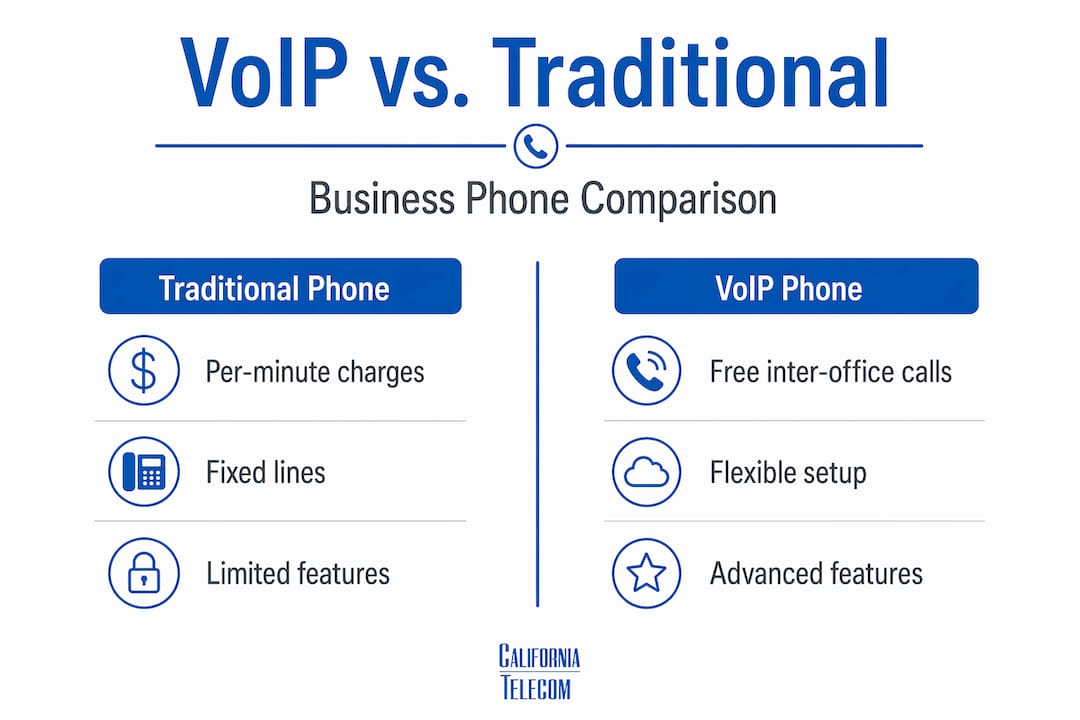
VoIP vs. traditional phone: a direct comparison
| Feature | Traditional phone | VoIP |
|---|---|---|
| Inter-office calls | Charged as external calls | Free over internal network |
| Adding extensions | Requires physical wiring | Software provisioning only |
| Remote worker support | Limited, expensive | Full features via app |
| CRM and tool integration | Not available | Native API integration |
| Voicemail to email | Rarely available | Standard feature |
| Disaster recovery | Single point of failure | Switch devices or locations instantly |
Advanced features and integrations
VoIP supports advanced features including call recording, intelligent call routing, voicemail-to-email transcription, IVR menus, and real-time analytics. These aren't premium add-ons. They're built into most hosted VoIP platforms at no additional cost.
The integration angle is where VoIP becomes genuinely transformative for sales and operations teams. VoIP integrates with CRM tools and turns call data into a business asset. Every inbound call can auto-log to a contact record, trigger follow-up tasks, or populate a deal pipeline. That turns your phone system into a revenue tool, not just a communication utility.
For business continuity, the flexibility is significant. If a location loses power or internet, employees can switch to a mobile softphone app and maintain the same number, extension, and call routing. No special hardware is required for this failover. It works automatically on any device with internet access.
If you're also evaluating what to do with legacy analog lines at your locations, California Telecom's POTS replacement options offer a direct path off copper without disrupting existing infrastructure.
Call quality: what actually degrades VoIP audio
Bandwidth is the least of your concerns. Most IT managers overestimate how much raw bandwidth VoIP needs and underestimate how much network behavior matters.
A single G.711 call uses roughly 87 kbps including packet overhead. Even 50 simultaneous calls would use less than 5 Mbps. What actually breaks call quality is inconsistency in how packets arrive. Specifically:
- Latency is the total delay for a packet to travel from sender to receiver. Anything above 150ms one way becomes noticeable to callers.
- Jitter is the variation in packet arrival times. Jitter and packet loss degrade audio more severely than bandwidth limits. A jitter buffer absorbs some variation, but high jitter exhausts the buffer and creates gaps in audio.
- Packet loss above 1-2% produces audible clipping. Above 5%, conversations become difficult to follow.
Codec selection and network configuration
VoIP codecs trade off bandwidth for audio quality. G.711 delivers near-landline clarity but uses approximately 87 kbps per call. G.729 compresses more aggressively, using only 32 kbps, but introduces more processing delay and slight audio degradation. The Opus codec adapts dynamically to network conditions and is increasingly common in web-based calling. IT managers should match codec selection to their upload speeds and concurrent call load.
Quality of Service (QoS) is the most impactful configuration you can make. QoS policies on your router classify voice packets as high-priority and ensure they move through the network ahead of email downloads, software updates, or file transfers. Configuring QoS is the single most effective step for preventing choppy audio on otherwise adequate internet connections.
NAT traversal is another common failure point. When a VoIP device sits behind a NAT router, the private IP address embedded in SIP headers doesn't match the public IP the internet sees. This mismatch causes one-way audio and dropped calls. A Session Border Controller (SBC) normalizes these address discrepancies and also adds security by hiding your internal network topology from external SIP traffic.
Pro Tip: Run a dedicated fiber connection for voice traffic at your highest-call-volume locations. Shared broadband creates unpredictable jitter during peak usage hours that QoS alone cannot fully compensate for. California Telecom's analysis of dedicated fiber vs. broadband lays out the cost-of-downtime case clearly.
My take: what most VoIP deployments get wrong
I've watched a lot of businesses make the same mistake when deploying VoIP: they treat it as a phone upgrade when it's actually a network project. The phone part works fine on day one. The problems show up two weeks later when the sales team is on calls during the morning backup window and suddenly everyone sounds like they're underwater.
In my experience, the businesses that get VoIP right spend 80% of their planning time on network design and 20% on phone configuration. They audit current internet capacity, identify which sites need QoS configured, and resolve NAT traversal issues before a single handset goes live. The ones that get it wrong do the opposite. They buy the phones, pick a softphone app, and discover the firewall is dropping SIP packets after launch.
What I find most interesting is how rarely companies use VoIP's data capabilities after deployment. The CRM integration, the call analytics, the voicemail transcription. Those features are sitting there unused while managers are still manually logging calls. VoIP technology, done correctly, doesn't just replace your phone system. It gives your operations team visibility they didn't have before.
One more thing worth saying directly: if your locations are connected over shared broadband, you are building on an unstable foundation. I've seen beautifully configured VoIP systems deliver terrible call quality simply because the underlying connection was inconsistent. Fix the network first. Everything else follows.
— Jim
Ready to deploy VoIP across your locations?
Understanding how VoIP works is step one. Getting it right across multiple offices, remote workers, and complex network environments is where most businesses need a specialist.Californiatelecom designs, deploys, and manages VoIP and unified communications for multi-location businesses nationwide. From managed LAN/WAN services that optimize your network for voice traffic to hosted UCaaS solutions that unify your phone system across every site, Californiatelecom handles the full stack with one engineer, one bill, and a 99.999% voice uptime SLA. If you're evaluating a VoIP migration or troubleshooting an existing system, start with a free consultation and get a network assessment built for your specific environment.
FAQ
How does a VoIP call actually travel over the internet?
Your voice is captured by a microphone, digitized by a codec into 20ms audio frames, wrapped in RTP/UDP/IP packets, and transmitted over the internet. At the destination, packets are reordered and decoded back into audio, completing the process in under 200 milliseconds.
What is SIP and why does it matter for VoIP?
SIP (Session Initiation Protocol) is the signaling layer that sets up, manages, and terminates VoIP calls. It works separately from RTP, which carries the actual audio. Distinguishing between the two is critical for troubleshooting connection versus audio quality issues.
How much bandwidth do VoIP calls actually require?
A single G.711 call uses roughly 87 kbps including overhead. Fifty concurrent calls use under 5 Mbps. Consistent network behavior, specifically low jitter and low packet loss, matters far more than raw bandwidth for call quality.
Can VoIP phones work during an internet outage?
Yes, if configured for failover. VoIP softphone apps can switch to mobile data automatically, maintaining the same number and call routing without requiring any hardware. This flexibility makes VoIP more resilient than traditional phone systems in many outage scenarios.
What is the biggest technical risk when deploying VoIP?
Misconfigured NAT traversal and firewall rules are the most common causes of one-way audio and dropped calls. Deploying a Session Border Controller and disabling SIP ALG on routers resolves the majority of these issues before they affect users.
Recommended
- Next-Generation Managed POTS Lines — Voice Services | California Telecom
- UCaaS (Hosted PBX) — Voice Services | California Telecom
- POTS Line Replacement: What California Businesses Need to Know | California Telecom
- Common California business telecom mistakes IT managers must avoid | California Telecom